MI DISP API
REVISION HISTORY
| Revision No. | Description |
Date |
|---|---|---|
| 2.03 | 04/12/2018 | |
| 2.04 | 06/06/2019 | |
| 2.05 | 06/19/2019 | |
| 2.06 | 05/13/2020 | |
| 2.07 | 06/18/2020 | |
| 2.08 | 08/04/2020 | |
| 2.09 | 09/03/2020 | |
| 2.10 | 10/26/2020 | |
| 2.11 | 12/24/2020 | |
| 2.12 | 01/05/2021 | |
| 2.13 | 01/22/2021 | |
| 2.14 | 04/16/2021 | |
| 2.15 | 04/22/2021 | |
| 2.16 | 05/17/2021 | |
| 2.17 | 05/25/2021 | |
| 2.18 | 06/10/2021 | |
| 2.19 | 08/05/2021 | |
| 08/25/2021 | ||
| 2.20 | 09/03/2021 | |
| 2.21 | 10/12/2021 | |
| 2.22 | 11/29/2021 | |
| 2.23 | 12/08/2021 | |
| 2.24 | 12/20/2021 | |
| 2.25 | 2/16/2022 | |
| 2.26 | 3/7/2022 | |
| 2.27 | 06/10/2022 |
1. SUMMARY
1.1. Module Description
The DISP is a video display unit. Its main function is to splice the image output from modules which bind with it, and to perform color space conversion on the image. After that, the image is output to the display or LCD through HDMI/VGA/MIPI/TTL or other interfaces.
1.2. Flow Chart
1.2.1. Taiyaki/Takoyaki

Note:
-
HDMI and VGA interface can be used at the same time to output an image, whereas MIPI/TTL interface can only be used one at a time to output an image.
-
The output screen of MOP1 will be superimposed on MOP0 to realize the function of PIP, that is, the display priority of MOP1 is higher than that of MOP0.
-
The display positions of the 16 Input Ports on MOP0 cannot overlap each other.
-
The DISP module and other modules can only be bound through E_MI_SYS_BIND_TYPE_FRAME_BASE.
-
The input image data format of the DISP module only supports E_MI_SYS_PIXEL_FRAME_YUV_SEMIPLANAR_420.
1.2.2. Pretzel/Pudding

Note:
-
Pretzel/Pudding does not support to adjust brightness, saturation and chroma.
-
The DISP module and other modules can only be bound through E_MI_SYS_BIND_TYPE_FRAME_BASE.
-
The input image data format of the DISP module only supports E_MI_SYS_PIXEL_FRAME_YUV_SEMIPLANAR_420.
1.2.3. Tiramisu

Note:
-
For each device, HDMI and VGA interfaces can be used to output an image at the same time, whereas interfaces like CVBS, MIPI, TTL, BT1120, BT656, BT601, sRGB, MCU can only be output an image separately.
-
The output screen of MOP1 will be superimposed on MOP0 to realize the function of PIP, that is, the display priority of MOP1 is higher than that of MOP0.
-
The display positions of the 16 Input Ports on MOP0 cannot overlap each other.
-
MOP2 and MOP3 are used in the same way as MOP0 and MOP1.
-
The output of DISP0 and DISP1 can be written back to the memory by WBC.
-
The DISP module and other modules can only be bound through E_MI_SYS_BIND_TYPE_FRAME_BASE.
-
The input image data format of the DISP module only supports E_MI_SYS_PIXEL_FRAME_YUV_SEMIPLANAR_420.
1.2.4. Ikayaki
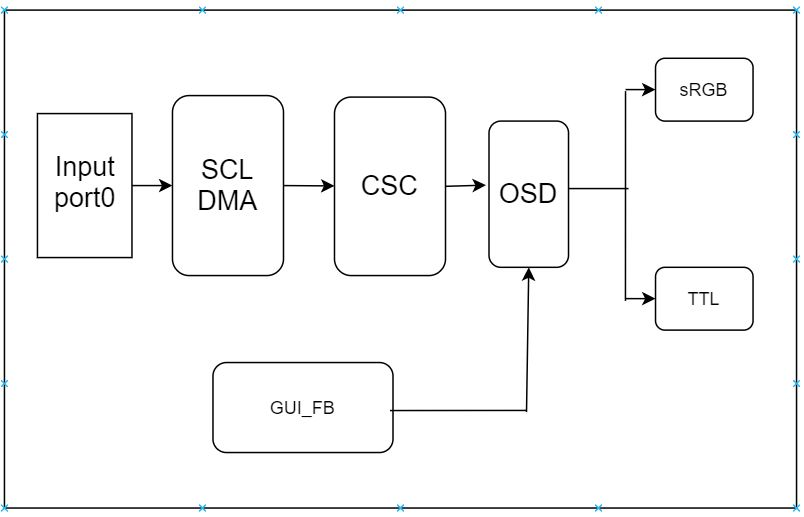
Note:
-
TTL/sRGB interface can only be used one to output an image at a time.
-
The DISP module and other modules can only be bound through E_MI_SYS_BIND_TYPE_FRAME_BASE.
-
The input image data format of the DISP module only supports E_MI_SYS_PIXEL_FRAME_YUV_SEMIPLANAR_420.
1.2.5. Muffin

Note:
-
For each device, HDMI and VGA interfaces can be used to output an image at the same time, whereas interfaces like CVBS, MIPI, TTL, BT1120, BT656, BT601, sRGB, MCU can only be output an image separately.
-
The output screen of MOP1 will be superimposed on MOP0 to realize the function of PIP, that is, the display priority of MOP1 is higher than that of MOP0.
-
The display positions of the 32 Input Ports on MOP0 cannot overlap each other.
-
MOP⅔ and MOP⅘ are used in the same way as MOP0 and MOP1.
-
The output of DISP0 and DISP1 can be written back to the memory by WBC.
-
The DISP module and other modules can only be bound through E_MI_SYS_BIND_TYPE_FRAME_BASE.
-
The input image data format of the DISP module only supports E_MI_SYS_PIXEL_FRAME_YUV_SEMIPLANAR_420.
1.2.6. Mochi

Note:
-
For each device, HDMI and VGA interfaces can be used to output an image at the same time, whereas interfaces like CVBS can only be output an image separately.
-
The output screen of MOP1 will be superimposed on MOP0 to realize the function of PIP, that is, the display priority of MOP1 is higher than that of MOP0.
-
The display positions of the 32 Input Ports on MOP0 cannot overlap each other.
-
MOP2 and MOP3 are used in the same way as MOP0 and MOP1.
-
The output of DISP0 and DISP1 can be written back to the memory by WBC.
-
The DISP module and other modules can only be bound through E_MI_SYS_BIND_TYPE_FRAME_BASE.
-
The input image data format of the DISP module only supports E_MI_SYS_PIXEL_FRAME_YUV_SEMIPLANAR_420.
1.2.7. Maruko
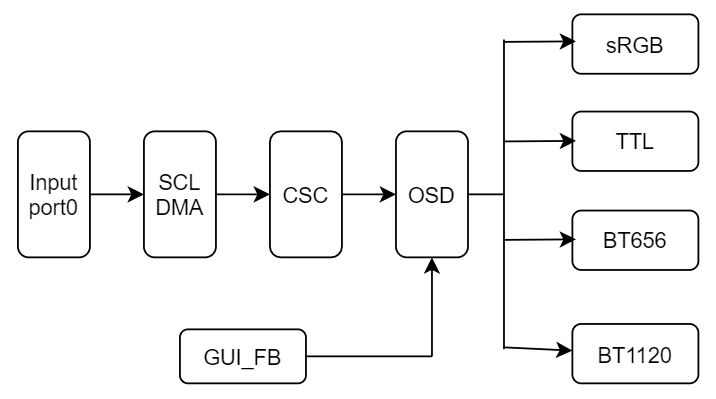
Note:
-
sRGB, TTL, B656 and BT1120 cannot be output at the same time, only one of them can be output at a time.
-
The DISP module and other modules can only be bound through E_MI_SYS_BIND_TYPE_FRAME_BASE.
-
The input image data format of the DISP module only supports: E_MI_SYS_PIXEL_FRAME_YUV_SEMIPLANAR_420, E_MI_SYS_PIXEL_FRAME_YUV_SEMIPLANAR_420_NV21, E_MI_SYS_PIXEL_FRAME_YUV420_PLANAR, E_MI_SYS_PIXEL_FRAME_YUV_SEMIPLANAR_422, E_MI_SYS_PIXEL_FRAME_YUV422_PLANAR, E_MI_SYS_PIXEL_FRAME_YUV422_YUYV, E_MI_SYS_PIXEL_FRAME_YUV422_UYVY, E_MI_SYS_PIXEL_FRAME_ARGB8888, E_MI_SYS_PIXEL_FRAME_ABGR8888, E_MI_SYS_PIXEL_FRAME_BGRA8888.
The differences among different chip series are shown in the table below:
| Output interface Chip series |
HDMI | VGA | MIPI DSI | TTL | CVBS | sRGB |
|---|---|---|---|---|---|---|
| Pretzel | not support | not support | not support | support | not support | not support |
| Macaron | not support | not support | not support | not support | not support | not support |
| Taiyaki | support | support | not support | not support | not support | not support |
| Takoyaki | not support | not support | support | support | not support | not support |
| Pudding | not support | not support | not support | support | not support | not support |
| Ispahan | not support | not support | not support | not support | not support | not support |
| MSR930 | support | support | support | support | not support | not support |
| Tiramisu | support | support | support | support | support | support |
| Ikayaki | not support | not support | not support | support | not support | support |
| Muffin | support | support | support | support | support | support |
| Mochi | support | support | not support | not support | support | not support |
| Maruko | not support | not support | not support | support | not support | support |
1.3. Keyword
-
DEV
Device, which corresponded to DISP0/1 in Flow Chart.
-
MOP
A hardware unit that reads image data in memory and performs puzzle processing.
-
LAYER
Video layer. MOP hardware abstraction layer.
-
CSC
Color space conversion unit
-
OSD Mixer
UI overlay
-
GUI FB/HW Cursor
GOP output
-
PIP
Picture In Picture
-
WBC
Write back channel, it can capture video layer or device-level video data, used for multi-dev homologous display.
2. API LIST
The MI DISP module provides the following APIs:
| API Name | Function |
|---|---|
| MI_DISP_Enable | Enable video output device |
| MI_DISP_Disable | Disable video output device |
| MI_DISP_SetPubAttr | Set public attribute of video output device |
| MI_DISP_GetPubAttr | Get public attribute of video output device |
| MI_DISP_DeviceAttach | Enable video output devices from the same source |
| MI_DISP_DeviceDetach | Disable video output devices from the same source |
| MI_DISP_EnableVideoLayer | Enable video layer |
| MI_DISP_DisableVideoLayer | Disable video layer |
| MI_DISP_SetVideoLayerAttr | Set video layer attribute |
| MI_DISP_GetVideoLayerAttr | Get video layer attribute |
| MI_DISP_BindVideoLayer | Bind video layer to specified device |
| MI_DISP_UnBindVideoLayer | Unbind video layer from specified device |
| MI_DISP_SetPlayToleration | Set playback toleration |
| MI_DISP_GetPlayToleration | Get playback toleration |
| MI_DISP_GetScreenFrame | Get screen output frame data |
| MI_DISP_ReleaseScreenFrame | Release screen output frame data |
| MI_DISP_SetVideoLayerAttrBatchBegin | Set the input port on the video layer related operations start |
| MI_DISP_SetVideoLayerAttrBatchEnd | Set the input port on the video layer related operations end |
| MI_DISP_EnableInputPort | Enable specified video input port |
| MI_DISP_DisableInputPort | Disable specified video input port |
| MI_DISP_SetInputPortAttr | Set specified video input port attribute |
| MI_DISP_GetInputPortAttr | Get specified video input port attribute |
| MI_DISP_SetInputPortDispPos | Set specified video input port display position |
| MI_DISP_GetInputPortDispPos | Get specified video input port display position |
| MI_DISP_PauseInputPort | Pause specified video input port |
| MI_DISP_ResumeInputPort | Resume specified video input port |
| MI_DISP_StepInputPort | Play specified video input port by single frame |
| MI_DISP_ShowInputPort | Show specified video input port |
| MI_DISP_HideInputPort | Hide specified video input port |
| MI_DISP_SetInputPortSyncMode | Set specified video input port sync mode |
| MI_DISP_QueryInputPortStat | Query video input port status |
| MI_DISP_SetZoomInWindow | Crop video input port |
| MI_DISP_GetVgaParam | Get VGA output device parameter |
| MI_DISP_SetVgaParam | Set VGA output device parameter |
| MI_DISP_GetHdmiParam | Get HDMI output device parameter |
| MI_DISP_SetHdmiParam | Set HDMI output device parameter |
| MI_DISP_GetLcdParam | Get LCD output device parameter |
| MI_DISP_SetLcdParam | Set LCD output device parameter |
| MI_DISP_GetCvbsParam | Get CVBS output device parameter |
| MI_DISP_SetCvbsParam | Set CVBS output device parameter |
| MI_DISP_DeviceGetColorTempeture | Get output image color temperature information |
| MI_DISP_DeviceSetColorTempeture | Set output image color temperature information |
| MI_DISP_DeviceSetGammaParam | Adjust output image gamma parameter |
| MI_DISP_SetVideoLayerRotateMode | Set the rotation Angle of the output image |
| MI_DISP_ClearInputPortBuffer | Clear the content of specified video input port |
| MI_DISP_InitDev | Initialize disp device |
| MI_DISP_DeInitDev | De-initialize disp device |
| MI_DISP_SetWBCSource | Set the write-back source of the write-back device |
| MI_DISP_GetWBCSource | Get the write-back source of the write-back device |
| MI_DISP_SetWBCAttr | Set write-back device attributes |
| MI_DISP_GetWBCAttr | Get write-back device attributes |
| MI_DISP_EnableWBC | Enable write-back device |
| MI_DISP_DisableWBC | Disable write-back device |
2.1. MI_DISP_Enable
-
Function
Enable video output device
-
Syntax
MI_S32 MI_DISP_Enable (MI_DISP_DEV DispDev);
-
Parameter
Parameter Name Description Input/Output DispDev Video output device number Input -
Return Value
-
Zero: Successful
-
Non-zero: Failed, see error code for details
-
-
Requirement
-
Header file: mi_disp.h, mi_disp_datatype.h
-
Lib: libmi_disp.a / libmi_disp.so
-
-
Note
-
Since system will not initialize to enable the device, the device should first be enabled before the video output function can be used.
-
Before calling the device enable function, the public attribute of the device must be set beforehand; otherwise, a device not configured error code will be returned.
-
-
Example
MI_U32 DispDev = 0;
MI_U32 DispLayer = 0;
MI_U32 DispInport = 0;
MI_DISP_PubAttr_t stPubAttr;
MI_DISP_VideoLayerAttr_t stLayerAttr;
MI_DISP_InputPortAttr_t stInputPortAttr;
MI_DISP_VidWinRect_t stWinRect;
MI_DISP_RotateConfig_t stRotateConfig;

memset(&stPubAttr,0,sizeof(MI_DISP_PubAttr_t));
memset(&stLayerAttr,0,sizeof(MI_DISP_VideoLayerAttr_t));
memset(&stInputPortAttr,0,sizeof(MI_DISP_InputPortAttr_t));
memset(&stWinRect, 0, sizeof(MI_DISP_VidWinRect_t));
memset(&stRotateConfig, 0, sizeof(MI_DISP_RotateConfig_t));

stPubAttr.eIntfSync = E_MI_DISP_OUTPUT_1080P60;
stPubAttr.eIntfType = E_MI_DISP_INTF_HDMI;
MI_DISP_SetPubAttr(DispDev, &stPubAttr);
stPubAttr.eIntfType = E_MI_DISP_INTF_VGA;
MI_DISP_SetPubAttr(DispDev, &stPubAttr); // Non-essential steps
MI_DISP_Enable(DispDev);

//HDMI related init
//Necessary steps. Not listed here

stLayerAttr.stVidLayerSize.u16Width = 1920;
stLayerAttr.stVidLayerSize.u16Height = 1080;
stLayerAttr.stVidLayerDispWin.u16X = 0;
stLayerAttr.stVidLayerDispWin.u16Y = 0;
stLayerAttr.stVidLayerDispWin.u16Width = 1920;
stLayerAttr.stVidLayerDispWin.u16Height = 1080;
stRotateConfig.eRotateMode = E_MI_DISP_ROTATE_NONE;
MI_DISP_BindVideoLayer(DispLayer,DispDev);
MI_DISP_SetVideoLayerAttr(DispLayer, &stLayerAttr);
MI_DISP_EnableVideoLayer(DispLayer);
MI_DISP_SetVideoLayerRotateMode(DispLayer, &stRotateConfig); // Non-essential steps

stInputPortAttr.u16SrcWidth = 1920;
stInputPortAttr.u16SrcHeight = 1080;
stInputPortAttr.stDispWin.u16X = 0;
stInputPortAttr.stDispWin.u16Y = 0;
stInputPortAttr.stDispWin.u16Width = 1920;
stInputPortAttr.stDispWin.u16Height = 1080;
stWinRect.u16X = 0;
stWinRect.u16Y = 0;
stWinRect.u16Width = 1920;
stWinRect.u16Height = 1080;
MI_DISP_SetInputPortAttr(DispLayer, DispInport, &stInputPortAttr);
MI_DISP_SetZoomInWindow(DispLayer, DispInport, &stWinRect); // Non-essential steps
MI_DISP_SetVideoLayerAttrBatchBegin(DispLayer); // Non-essential steps
MI_DISP_EnableInputPort(DispLayer, DispInport);
MI_DISP_SetVideoLayerAttrBatchEnd(DispLayer); // Non-essential steps

//exit flow
MI_DISP_SetVideoLayerAttrBatchBegin(DispLayer); // Non-essential steps
MI_DISP_DisableInputPort(DispLayer, DispInport);
MI_DISP_SetVideoLayerAttrBatchEnd(DispLayer); // Non-essential steps
MI_DISP_DisableVideoLayer(DispLayer);
MI_DISP_UnBindVideoLayer(DispLayer, DispDev);
MI_DISP_Disable(DispDev);
-
Flow Diagram
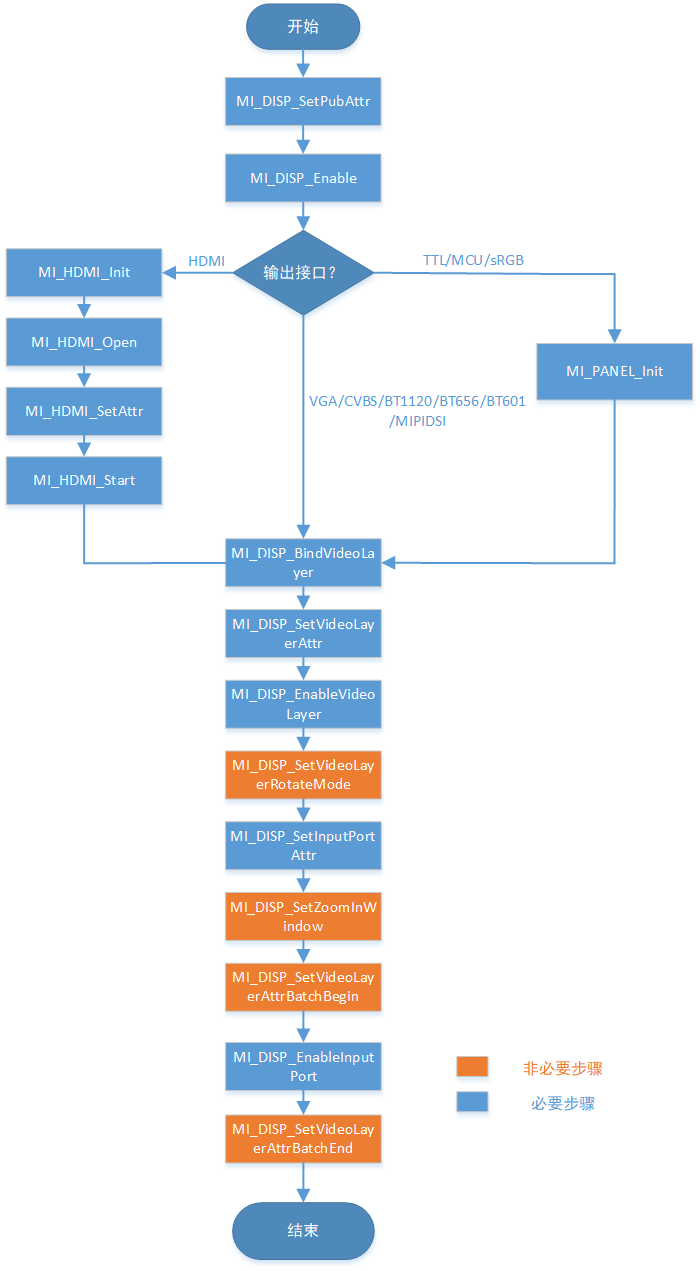
-
Related API
2.2. MI_DISP_Disable
-
Function
Disable video output device
-
Syntax
MI_S32 MI_DISP_Disable(MI_DISP_DEV DispDev);
-
Parameter
Parameter Name Description Input/Output DispDev Video output device number Input -
Return Value
-
Zero: Successful
-
Non-zero: Failed, see error code for details
-
-
Requirement
-
Header file: mi_disp.h, mi_disp_datatype.h
-
Lib: libmi_disp.a / libmi_disp.so
-
-
Flow Diagram
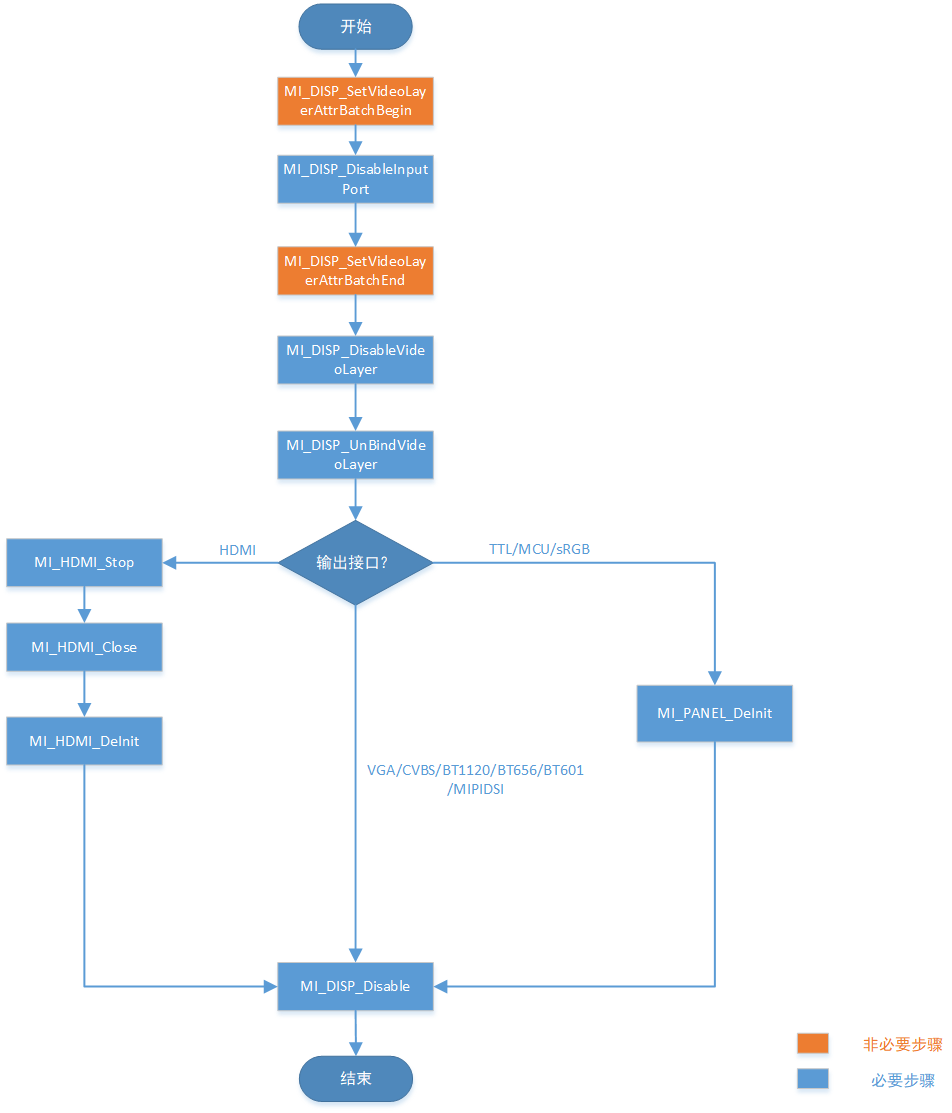
-
Related API
2.3. MI_DISP_SetPubAttr
-
Function
Set public attribute of video output device
-
Syntax
MI_S32 MI_DISP_SetPubAttr(MI_DISP_DEV DispDev, MI_DISP_PubAttr_t *pstPubAttr);
-
Parameter
Parameter Name Description Input/Output DispDev Output device number Input pstPubAttr Pointer to output device public attribute structure Input -
Return Value
-
Zero: Successful
-
Non-zero: Failed, see error code for details
-
-
Requirement
-
Header file: mi_disp.h, mi_disp_datatype.h
-
Lib: libmi_disp.a / libmi_disp.so
-
-
Related API
2.4. MI_DISP_GetPubAttr
-
Function
Get public attribute of video output device
-
Syntax
MI_S32 MI_DISP_GetPubAttr (MI_DISP_DEV DispDev, MI_DISP_PubAttr_t *pstPubAttr);
-
Parameter
Parameter Name Description Input/Output DispDev Output device number Input pstPubAttr Pointer to output device public attribute structure Output -
Return Value
-
Zero: Successful
-
Non-zero: Failed, see error code for details
-
-
Requirement
-
Header file: mi_disp.h, mi_disp_datatype.h
-
Lib: libmi_disp.a / libmi_disp.so
-
-
Related API
2.5. MI_DISP_DeviceAttach
-
Function
Enable video output devices from the same source, which can achieve the effect of same screen with different output interfaces available simultaneously.
-
Syntax
MI_S32 MI_DISP_DeviceAttach(MI_DISP_DEV DispSrcDev, MI_DISP_DEV DispDstDev, const MI_DISP_DevAttachAttr_t *pstAttachAttr);
-
Parameter
Parameter Name Description Input/Output DispSrcDev Output device number (video source device) Input DispDstDev Output device number (video destination device) Input pstAttachAttr Video destination output attributes Input -
Return Value
-
Zero: Successful
-
Non-zero: Failed, see error code for details
-
-
Requirement
-
Header file: mi_disp.h, mi_disp_datatype.h
-
Lib: libmi_disp.a / libmi_disp.so
-
-
Note
-
This API only supports chips featuring two video devices.
-
Currently supported chips include MSR930 and MSR650x.
-
-
Related API
2.6. MI_DISP_DeviceDetach
-
Function
Disable video output devices from the same source
-
Syntax
MI_S32 MI_DISP_DeviceDetach(MI_DISP_DEV DispSrcDev, MI_DISP_DEV DispDstDev);
-
Parameter
Parameter Name Description Input/Output DispSrcDev Output device number (video source device) Input DispDstDev Output device number (video destination device) Input -
Return Value
-
Zero: Successful
-
Non-zero: Failed, see error code for details
-
-
Requirement
-
Header file: mi_disp.h, mi_disp_datatype.h
-
Lib: libmi_disp.a / libmi_disp.so
-
-
Note
-
This API only supports chips featuring two video devices.
-
Currently supported chips include MSR930 and MSR650x.
-
-
Related API
2.7. MI_DISP_EnableVideoLayer
-
Function
Enable video layer
-
Syntax
MI_S32 MI_DISP_EnableVideoLayer (MI_DISP_LAYER DispLayer);
-
Parameter
Parameter Name Description Input/Output DispLayer Video output display layer number Input -
Return Value
-
Zero: Successful
-
Non-zero: Failed, see error code for details
-
-
Requirement
-
Header file: mi_disp.h, mi_disp_datatype.h
-
Lib: libmi_disp.a / libmi_disp.so
-
-
Related API
2.8. MI_DISP_DisableVideoLayer
-
Function
Disable video layer
-
Syntax
MI_S32 MI_DISP_DisableVideoLayer (MI_DISP_LAYER DispLayer);
-
Parameter
Parameter Name Description Input/Output DispLayer Video output display layer number Input -
Return Value
-
Zero: Successful
-
Non-zero: Failed, see error code for details
-
-
Requirement
-
Header file: mi_disp.h, mi_disp_datatype.h
-
Lib: libmi_disp.a / libmi_disp.so
-
-
Note
- Before calling this function, make sure all input port of video layer has been disabled.
-
Related API
2.9. MI_DISP_SetVideoLayerAttr
-
Function
Set video layer attribute
-
Syntax
MI_S32 MI_DISP_SetVideoLayerAttr(MI_DISP_LAYER DispLayer, MI_DISP_VideoLayerAttr_t *pstLayerAttr);
-
Parameter
Parameter Name Description Input/Output DispLayer Video output display layer number Input pstLayerAttr Pointer to video layer attribute structure Input -
Return Value
-
Zero: Successful
-
Non-zero: Failed, see error code for details
-
-
Requirement
-
Header file: mi_disp.h, mi_disp_datatype.h
-
Lib: libmi_disp.a / libmi_disp.so
-
-
Related API
2.10. MI_DISP_GetVideoLayerAttr
-
Function
Get video layer attribute
-
Syntax
MI_S32 MI_DISP_GetVideoLayerAttr(MI_DISP_LAYER DispLayer, MI_DISP_VideoLayerAttr_t *pstLayerAttr);
-
Parameter
Parameter Name Description Input/Output DispLayer Video output display layer number Input pstLayerAttr Pointer to video layer attribute structure Output -
Return Value
-
Zero: Successful
-
Non-zero: Failed, see error code for details
-
-
Requirement
-
Header file: mi_disp.h, mi_disp_datatype.h
-
Lib: libmi_disp.a / libmi_disp.so
-
-
Related API
2.11. MI_DISP_BindVideoLayer
-
Function
Bind video layer to specified device
-
Syntax
MI_S32 MI_DISP_BindVideoLayer(MI_DISP_LAYER DispLayer, MI_DISP_DEV DispDev);
-
Parameter
Parameter Name Description Input/Output DispLayer Video output display layer number Input DispDev Output device number Input -
Return Value
-
Zero: Successful
-
Non-zero: Failed, see error code for details
-
-
Requirement
-
Header file: mi_disp.h, mi_disp_datatype.h
-
Lib: libmi_disp.a / libmi_disp.so
-
-
Note
-
Before calling this function, make sure the device has been enabled.
-
Before calling this function, make sure the all input port of video layer has been disabled
-
When DISP is bound to other modules, the mapping relationship between device/video layer/input port of DISP and the corresponding channel/port are as follows.
Tiramisu:

Muffin supports two binding relationships:


Mochi supports two binding relationships:


-
-
Related API
2.12. MI_DISP_UnBindVideoLayer
-
Function
Unbind video layer from specified device
-
Syntax
MI_S32 MI_DISP_UnBindVideoLayer(MI_DISP_LAYER DispLayer, MI_DISP_DEV DispDev);
-
Parameter
Parameter Name Description Input/Output DispLayer Video output display layer number Input DispDev Output device number Input -
Return Value
-
Zero: Successful
-
Non-zero: Failed, see error code for details
-
-
Requirement
-
Header file: mi_disp.h, mi_disp_datatype.h
-
Lib: libmi_disp.a / libmi_disp.so
-
-
Note
-
Before calling this function, make sure all input port of video layer has been disabled.
-
Before calling this function, make sure video layer has been disabled
-
-
Related API
2.13. MI_DISP_SetPlayToleration
-
Function
Set playback toleration
-
Syntax
MI_S32 MI_DISP_SetPlayToleration(MI_DISP_LAYER DispLayer, MI_U32 u32Toleration);
-
Parameter
Parameter Name Description Input/Output DispLayer Video output display layer number Input u32Toleration Playback toleration used to adjust the error tolerance of the frame rate control algorithm Input -
Return Value
-
Zero: Successful
-
Non-zero: Failed, see error code for details
-
-
Requirement
-
Header file: mi_disp.h, mi_disp_datatype.h
-
Lib: libmi_disp.a / libmi_disp.so
-
-
Note
-
Playback toleration is measured in unit of millisecond.
-
Before calling this function, make sure the video layer has been enabled.
-
Currently supported chips include MSR930 and MSR650x.
-
-
Related API
2.14. MI_DISP_GetPlayToleration
-
Function
Get playback toleration
-
Syntax
MI_S32 MI_DISP_GetPlayToleration (MI_DISP_LAYER DispLayer, MI_U32 *pu32Toleration);
-
Parameter
Parameter Name Description Input/Output DispLayer Video output display layer number Input pu32Toleration Playback toleration. Output -
Return Value
-
Zero: Successful
-
Non-zero: Failed, see error code for details
-
-
Requirement
-
Header file: mi_disp.h, mi_disp_datatype.h
-
Lib: libmi_disp.a / libmi_disp.so
-
-
Note
-
Playback toleration is measured in unit of millisecond.
-
Before calling this function, make sure the video layer has been enabled.
-
Currently supported chips include MSR930 and MSR650x.
-
-
Related API
2.15. MI_DISP_GetScreenFrame
-
Function
Get output screen frame data
-
Syntax
MI_S32 MI_DISP_GetScreenFrame(MI_DISP_LAYER DispLayer, MI_DISP_VideoFrame_t *pstVFrame, MI_S32 s32MilliSec);
-
Parameter
Parameter Name Description Input/Output DispLayer Video output display layer number Input pstVFrame Pointer to the gotten output screen frame data structure Output s32MilliSec Block the port when the timeout parameter s32MilliSec is set to -1; do not block the port when the timeout parameter s32MilliSec is set to 0. Value larger than 0 represents the timeout waiting time. The timeout waiting time is in unit of millisecond (ms). Input -
Return Value
-
Zero: Successful
-
Non-zero: Failed, see error code for details
-
-
Requirement
-
Header file: mi_disp.h, mi_disp_datatype.h
-
Lib: libmi_disp.a / libmi_disp.so
-
-
Note
-
Before calling this function, make sure the video layer has been enabled.
-
Currently supported chips include MSR930 and MSR650x.
-
-
Related API
2.16. MI_DISP_ReleaseScreenFrame
-
Function
Release output screen frame data
-
Syntax
MI_S32 MI_DISP_ReleaseScreenFrame (MI_DISP_LAYER DispLayer, MI_DISP_VideoFrame_t *pstVFrame);
-
Parameter
Parameter Name Description Input/Output DispLayer Video output display layer number Input pstVFrame Pointer to the gotten output screen frame data structure Input -
Return Value
-
Zero: Successful
-
Non-zero: Failed, see error code for details
-
-
Requirement
-
Header file: mi_disp.h, mi_disp_datatype.h
-
Lib: libmi_disp.a / libmi_disp.so
-
-
Note
-
Before calling this function, make sure the video layer has been enabled.
-
Currently supported chips include MSR930 and MSR650x.
-
-
Related API
2.17. MI_DISP_SetVideoLayerAttrBatchBegin
-
Function
Set the input port on the video layer related operations start.
-
Syntax
MI_S32 MI_DISP_SetVideoLayerAttrBatchBegin (MI_DISP_LAYER DispLayer);
-
Parameter
Parameter Name Description Input/Output DispLayer Video output display layer number Input -
Return Value
-
Zero: Successful
-
Non-zero: Failed, see error code for details
-
-
Requirement
-
Header file: mi_disp.h, mi_disp_datatype.h
-
Lib: libmi_disp.a / libmi_disp.so
-
-
Note
-
Before calling this function, make sure the video layer has been enabled.
-
The MI_DISP_SetVideoLayerAttrBatchBegin and MI_DISP_SetVideoLayerAttrBatchEnd must be paired, otherwise the related operations after MI_DISP_SetVideoLayerAttrBatchBegin will not take effect.
-
This interface supports batch processing of the following interfaces:
MI_DISP_EnableInputPort, MI_DISP_DisableInputPort, MI_DISP_HideInputPort, MI_DISP_ShowInputPort.
-
It will take effect immediately for interfaces that do not support batch processing.
-
Input port operations in batch processing are all effective after MI_DISP_SetVideoLayerAttrBatchEnd.
For example, batch processing disables input port 0 ~ 15, interface order is MI_DISP_SetVideoLayerAttrBatchBegin, MI_DISP_DisableInputPort (0 ~ 15), MI_DISP_SetVideoLayerAttrBatchEnd.
-
Currently supported chips include Muffin and Mochi.
-
-
Related API
2.18. MI_DISP_SetVideoLayerAttrBatchEnd
-
Function
Set the input port on the video layer related operations end.
-
Syntax
MI_S32 MI_DISP_SetVideoLayerAttrBatchEnd (MI_DISP_LAYER DispLayer);
-
Parameter
Parameter Name Description Input/Output DispLayer Video output display layer number Input -
Return Value
-
Zero: Successful
-
Non-zero: Failed, see error code for details
-
-
Requirement
-
Header file: mi_disp.h, mi_disp_datatype.h
-
Lib: libmi_disp.a / libmi_disp.so
-
-
Note
-
Before calling this function, make sure the MI_DISP_SetVideoLayerAttrBatchBegin has been called.
-
Before calling this function, make sure the video layer has been enabled.
-
Currently supported chips include Muffin and Mochi.
-
-
Related API
2.19. MI_DISP_EnableInputPort
-
Function
Enable specified video input port
-
Syntax
MI_S32 MI_DISP_EnableInputPort (MI_DISP_LAYER DispLayer, MI_DISP_INPUTPORT LayerInputPort);
-
Parameter
Parameter Name Description Input/Output DispLayer Video output display layer number Input LayerInputPort Video input port number Input -
Return Value
-
Zero: Successful
-
Non-zero: Failed, see error code for details
-
-
Requirement
-
Header file: mi_disp.h, mi_disp_datatype.h
-
Lib: libmi_disp.a / libmi_disp.so
-
-
Note
-
Before calling this function, make sure the video layer has been enabled.
-
Before calling this function, make sure video layer has been bound
-
-
Related API
2.20. MI_DISP_DisableInputPort
-
Function
Disable specified video input port
-
Syntax
MI_S32 MI_DISP_DisableInputPort (MI_DISP_LAYER DispLayer, MI_DISP_INPUTPORT LayerInputPort);
-
Parameter
Parameter Name Description Input/Output DispLayer Video output display layer number Input LayerInputPort Video input port number Input -
Return Value
-
Zero: Successful
-
Non-zero: Failed, see error code for details
-
-
Requirement
-
Header file: mi_disp.h, mi_disp_datatype.h
-
Lib: libmi_disp.a / libmi_disp.so
-
-
Note
- Before calling this function, make sure the video layer has been enabled.
-
Related API
2.21. MI_DISP_SetInputPortAttr
-
Function
Set specified video input port attribute
-
Syntax
MI_S32 MI_DISP_SetInputPortAttr(MI_DISP_LAYER DispLayer, MI_DISP_INPUTPORT LayerInputPort, MI_DISP_InputPortAttr_t *pstInputPortAttr);
-
Parameter
Parameter Name Description Input/Output DispLayer Video output display layer number Input LayerInputPort Video input port number Input pstInputPortAttr Video input port attribute pointer Input -
Return Value
-
Zero: Successful
-
Non-zero: Failed, see error code for details
-
-
Requirement
-
Header file: mi_disp.h, mi_disp_datatype.h
-
Lib: libmi_disp.a / libmi_disp.so
-
-
Note
-
Before calling this function, make sure the video layer has been enabled.
-
Before calling this function, make sure video layer has been bound .
-
-
Related API
2.22. MI_DISP_GetInputPortAttr
-
Function
Get specified video input port attribute
-
Syntax
MI_S32 MI_DISP_GetInputPortAttr(MI_DISP_LAYER DispLayer, MI_DISP_INPUTPORT LayerInputPort, MI_DISP_InputPortAttr_t *pstInputPortAttr);
-
Parameter
Parameter Name Description Input/Output DispLayer Video output display layer number Input LayerInputPort Video input port number Input pstInputPortAttr Video input port attribute pointer Output -
Return Value
-
Zero: Successful
-
Non-zero: Failed, see error code for details
-
-
Requirement
-
Header file: mi_disp.h, mi_disp_datatype.h
-
Lib: libmi_disp.a / libmi_disp.so
-
-
Note
-
Before calling this function, make sure the video layer has been enabled.
-
Before calling this function, make sure video layer has been bound
-
-
Related API
2.23. MI_DISP_SetInputPortDispPos
-
Function
Set specified video input port display position
-
Syntax
MI_S32 MI_DISP_SetInputPortDispPos(MI_DISP_LAYER DispLayer, MI_DISP_INPUTPORT LayerInputPort, const MI_DISP_Position_t *pstDispPos);
-
Parameter
Parameter Name Description Input/Output DispLayer Video output display layer number Input LayerInputPort Video input port number Input pstDispPos Input port position pointer Input -
Return Value
-
Zero: Successful
-
Non-zero: Failed, see error code for details
-
-
Requirement
-
Header file: mi_disp.h, mi_disp_datatype.h
-
Lib: libmi_disp.a / libmi_disp.so
-
-
Note
- Before calling this function, make sure the video layer has been enabled.
-
Related API
2.24. MI_DISP_GetInputPortDispPos
-
Function
Get specified video input port display position
-
Syntax
MI_S32 MI_DISP_GetInputPortDispPos(MI_DISP_LAYER DispLayer, MI_DISP_INPUTPORT LayerInputPort, MI_DISP_Position_t *pstDispPos);
-
Parameter
Parameter Name Description Input/Output DispLayer Video output display layer number Input LayerInputPort Video input port number Input pstDispPos Input port position pointer Output -
Return Value
-
Zero: Successful
-
Non-zero: Failed, see error code for details
-
-
Requirement
-
Header file: mi_disp.h, mi_disp_datatype.h
-
Lib: libmi_disp.a / libmi_disp.so
-
-
Note
- Before calling this function, make sure the video layer has been enabled.
-
Related API
2.25. MI_DISP_PauseInputPort
-
Function
Pause specified video input port
-
Syntax
MI_S32 MI_DISP_PauseInputPort (MI_DISP_LAYER DispLayer, MI_DISP_INPUTPORT LayerInputPort);
-
Parameter
Parameter Name Description Input/Output DispLayer Video output display layer number Input LayerInputPort Video input port number Input -
Return Value
-
Zero: Successful
-
Non-zero: Failed, see error code for details
-
-
Requirement
-
Header file: mi_disp.h, mi_disp_datatype.h
-
Lib: libmi_disp.a / libmi_disp.so
-
-
Note
- Before calling this function, make sure the video layer has been enabled.
-
Related API
2.26. MI_DISP_ResumeInputPort
-
Function
Resume specified video input port
-
Syntax
MI_S32 MI_DISP_ResumeInputPort (MI_DISP_LAYER DispLayer, MI_DISP_INPUTPORT LayerInputPort);
-
Parameter
Parameter Name Description Input/Output DispLayer Video output display layer number Input LayerInputPort Video input port number Input -
Return Value
-
Zero: Successful
-
Non-zero: Failed, see error code for details
-
-
Requirement
-
Header file: mi_disp.h, mi_disp_datatype.h
-
Lib: libmi_disp.a / libmi_disp.so
-
-
Note
- Before calling this function, make sure the video layer has been enabled.
-
Related API
2.27. MI_DISP_StepInputPort
-
Function
Play specified video input port by single frame
-
Syntax
MI_S32 MI_DISP_StepInputPort (MI_DISP_LAYER DispLayer, MI_DISP_INPUTPORT LayerInputPort);
-
Parameter
Parameter Name Description Input/Output DispLayer Video output display layer number Input LayerInputPort Video input port number Input -
Return Value
-
Zero: Successful
-
Non-zero: Failed, see error code for details
-
-
Requirement
-
Header file: mi_disp.h, mi_disp_datatype.h
-
Lib: libmi_disp.a / libmi_disp.so
-
-
Note
-
Before calling this function, make sure the video layer has been enabled.
-
Currently supported chips include MSR930 and MSR650x.
-
-
Related API
2.28. MI_DISP_ShowInputPort
-
Function
Show specified video input port
-
Syntax
MI_S32 MI_DISP_ShowInputPort (MI_DISP_LAYER DispLayer, MI_DISP_INPUTPORT LayerInputPort);
-
Parameter
Parameter Name Description Input/Output DispLayer Video output display layer number Input LayerInputPort Video input port number Input -
Return Value
-
Zero: Successful
-
Non-zero: Failed, see error code for details
-
-
Requirement
-
Header file: mi_disp.h, mi_disp_datatype.h
-
Lib: libmi_disp.a / libmi_disp.so
-
-
Note
- Before calling this function, make sure the video layer has been enabled.
-
Related API
2.29. MI_DISP_HideInputPort
-
Function
Hide specified video input port
-
Syntax
MI_S32 MI_DISP_HideInputPort (MI_DISP_LAYER DispLayer, MI_DISP_INPUTPORT LayerInputPort);
-
Parameter
Parameter Name Description Input/Output DispLayer Video output display layer number Input LayerInputPort Video input port number Input -
Return Value
-
Zero: Successful
-
Non-zero: Failed, see error code for details
-
-
Requirement
-
Header file: mi_disp.h, mi_disp_datatype.h
-
Lib: libmi_disp.a / libmi_disp.so
-
-
Note
- Before calling this function, make sure the video layer has been enabled.
-
Related API
2.30. MI_DISP_SetInputPortSyncMode
-
Function
Set specified video input port sync mode
-
Syntax
MI_S32 MI_DISP_SetInputPortSyncMode (MI_DISP_LAYER DispLayer, MI_DISP_INPUTPORT LayerInputPort, MI_DISP_SyncMode_e eMode);
-
Parameter
Parameter Name Description Input/Output DispLayer Video output display layer number Input LayerInputPort Video input port number Input eMode Input port sync mode Input -
Return Value
-
Zero: Successful
-
Non-zero: Failed, see error code for details
-
-
Requirement
-
Header file: mi_disp.h, mi_disp_datatype.h
-
Lib: libmi_disp.a / libmi_disp.so
-
-
Note
-
Before calling this function, make sure the video layer has been enabled.
-
Currently supported chips include MSR930 and MSR650x.
-
2.31. MI_DISP_QueryInputPortStat
-
Function
Query video input port status
-
Syntax
MI_S32 MI_DISP_QueryInputPortStat(MI_DISP_LAYER DispLayer, MI_DISP_INPUTPORT LayerInputPort, MI_DISP_QueryChanelStatus_t *pstStatus);
-
Parameter
Parameter Name Description Input/Output DispLayer Video output display layer number Input LayerInputPort Video input port number Input pstStatus Input port status pointer Output -
Return Value
-
Zero: Successful
-
Non-zero: Failed, see error code for details
-
-
Requirement
-
Header file: mi_disp.h, mi_disp_datatype.h
-
Lib: libmi_disp.a / libmi_disp.so
-
-
Note
- Before calling this function, make sure the video layer has been enabled.
2.32. MI_DISP_SetZoomInWindow
-
Function
Crop video input port.
-
Syntax
MI_S32 MI_DISP_SetZoomInWindow(MI_DISP_LAYER DispLayer, MI_DISP_INPUTPORT LayerInputPort, MI_DISP_VidWinRect_t *pstZoomRect);
-
Parameter
Parameter Name Description Input/Output DispLayer Video output video layer number. Input LayerInputPort Video input port number. Input pstZoomRect Video cropping attribute pointer. Input -
Return Value
-
Zero: Successful
-
Non-zero: Failed, see error code for details
-
-
Requirement
-
Header file: mi_disp.h, mi_disp_datatype.h
-
Lib: libmi_disp.a / libmi_disp.so
-
-
Note
- The video layer must be enabled before calling.
-
Related API
2.33. MI_DISP_GetVgaParam
-
Function
Get VGA output device parameter
-
Syntax
MI_S32 MI_DISP_GetVgaParam(MI_DISP_DEV DispDev, MI_DISP_VgaParam_t *pstVgaParam);
-
Parameter
Parameter Name Description Input/Output DispDev Video output device number Input pstVgaParam Pointer to VGA image output effect structure Output -
Return Value
-
Zero: Successful
-
Non-zero: Failed, see error code for details
-
-
Requirement
-
Header file: mi_disp.h, mi_disp_datatype.h
-
Lib: libmi_disp.a / libmi_disp.so
-
-
Note
- Before calling this function, make sure the video layer has been enabled.
-
Related API
2.34. MI_DISP_SetVgaParam
-
Function
Set VGA output device parameter
-
Syntax
MI_S32 MI_DISP_SetVgaParam (MI_DISP_DEV DispDev, MI_DISP_VgaParam_t *pstVgaParam);
-
Parameter
Parameter Name Description Input/Output DispDev Video output device number Input pstVgaParam Pointer to VGA image output effect structure Input -
Return Value
-
Zero: Successful
-
Non-zero: Failed, see error code for details
-
-
Requirement
-
Header file: mi_disp.h, mi_disp_datatype.h
-
Lib: libmi_disp.a / libmi_disp.so
-
-
Note
- Before calling this function, make sure the video layer has been enabled.
-
Related API
2.35. MI_DISP_GetHdmiParam
-
Function
Get HDMI output device parameter
-
Syntax
MI_S32 MI_DISP_GetHdmiParam(MI_DISP_DEV DispDev, MI_DISP_HdmiParam_t *pstHdmiParam);
-
Parameter
Parameter Name Description Input/Output DispDev Video Output device number Input pstHdmiParam Pointer to HDMI image output effect structure Output -
Return Value
-
Zero: Successful
-
Non-zero: Failed, see error code for details
-
-
Requirement
-
Header file: mi_disp.h, mi_disp_datatype.h
-
Lib: libmi_disp.a / libmi_disp.so
-
-
Note
- Before calling this function, make sure the video layer has been enabled.
-
Related API
2.36. MI_DISP_SetHdmiParam
-
Function
Set HDMI output device parameter
-
Syntax
MI_S32 MI_DISP_SetHdmiParam(MI_DISP_DEV DispDev, MI_DISP_HdmiParam_t *pstHdmiParam);
-
Parameter
Parameter Name Description Input/Output DispDev Video output device number Input pstHdmiParam Pointer to HDMI image output effect structure Input -
Return Value
-
Zero: Successful
-
Non-zero: Failed, see error code for details
-
-
Requirement
-
Header file: mi_disp.h, mi_disp_datatype.h
-
Lib: libmi_disp.a / libmi_disp.so
-
-
Note
- Before calling this function, make sure the video layer has been enabled.
-
Related API
2.37. MI_DISP_GetLcdParam
-
Function
Get LCD output device parameter
-
Syntax
MI_S32 MI_DISP_GetLcdParam(MI_DISP_DEV DispDev, MI_DISP_LcdParam_t *pstLcdParam);
-
Parameter
Parameter Name Description Input/Output DispDev Video output device number Input pstLcdParam Pointer to LCD image output effect structure Output -
Return Value
-
Zero: Successful
-
Non-zero: Failed, see error code for details
-
-
Requirement
-
Header file: mi_disp.h, mi_disp_datatype.h
-
Lib: libmi_disp.a / libmi_disp.so
-
-
Note
- Before calling this function, make sure the video layer has been enabled.
-
Related API
2.38. MI_DISP_SetLcdParam
-
Function
Set LCD output device parameter
-
Syntax
MI_S32 MI_DISP_SetLcdParam(MI_DISP_DEV DispDev, MI_DISP_LcdParam_t *pstLcdParam);
-
Parameter
Parameter Name Description Input/Output DispDev Video output device number Input pstLcdParam Pointer to LCD image output effect structure Input -
Return Value
-
Zero: Successful
-
Non-zero: Failed, see error code for details
-
-
Requirement
-
Header file: mi_disp.h, mi_disp_datatype.h
-
Lib: libmi_disp.a / libmi_disp.so
-
-
Note
- Before calling this function, make sure the video layer has been enabled.
-
Related API
2.39. MI_DISP_GetCvbsParam
-
Function
Get CVBS output device parameter
-
Syntax
MI_S32 MI_DISP_GetCvbsParam(MI_DISP_DEV DispDev, MI_DISP_CvbsParam_t *pstCvbsParam);
-
Parameter
Parameter Name Description Input/Output DispDev Video output device number Input pstCvbsParam CVBS image output effect structure pointer Output -
Return Value
-
Zero: Successful
-
Non-zero: Failed, see error code for details
-
-
Requirement
-
Header file: mi_disp.h, mi_disp_datatype.h
-
Lib: libmi_disp.a / libmi_disp.so
-
-
Note
- Before calling this function, make sure the video layer has been enabled.
-
Related API
2.40. MI_DISP_SetCvbsParam
-
Function
Set CVBS output device parameter
-
Syntax
MI_S32 MI_DISP_SetCvbsParam(MI_DISP_DEV DispDev, MI_DISP_CvbsParam_t *pstCvbsParam);
-
Parameter
Parameter Name Description Input/Output DispDev Video output device number Input pstCvbsParam CVBS image output effect structure pointer Input -
Return Value
-
Zero: Successful
-
Non-zero: Failed, see error code for details
-
-
Requirement
-
Header file: mi_disp.h, mi_disp_datatype.h
-
Lib: libmi_disp.a / libmi_disp.so
-
-
Note
- Before calling this function, make sure the video layer has been enabled.
-
Related API
2.41. MI_DISP_DeviceGetColorTempeture
-
Function
Get output image color temperature information
-
Syntax
MI_S32 MI_DISP_DeviceGetColorTempeture(MI_DISP_DEV DispDev, MI_DISP_ColorTemperature_t *pstColorTempInfo);
-
Parameter
Parameter Name Description Input/Output DispDev Video output device number Input pstColorTempInfo Pointer to output image color temperature structure Output -
Return Value
-
Zero: Successful
-
Non-zero: Failed, see error code for details
-
-
Requirement
-
Header file: mi_disp.h, mi_disp_datatype.h
-
Lib: libmi_disp.a / libmi_disp.so
-
-
Note
-
Before calling this function, make sure the video layer has been enabled.
-
Currently supported chips include Takoyaki series.
-
-
Related API
2.42. MI_DISP_DeviceSetColorTempeture
-
Function
Set image output color temperature information
-
Syntax
MI_S32 MI_DISP_DeviceSetColorTempeture(MI_DISP_DEV DispDev, MI_DISP_ColorTemperature_t *pstColorTempInfo);
-
Parameter
Parameter Name Description Input/Output DispDev Video output device number Input pstColorTempInfo Pointer to output image color temperature structure Input -
Return Value
-
Zero: Successful
-
Non-zero: Failed, see error code for details
-
-
Requirement
-
Header file: mi_disp.h, mi_disp_datatype.h
-
Lib: libmi_disp.a / libmi_disp.so
-
-
Note
-
Before calling this function, make sure the video layer has been enabled.
-
Currently supported chips include Takoyaki series.
-
-
Related API
2.43. MI_DISP_DeviceSetGammaParam
-
Function
Adjust output image Gamma
-
Syntax
MI_S32 MI_DISP_DeviceSetGammaParam(MI_DISP_DEV DispDev, MI_DISP_GammaParam_t *pstGammaParam);
-
Parameter
Parameter Name Description Input/Output DispDev Video output device number Input pstGammaParam Pointer to output image gamma structure Input -
Return Value
-
Zero: Successful
-
Non-zero: Failed, see error code for details
-
-
Requirement
-
Header file: mi_disp.h, mi_disp_datatype.h
-
Lib: libmi_disp.a / libmi_disp.so
-
-
Note
-
Before calling this function, make sure the video layer has been enabled.
-
Currently supported chips include Takoyaki series.
-
2.44. MI_DISP_SetVideoLayerRotateMode
-
Function
Set video layer rotation mode
-
Syntax
MI_S32 MI_DISP_SetVideoLayerRotateMode(MI_DISP_LAYER DispLayer, MI_DISP_RotateConfig_t *pstRotateConfig);
-
Parameter
Parameter Name Description Input/Output DispLayer Video output layer number Input pstRotateConfig Pointer to rotation angle structure of the output image Input -
Return Value
-
Zero: Successful
-
Non-zero: Failed, see error code for details
-
-
Requirement
-
Header file: mi_disp.h, mi_disp_datatype.h
-
Lib: libmi_disp.a / libmi_disp.so
-
-
Note
-
Currently supported chips include Takoyaki/Tiramisu/Muffin series. Only Takoyaki support 180 degrees of rotation.
-
Before calling this function, make sure video layer has been enabled.
-
Before calling this function, make sure all input port of video layer has been disabled.
-
Need to be bound by VDEC/SCL.
-
Each video layer only supports one input port. For example, when turn on 90 degrees of rotation, each video layer can only enable input port 0.
-
The rotate mode maximum supported resolution is 1920x1080.
-
2.45. MI_DISP_ClearInputPortBuffer
-
Function
Clear the content of specified video input port
-
Syntax
MI_S32 MI_DISP_ClearInputPortBuffer(MI_DISP_LAYER DispLayer, MI_DISP_INPUTPORT LayerInputPort, MI_BOOL bClrAll);
-
Parameter
Parameter Name Description Input/Output DispLayer Video output layer number Input LayerInputPort Video input port number Input bClrAll The flag of clearing current display content Input -
Return Value
-
Zero: Successful
-
Non-zero: Failed, see error code for details
-
-
Requirement
-
Header file: mi_disp.h, mi_disp_datatype.h
-
Lib: libmi_disp.a / libmi_disp.so
-
-
Note
- Before calling this function, make sure the video layer has been enabled.
2.46. MI_DISP_InitDev
-
Function
Initialize disp device.
-
Syntax
MI_S32 MI_DISP_InitDev(MI_DISP_InitParam_t *pstInitParam);
-
Parameters
Parameter Name Description Input/Output pstInitParam Initialization Parameter Currently unused and can be configured as NULL Input -
Return Value
-
Zero: Successful
-
Non-zero: Failed, see error code for details
-
-
Requirement
-
Header file: mi_disp.h, mi_disp_datatype.h mi_disp_datatype.h
-
Lib: libmi_disp.a / libmi_disp.so
-
-
Note
- If this interface is not called before calling any DISP API, the device will be initialized automatically in the code.
2.47. MI_DISP_DeInitDev
-
Function
De-initialize disp device.
-
Syntax
MI_S32 MI_DISP_DeInitDev(void);
-
Return Value
-
Zero: Successful
-
Non-zero: Failed, see error code for details
-
-
Requirement
-
Header file: mi_disp.h, mi_disp_datatype.h mi_disp_datatype.h
-
Lib: libmi_disp.a / libmi_disp.so
-
-
Note
-
This interface should be called after the device has been initialized; otherwise, a failed message will be returned.
-
If this interface is not called after the app exited, the disp device will be auto de-initialized.
-
Please call this interface before dynamically switching to the next interface type.
-
2.48. MI_DISP_SetWBCSource
-
Function
Set the write-back source of the video write-back device, the device or the video layer of the device can be set.
-
Syntax
MI_S32 MI_DISP_SetWBCSource(MI_DISP_WBC DispWbc, const MI_DISP_WBC_Source_t *pstWbcSource);
-
Parameters
Parameter Name Description Input/Output DispWbc Write back the device number. Input pstWbcSource Write back the source structure pointer. Input -
Return Value
-
Zero: Successful
-
Non-zero: Failed, see error code for details
-
-
Requirement
-
Header file: mi_disp.h, mi_disp_datatype.h
-
Lib: libmi_disp.a / libmi_disp.so
-
-
Note
-
Only supports Tiramisu/ Muffin/ Mochi, and one write-back device.
-
u32SourceId only supported 0/1.
-
-
Example
MI_DISP_WBC_Source_t stWbcSource;
MI_DISP_WBC_Attr_t stWbcAttr;

stWbcSource.eSourceType = MI_DISP_WBC_SOURCE_DEV;
stWbcSource.u32SourceId = 0;
MI_DISP_SetWBCSource(0, &stWbcSource);

stWbcAttr.stTargetSize.u32Width = 720;
stWbcAttr.stTargetSize.u32Height = 576;
stWbcAttr.ePixFormat = E_MI_SYS_PIXEL_FRAME_YUV_SEMIPLANAR_420;
MI_DISP_SetWBCAttr(0, &stWbcAttr);
MI_DISP_EnableWBC(0);

stSrcChnPort.eModId = E_MI_MODULE_ID_WBC;
stSrcChnPort.u32DevId = 0;
stSrcChnPort.u32ChnId = 0;
stSrcChnPort.u32PortId = 0;

stDstChnPort.eModId = E_MI_MODULE_ID_DISP;
stDstChnPort.u32DevId = 1;
stDstChnPort.u32ChnId = 0;
stDstChnPort.u32PortId = 0;

MI_SYS_BindChnPort(0, &stSrcChnPort, &stDstChnPort, 30, 30);
-
Related API
2.49. MI_DISP_GetWBCSource
-
Function
Get the write-back source from the video write-back device.
-
Syntax
MI_S32 MI_DISP_GetWBCSource(MI_DISP_WBC DispWbc, MI_DISP_WBC_Source_t *pstWbcSource);
-
Parameters
Parameter Name Description Input/Output DispWbc Write back the device number. Input pstWbcSource Write back the source structure pointer. Output -
Return Value
-
Zero: Successful
-
Non-zero: Failed, see error code for details
-
-
Requirement
-
Header file: mi_disp.h, mi_disp_datatype.h
-
Lib: libmi_disp.a / libmi_disp.so
-
-
Related API
2.50. MI_DISP_SetWBCAttr
-
Function
Set video write-back device attributes.
-
Syntax
MI_S32 MI_DISP_SetWBCAttr(MI_DISP_WBC DispWbc, const MI_DISP_WBC_Attr_t *pstWbcAttr);
-
Parameters
Parameter Name Description Input/Output DispWbc Write back the device number. Input pstWbcAttr Write back the device attribute structure pointer. Input -
Return Value
-
Zero: Successful
-
Non-zero: Failed, see error code for details
-
-
Requirement
-
Header file: mi_disp.h, mi_disp_datatype.h
-
Lib: libmi_disp.a / libmi_disp.so
-
-
Related API
2.51. MI_DISP_GetWBCAttr
-
Function
Get video write-back device attributes.
-
Syntax
MI_S32 MI_DISP_GetWBCAttr(MI_DISP_WBC DispWbc, MI_DISP_WBC_Attr_t *pstWbcAttr);
-
Parameters
Parameter Name Description Input/Output DispWbc Write back the device number. Input pstWbcAttr Write back the device attribute structure pointer. Output -
Return Value
-
Zero: Successful
-
Non-zero: Failed, see error code for details
-
-
Requirement
-
Header file: mi_disp.h, mi_disp_datatype.h
-
Lib: libmi_disp.a / libmi_disp.so
-
-
Related API
2.52. MI_DISP_EnableWBC
-
Function
Enable video write-back device.
-
Syntax
MI_S32 MI_DISP_EnableWBC(MI_DISP_WBC DispWbc);
-
Parameters
Parameter Name Description Input/Output DispWbc Write back the device number. Input -
Return Value
-
Zero: Successful
-
Non-zero: Failed, see error code for details
-
-
Requirement
-
Header file: mi_disp.h, mi_disp_datatype.h
-
Lib: libmi_disp.a / libmi_disp.so
-
-
Related API
2.53. MI_DISP_DisableWBC
-
Function
Disable video write-back device.
-
Syntax
MI_S32 MI_DISP_DisableWBC(MI_DISP_WBC DispWbc);
-
Parameters
Parameter Name Description Input/Output DispWbc Write back the device number. Input -
Return Value
-
Zero: Successful
-
Non-zero: Failed, see error code for details
-
-
Requirement
-
Header file: mi_disp.h, mi_disp_datatype.h
-
Lib: libmi_disp.a / libmi_disp.so
-
-
Related API
3. DISP DATA TYPE
The table below lists the data type definitions of the DISP module:
| Data Structure | Description |
|---|---|
| MI_DISP_DEV | Define the DISP_DEV type |
| MI_DISP_LAYER | Define the DISP_LAYER type |
| MI_DISP_INPUTPORT | Define the LAYER_INPUTPORT type |
| MI_DISP_Interface_e | Define the DISP interface type |
| MI_DISP_IntfSync_e | Define DISP timing type |
| MI_DISP_SyncInfo_t | Define the DISP sync information |
| MI_DISP_PubAttr_t | Define the DISP public attribute |
| MI_DISP_DevAttachMode_e | Define DISP video destination output mode |
| MI_DISP_DevAttachAttr_t | Define DISP video destination output attribute |
| MI_DISP_Csc_t | Define the DISP color space conversion information |
| MI_DISP_CscMattrix_e | Define the DISP color space conversion matrix |
| MI_DISP_VgaParam_t | Define the DISP VGA parameter information |
| MI_DISP_HdmiParam_t | Define the DISP HDMI parameter information |
| MI_DISP_LcdParam_t | Define the DISP LCD parameter information |
| MI_DISP_CvbsParam_t | Define the DISP CVBS output image parameter |
| MI_DISP_ColorTemperature_t | Define the DISP color temperature parameter |
| MI_DISP_GammaParam_t | Define the DISP Gamma parameter |
| MI_DISP_VideoLayerSize_t | |
| Define the DISP video layer size | |
| MI_DISP_VideoLayerAttr_t | Define the DISP video layer attribute |
| MI_DISP_RotateMode_e | Define the DISP rotation angle information |
| MI_DISP_RotateConfig_t | Define the DISP rotation parameter |
| MI_DISP_VidWinRect_t | Define the DISP window attribute |
| MI_DISP_InputPortAttr_t | Define the DISP input port attribute |
| MI_DISP_Position_t | Define the DISP input port position |
| MI_DISP_SyncMode_e | Define the DISP sync mode |
| MI_DISP_InputPortStatus_e | Define the DISP input port status type |
| MI_DISP_QueryChannelStatus_t | Define the DISP input port status information |
| MI_DISP_VideoFrame_t | Define the DISP video frame information |
| MI_DISP_InitParam_t | Define the initialized parameter of DISP device |
| MI_DISP_WBC | Define the type of DISP_WBC. |
| MI_DISP_WBC_SourceType_e | The source type of the data captured by the video write-back device |
| MI_DISP_WBC_Source_t | The write-back source of video write-back device |
| MI_DISP_WBC_TargetSize_t | The target size of the video write-back device |
| MI_DISP_WBC_Attr_t | Video write-back device attributes |
3.1. MI_DISP_DEV
-
Description
Define the DISP_DEV type
-
Definition
typedef MI_S32 MI_DISP_DEV;
3.2. MI_DISP_LAYER
-
Description
Define the DISP_LAYER type.
Video layer is the output unit of DISP. For DISP with multiple input ports, all input ports are eventually spliced into a video layer and output to the monitor or LCD. For DISP with only one input port, the input port size is equal to the video layer size.
-
Definition
typedef MI_S32 MI_DISP_LAYER;
3.3. MI_DISP_INPUTPORT
-
Description
Define the LAYER_INPUTPORT type.
-
Definition
typedef MI_S32 MI_DISP_INPUTPORT;
3.4. MI_DISP_Interface_e
-
Description
Define video output interface.
-
Definition
typedef enum { E_MI_DISP_INTF_CVBS = 0, E_MI_DISP_INTF_YPBPR, E_MI_DISP_INTF_VGA, E_MI_DISP_INTF_BT656, E_MI_DISP_INTF_BT1120, E_MI_DISP_INTF_HDMI, E_MI_DISP_INTF_LCD, E_MI_DISP_INTF_BT656_H, E_MI_DISP_INTF_BT656_L, E_MI_DISP_INTF_TTL, E_MI_DISP_INTF_MIPIDSI, E_MI_DISP_INTF_TTL_SPI_IF, E_MI_DISP_INTF_SRGB, E_MI_DISP_INTF_MCU, E_MI_DISP_INTF_MCU_NOFLM, E_MI_DISP_INTF_BT601, E_MI_DISP_INTF_BT1120_DDR, E_MI_DISP_INTF_MAX, }MI_DISP_Interface_e; -
Supported Timings
eIntfType eIntfSync HDMI E_MI_DISP_OUTPUT_1080P60, E_MI_DISP_OUTPUT_1080P30, E_MI_DISP_OUTPUT_1080P50, E_MI_DISP_OUTPUT_1080P25, E_MI_DISP_OUTPUT_1080P24, E_MI_DISP_OUTPUT_1920x1080_2997, E_MI_DISP_OUTPUT_1920x1080_5994, E_MI_DISP_OUTPUT_1920x1080_2398, E_MI_DISP_OUTPUT_720P60, E_MI_DISP_OUTPUT_720P30, E_MI_DISP_OUTPUT_720P50, E_MI_DISP_OUTPUT_720P25, E_MI_DISP_OUTPUT_720P24, E_MI_DISP_OUTPUT_1280x720_2997, E_MI_DISP_OUTPUT_1280x720_5994, E_MI_DISP_OUTPUT_480P60, E_MI_DISP_OUTPUT_576P50, E_MI_DISP_OUTPUT_640x480_60, E_MI_DISP_OUTPUT_848x480_60, E_MI_DISP_OUTPUT_800x600_60, E_MI_DISP_OUTPUT_2560x1440_60, E_MI_DISP_OUTPUT_2560x1440_50, E_MI_DISP_OUTPUT_2560x1440_30, E_MI_DISP_OUTPUT_2560x1600_60, E_MI_DISP_OUTPUT_1024x768_60, E_MI_DISP_OUTPUT_1280x1024_60, E_MI_DISP_OUTPUT_1366x768_60, E_MI_DISP_OUTPUT_1440x900_60, E_MI_DISP_OUTPUT_1280x800_60, E_MI_DISP_OUTPUT_1680x1050_60, E_MI_DISP_OUTPUT_1600x1200_60, E_MI_DISP_OUTPUT_1280x768_60, E_MI_DISP_OUTPUT_1280x960_60, E_MI_DISP_OUTPUT_1360x768_60, E_MI_DISP_OUTPUT_1400x1050_60, E_MI_DISP_OUTPUT_1600x900_60, E_MI_DISP_OUTPUT_1920x1440_60, E_MI_DISP_OUTPUT_1920x1200_60, E_MI_DISP_OUTPUT_3840x2160_30, E_MI_DISP_OUTPUT_3840x2160_25, E_MI_DISP_OUTPUt_3840x2160_24, E_MI_DISP_OUTPUT_3840x2160_2997 VGA E_MI_DISP_OUTPUT_1080P60, E_MI_DISP_OUTPUT_1080P30, E_MI_DISP_OUTPUT_1080P50, E_MI_DISP_OUTPUT_1080P25, E_MI_DISP_OUTPUT_1080P24, E_MI_DISP_OUTPUT_1920x1080_2997, E_MI_DISP_OUTPUT_1920x1080_5994, E_MI_DISP_OUTPUT_1920x1080_2398, E_MI_DISP_OUTPUT_720P60, E_MI_DISP_OUTPUT_720P30, E_MI_DISP_OUTPUT_720P50, E_MI_DISP_OUTPUT_720P25, E_MI_DISP_OUTPUT_720P24, E_MI_DISP_OUTPUT_1280x720_2997, E_MI_DISP_OUTPUT_1280x720_5994, E_MI_DISP_OUTPUT_480P60, E_MI_DISP_OUTPUT_576P50, E_MI_DISP_OUTPUT_640x480_60, E_MI_DISP_OUTPUT_848x480_60, E_MI_DISP_OUTPUT_800x600_60, E_MI_DISP_OUTPUT_1024x768_60, E_MI_DISP_OUTPUT_1280x1024_60, E_MI_DISP_OUTPUT_1366x768_60, E_MI_DISP_OUTPUT_1440x900_60, E_MI_DISP_OUTPUT_1280x800_60, E_MI_DISP_OUTPUT_1680x1050_60, E_MI_DISP_OUTPUT_1600x1200_60, E_MI_DISP_OUTPUT_1280x768_60, E_MI_DISP_OUTPUT_1280x960_60, E_MI_DISP_OUTPUT_1360x768_60, E_MI_DISP_OUTPUT_1400x1050_60, E_MI_DISP_OUTPUT_1600x900_60, E_MI_DISP_OUTPUT_1920x1200_60 HDMI+VGA E_MI_DISP_OUTPUT_1080P60, E_MI_DISP_OUTPUT_1080P30, E_MI_DISP_OUTPUT_1080P50, E_MI_DISP_OUTPUT_1080P25, E_MI_DISP_OUTPUT_1080P24, E_MI_DISP_OUTPUT_1920x1080_2997, E_MI_DISP_OUTPUT_1920x1080_5994, E_MI_DISP_OUTPUT_1920x1080_2398, E_MI_DISP_OUTPUT_720P60, E_MI_DISP_OUTPUT_720P30, E_MI_DISP_OUTPUT_720P50, E_MI_DISP_OUTPUT_720P25, E_MI_DISP_OUTPUT_720P24, E_MI_DISP_OUTPUT_1280x720_2997, E_MI_DISP_OUTPUT_1280x720_5994, E_MI_DISP_OUTPUT_480P60, E_MI_DISP_OUTPUT_576P50, E_MI_DISP_OUTPUT_640x480_60, E_MI_DISP_OUTPUT_848x480_60, E_MI_DISP_OUTPUT_800x600_60, E_MI_DISP_OUTPUT_1024x768_60, E_MI_DISP_OUTPUT_1280x1024_60, E_MI_DISP_OUTPUT_1366x768_60, E_MI_DISP_OUTPUT_1440x900_60, E_MI_DISP_OUTPUT_1280x800_60, E_MI_DISP_OUTPUT_1680x1050_60, E_MI_DISP_OUTPUT_1600x1200_60, E_MI_DISP_OUTPUT_1280x768_60, E_MI_DISP_OUTPUT_1280x960_60, E_MI_DISP_OUTPUT_1360x768_60, E_MI_DISP_OUTPUT_1400x1050_60, E_MI_DISP_OUTPUT_1600x900_60, E_MI_DISP_OUTPUT_1920x1200_60 BT1120 E_MI_DISP_OUTPUT_1080P60, E_MI_DISP_OUTPUT_1080P30, E_MI_DISP_OUTPUT_1080P50, E_MI_DISP_OUTPUT_1080P25, E_MI_DISP_OUTPUT_720P60, E_MI_DISP_OUTPUT_720P30, E_MI_DISP_OUTPUT_720P50, E_MI_DISP_OUTPUT_720P25, E_MI_DISP_OUTPUT_480P60, E_MI_DISP_OUTPUT_576P50, E_MI_DISP_OUTPUT_USER BT1120-DDR E_MI_DISP_OUTPUT_3840x2160_30, E_MI_DISP_OUTPUT_3840x2160_25, E_MI_DISP_OUTPUT_1080P60, E_MI_DISP_OUTPUT_1080P30, E_MI_DISP_OUTPUT_1080P50, E_MI_DISP_OUTPUT_1080P25, E_MI_DISP_OUTPUT_720P60, E_MI_DISP_OUTPUT_720P30, E_MI_DISP_OUTPUT_720P50, E_MI_DISP_OUTPUT_720P25, E_MI_DISP_OUTPUT_480P60, E_MI_DISP_OUTPUT_576P50, E_MI_DISP_OUTPUT_USER BT656 E_MI_DISP_OUTPUT_1080P30, E_MI_DISP_OUTPUT_1080P50, E_MI_DISP_OUTPUT_1080P25, E_MI_DISP_OUTPUT_720P60, E_MI_DISP_OUTPUT_720P30, E_MI_DISP_OUTPUT_720P50, E_MI_DISP_OUTPUT_720P25, E_MI_DISP_OUTPUT_480P60, E_MI_DISP_OUTPUT_576P50, E_MI_DISP_OUTPUT_USER CVBS E_MI_DISP_OUTPUT_PAL, E_MI_DISP_OUTPUT_NTSC TTL E_MI_DISP_OUTPUT_USER MIPIDSI E_MI_DISP_OUTPUT_USER MCU E_MI_DISP_OUTPUT_USER MCU-NOFLM E_MI_DISP_OUTPUT_USER SRGB E_MI_DISP_OUTPUT_USER -
Note
- E_MI_DISP_INTF_BT1120 is single edge sampling; E_MI_DISP_INTF_BT1120_DDR is double edge sampling
-
Related Data Type and Interface
3.5. MI_DISP_IntfSync_e
-
Description
define DISP timing type.
-
Definition
typedef enum { E_MI_DISP_OUTPUT_PAL = 0, E_MI_DISP_OUTPUT_NTSC, E_MI_DISP_OUTPUT_960H_PAL, /* ITU-R BT.1302 960 x 576 at 50 Hz (interlaced)*/ E_MI_DISP_OUTPUT_960H_NTSC, /* ITU-R BT.1302 960 x 480 at 60 Hz (interlaced)*/ E_MI_DISP_OUTPUT_480i60, E_MI_DISP_OUTPUT_576i50, E_MI_DISP_OUTPUT_480P60, E_MI_DISP_OUTPUT_576P50, E_MI_DISP_OUTPUT_720P50, E_MI_DISP_OUTPUT_720P60, E_MI_DISP_OUTPUT_1080P24, E_MI_DISP_OUTPUT_1080P25, E_MI_DISP_OUTPUT_1080P30, E_MI_DISP_OUTPUT_1080I50, E_MI_DISP_OUTPUT_1080I60, E_MI_DISP_OUTPUT_1080P50, E_MI_DISP_OUTPUT_1080P60, E_MI_DISP_OUTPUT_640x480_60, /* VESA 640 x 480 at 60 Hz (non-interlaced) CVT */ E_MI_DISP_OUTPUT_800x600_60, /* VESA 800 x 600 at 60 Hz (non-interlaced) */ E_MI_DISP_OUTPUT_1024x768_60, /* VESA 1024 x 768 at 60 Hz (non-interlaced) */ E_MI_DISP_OUTPUT_1280x1024_60, /* VESA 1280 x 1024 at 60 Hz (non-interlaced) */ E_MI_DISP_OUTPUT_1366x768_60, /* VESA 1366 x 768 at 60 Hz (non-interlaced) */ E_MI_DISP_OUTPUT_1440x900_60, /* VESA 1440 x 900 at 60 Hz (non-interlaced) CVT Compliant */ E_MI_DISP_OUTPUT_1280x800_60, /* 1280*800@60Hz VGA@60Hz*/ E_MI_DISP_OUTPUT_1680x1050_60, /* VESA 1680 x 1050 at 60 Hz (non-interlaced) */ E_MI_DISP_OUTPUT_1920x2160_30, /* 1920x2160_30 */ E_MI_DISP_OUTPUT_1600x1200_60, /* VESA 1600 x 1200 at 60 Hz (non-interlaced) */ E_MI_DISP_OUTPUT_1920x1200_60, /* VESA 1920 x 1600 at 60 Hz (non-interlaced) CVT (Reduced Blanking)*/ E_MI_DISP_OUTPUT_2560x1440_30, /* 2560x1440_30 */ E_MI_DISP_OUTPUT_2560x1440_50, /* 2560x1440_50 */ E_MI_DISP_OUTPUT_2560x1440_60, /* 2560x1440_60 */ E_MI_DISP_OUTPUT_2560x1600_60, /* 2560x1600_60 */ E_MI_DISP_OUTPUT_3840x2160_25, /* 3840x2160_25 */ E_MI_DISP_OUTPUT_3840x2160_30, /* 3840x2160_30 */ E_MI_DISP_OUTPUT_3840x2160_60, /* 3840x2160_60 */ E_MI_DISP_OUTPUT_1920x1080_5994, /* 1920x1080_59.94 */ E_MI_DISP_OUTPUT_1920x1080_2997, /* 1920x1080_29.97 */ E_MI_DISP_OUTPUT_1280x720_5994, /* 1280X720_59.94 */ E_MI_DISP_OUTPUT_1280x720_2997, /* 1280x720_29.97 */ E_MI_DISP_OUTPUT_3840x2160_2997, /* 3840x2160_29.97 */ E_MI_DISP_OUTPUT_720P24, /* 1280x720_24 */ E_MI_DISP_OUTPUT_720P25, /* 1280x720_25 */ E_MI_DISP_OUTPUT_720P30, /* 1280x720_30 */ E_MI_DISP_OUTPUT_1920x1080_2398, /* 1920x1080_23.98*/ E_MI_DISP_OUTPUt_3840x2160_24, /* 3840x2160_24 */ E_MI_DISP_OUTPUT_848x480_60, /* 848x480_60 */ E_MI_DISP_OUTPUT_1280x768_60, /* 1280x768_60 */ E_MI_DISP_OUTPUT_1280x960_60, /* 1280x960_60 */ E_MI_DISP_OUTPUT_1360x768_60, /* 1360x768_60 */ E_MI_DISP_OUTPUT_1400x1050_60, /* 1400x1050_60 */ E_MI_DISP_OUTPUT_1600x900_60, /* 1600x900_60 */ E_MI_DISP_OUTPUT_1920x1440_60, /* 1920x1440_60 */ E_MI_DISP_OUTPUT_USER, E_MI_DISP_OUTPUT_MAX, } MI_DISP_OutputTiming_e; -
Member
For each Timing definition, LCD display should use E_MI_DISP_OUTPUT_USER.
-
Related Data Type and Interface
3.6. MI_DISP_SyncInfo_t
-
Description
Define the DISP sync information
-
Definition
typedef struct MI_DISP_SyncInfo_s { MI_BOOL bSynm; /* sync mode(0:timing,as BT.656; 1:signal,as LCD) */ MI_BOOL bIop; /* interlaced or progressive display(0:i; 1:p) */ MI_U8 u8Intfb; /* interlace bit width while output */ MI_U16 u16VStart ; /* vertical de start */ MI_U16 u16Vact ; /* vertical active area */ MI_U16 u16Vbb; /* vertical back blank porch */ MI_U16 u16Vfb; /* vertical front blank porch */ MI_U16 u16HStart; /* herizontal de start */ MI_U16 u16Hact; /* herizontal active area */ MI_U16 u16Hbb; /* herizontal back blank porch */ MI_U16 u16Hfb; /* herizontal front blank porch */ MI_U16 u16Hmid; /* bottom herizontal active area */ MI_U16 u16Bvact; /* bottom vertical active area */ MI_U16 u16Bvbb; /* bottom vertical back blank porch */ MI_U16 u16Bvfb; /* bottom vertical front blank porch */ MI_U16 u16Hpw; /* horizontal pulse width */ MI_U16 u16Vpw; /* vertical pulse width */ MI_BOOL bIdv; /* inverse data valid of output */ MI_BOOL bIhs; /* inverse horizontal synch signal */ MI_BOOL bIvs; /* inverse vertical synch signal */ MI_U32 u32FrameRate; } MI_DISP_SyncInfo_t -
Member
Member Name Description u16VStart Start from the vertical effective. Generally equal to Vsync width + Vsync back porch u16Vact Line number of each frame u16Vbb Vsync back porch u16Vfb Vsync front porch u16HStart Start from the horizontal effective. Generally equal to Hsync width + Hsync back porch u16Hact Pixel count of each line u16Hbb Hsync back porch u16Hfb Hsync front porch u16Hpw Hsync width u16Vpw Vsync width u32Framerate Frame rate Parameters not listed in the table are parameters not used yet.
-
Note
- Only used when pictures are shown on LCD.
-
Related Data Type and Interface
3.7. MI_DISP_PubAttr_t
-
Description
Define the DISP public attribute
-
Definition
typedef struct MI_DISP_PubAttr_s { MI_U32 u32BgColor; /* Background color of a device */ MI_DISP_Interface_e eIntfType; /* Type of a VO interface */ MI_DISP_IntfSync_e eIntfSync; /* Type of a VO interface timing */ MI_DISP_SyncInfo_t stSyncInfo; /* Information about VO interface timings */ } MI_DISP_PubAttr_t; -
Member
Member Description u32BgColor Set the background color u32IntfType Interface definition: MI_DISP_Interface_e eIntfSync Interface timing definition: MI_DISP_IntfSync_e stSyncInfo User-defined interface timing definition: MI_DISP_SyncInfo_t -
Note
-
stSyncInfo is used for E_MI_DISP_OUTPUT_USER; that is, the case in which the interface timing is user-defined.
-
Currently, all chips do not support custom background color, and the default background color is black.
-
-
Related Data Type and Interface
3.8. MI_DISP_DevAttachMode_e
-
Description
Define DISP video destination output mode.
-
Definition
typedef enum { E_MI_DISP_ATTACH_DEFAULT = 0, E_MI_DISP_ATTACH_OSD_MODE, E_MI_DISP_ATTACH_VIDEO_MODE, }MI_DISP_DevAttachMode_e; -
Member
Member Description E_MI_DISP_ATTACH_DEFAULT Destination output default mode E_MI_DISP_ATTACH_OSD_MODE Output video screen with OSD superimposed E_MI_DISP_ATTACH_VIDEO_MODE Output video screen only -
Related Data Type and Interface
3.9. MI_DISP_DevAttachAttr_t
-
Description
Define DISP video destination output attribute.
-
Definition
typedef struct MI_DISP_DevAttachAttr_s { MI_DISP_DevAttachMode_e eDevAttachMode; }MI_DISP_DevAttachAttr_t; -
Member
Member Description eDevAttachMode Set video destination output mode -
Related Data Type and Interface
3.10. MI_DISP_Csc_t
-
Description
Define the DISP color space conversion information
-
Definition
typedef struct MI_DISP_Csc_s { MI_DISP_CscMattrix_e eCscMatrix; MI_U32 u32Luma; /* luminance: 0 ~ 100 default: 50 */ MI_U32 u32Contrast; /* contrast : 0 ~ 100 default: 50 */ MI_U32 u32Hue; /* hue : 0 ~ 100 default: 50 */ MI_U32 u32Saturation; /* saturation: 0 ~ 100 default: 50 */ } MI_DISP_Csc_t; -
Member
Member Description eCscMatrix Color space conversion matrix u32Luma Luminance adjustment u32Contrast Contrast adjustment u32Hue Hue adjustment u32Saturation Saturation adjustment -
Note
- Currently supported chips include MSR930, MSR650x, Taiyaki, and Takoyaki series.
-
Related Data Type and Interface
3.11. MI_DISP_CscMattrix_e
-
Description
Define the DISP color space conversion matrix
-
Definition
typedef enum { E_MI_DISP_CSC_MATRIX_BYPASS = 0, /* do not change color space */ E_MI_DISP_CSC_MATRIX_BT601_TO_RGB_PC, /* change color space from BT.601 to RGB */ E_MI_DISP_CSC_MATRIX_BT709_TO_RGB_PC, /* change color space from BT.709 to RGB */ E_MI_DISP_CSC_MATRIX_RGB_TO_BT601_PC, /* change color space from RGB to BT.601 */ E_MI_DISP_CSC_MATRIX_RGB_TO_BT709_PC, /* change color space from RGB to BT.709 */ E_MI_DISP_CSC_MATRIX_NUM } MI_DISP_CscMatrix_e; -
Member
Member Description E_MI_DISP_CSC_MATRIX_BYPASS Bypass color space conversion E_MI_DISP_CSC_MATRIX_BT601_TO_RGB_PC BT.601 to RGB color space CSC matrix E_MI_DISP_CSC_MATRIX_BT709_TO_RGB_PC BT.709 to RGB color space CSC matrix E_MI_DISP_CSC_MATRIX_RGB_TO_BT601_PC RGB to BT.601 color space CSC matrix E_MI_DISP_CSC_MATRIX_RGB_TO_BT709_PC RGB to BT.709 color space CSC matrix -
Note
- Currently supported chips include MSR930, MSR650x, Taiyaki, and Takoyaki series.
-
Related Data Type and Interface
3.12. MI_DISP_VgaParam_t
-
Description
Define the DISP VGA parameter information
-
Definition
typedef struct MI_DISP_VgaParam_s { MI_DISP_Csc_t stCsc; /* color space */ MI_U32 u32Gain; /* current gain of VGA signals. [0, 64). default:0x30 */ MI_U32 u32Sharpness; } MI_DISP_VgaParam_t; -
Member
Member Description stCsc Color space conversion information definition u32Gain Signal strength gain u32Sharpness Sharpness definition -
Note
- Currently supported chips include MSR930, MSR650x, Taiyaki series.
-
Related Data Type and Interface
3.13. MI_DISP_HdmiParam_t
-
Description
Define the DISP HDMI parameter information
-
Definition
typedef struct MI_DISP_HdmiParam_s { MI_DISP_Csc_t stCsc; /* color space */ MI_U32 u32Gain; /* current gain of HDMI signals. [0, 64). default:0x30 */ MI_U32 u32Sharpness; } MI_DISP_HdmiParam_t; -
Member
Member Description stCsc Color space conversion information definition u32Gain Signal strength gain u32Sharpness Definition of sharpness -
Note
- Currently supported chips include MSR930, MSR650x, Taiyaki series.
-
Related Data Type and Interface
3.14. MI_DISP_LcdParam_t
-
Description
Define the DISP LCD parameter information
-
Definition
typedef struct MI_DISP_LcdParam_s { MI_DISP_Csc_t stCsc; /* color space */ MI_U32 u32Sharpness; } MI_DISP_LcdParam_t; -
Member
Member Description stCsc Color space conversion information definition u32Sharpness Sharpness definition -
Note
- Currently supported chips include Takoyaki series.
-
Related Data Type and Interface
3.15. MI_DISP_CvbsParam_t
-
Description
Define the DISP CVBS output image parameter
-
Definition
typedef struct MI_DISP_CvbsParam_s { MI_DISP_Csc_t stCsc; /* color space */ MI_U32 u32Sharpness; } MI_DISP_CvbsParam_t; -
Member
Member Description stCsc Color conversion information definition u32Sharpness Sharpness definition -
Related Data Type and Interface
3.16. MI_DISP_ColorTemperature_t
-
Description
Define the DISP color temperature parameter
-
Definition
typedef struct { MI_U16 u16RedOffset; MI_U16 u16GreenOffset; MI_U16 u16BlueOffset; MI_U16 u16RedColor; // 00~FF, 0x80 is no change MI_U16 u16GreenColor;// 00~FF, 0x80 is no change MI_U16 u16BlueColor; // 00~FF, 0x80 is no change }MI_DISP_ColorTemperature_t; -
Member
Member Description u16RedColor Red component definition u16GreenColor Green component definition u16BlueColor Blue component definition -
Note
- Currently supported chips include Takoyaki series.
-
Related Data Type and Interface
3.17. MI_DISP_GammaParam_t
-
Description
Define the DISP Gamma parameter
-
Definition
typedef struct { MI_BOOL bEn; MI_U16 u16EntryNum; MI_U8 *pu8ColorR; MI_U8 *pu8ColorG; MI_U8 *pu8ColorB; }MI_DISP_GammaParam_t; -
Member
Member Description bEn Enable gamma adjustment u16EntryNum The number of members in gamma table pu8ColorR Pointer to red component gamma table pu8ColorG Pointer to green component gamma table pu8ColorB Pointer to blue component gamma table -
Note
- Currently supported chips include Takoyaki series.
-
Related Data Type and Interface
3.18. MI_DISP_VideoLayerSize_t
-
Description
Define the DISP video layer size
-
Definition
typedef struct MI_DISP_VideoLayerSize_s { MI_U32 u32Width; MI_U32 u32Height; } MI_DISP_VideoLayerSize_t; -
Member
Member Description u32Width X-axis width u32Height Y-axis height -
Related Data Type and Interface
3.19. MI_DISP_VideoLayerAttr_t
-
Description
Define the DISP video layer attribute
-
Definition
typedef struct MI_DISP_VideoLayerAttr_s { MI_DISP_VidWinRect_t stDispWin; /* Display resolution */ MI_DISP_VideoLayerSize_t stLayerSize; /* Canvas size of the video layer */ MI_DISP_PixelFormat_e ePixFormat; /* Pixel format of the video layer */ } MI_DISP_VideoLayerAttr_t; -
Member
Member Description stDispWin Input port display position stLayerSize Video layer size ePixFormat Input pixel data format -
Related Data Type and Interface
3.20. MI_DISP_RotateMode_e
-
Description
Define the DISP rotation angle information
-
Definition
typedef enum { E_MI_DISP_ROTATE_NONE, E_MI_DISP_ROTATE_90, E_MI_DISP_ROTATE_180, E_MI_DISP_ROTATE_270, E_MI_DISP_ROTATE_NUM, }MI_DISP_RotateMode_e; -
Member
Member Description E_MI_DISP_ROTATE_NONE Do not rotate E_MI_DISP_ROTATE_90 Rotate 90 degrees clockwise E_MI_DISP_ROTATE_180 Rotate 180 degrees clockwise E_MI_DISP_ROTATE_270 Rotate 270 degrees clockwise -
Note
-
Currently supported chip series include Takoyaki/ Tiramisu/ Muffin.
-
Only Takoyaki supports rotation by 180 degrees.
-
-
Related Data Type and Interface
3.21. MI_DISP_RotateConfig_t
-
Description
Define the DISP rotation parameter
-
Definition
typedef struct MI_DISP_RotateConfig_s { MI_DISP_RotateMode_e eRotateMode; }MI_DISP_RotateConfig_t; -
Member
Member Description eRotateMode rotation angle enum -
Note
-
Currently supported chip series include Takoyaki/ Tiramisu/ Muffin.
-
Only Takoyaki supports rotation by 180 degrees.
-
-
Related Data Type and Interface
3.22. MI_DISP_VidWinRect_t
-
Description
Define the DISP window attribute
-
Definition
typedef struct MI_DISP_VidWinRect_s { MI_U16 u16X; MI_U16 u16Y; MI_U16 u16Width; MI_U16 u16Height; } MI_DISP_VidWinRect_t; -
Member
Member Description u16X X-axis start point u16Y Y-axis start point u16Width X-axis width u16Height Y-axis height -
Note
-
x, y, width and height of each window must be aligned with 2pixels.
-
Cropping cannot exceed the source area.
-
-
Related Data Type and Interface
3.23. MI_DISP_InputPortAttr_t
-
Description
Define the DISP input port attribute
-
Definition
typedef struct MI_DISP_InputPortAttr_s { MI_DISP_VidWinRect_t stDispWin; /* rect of video out chn */ MI_U16 u16SrcWidth; MI_U16 u16SrcHeight; MI_SYS_CompressMode_e eDecompressMode; } MI_DISP_InputPortAttr_t; -
Member
Member Description stDispWin Specify input port output window position and size u16SrcWidth Specify input image width u16SrcHeight Specify input image height eDecompressMode Specify input decompression mode -
Note
-
The Takoyaki/ Taiyaki/ Tiramisu/ Muffin/ Mochi series chips can can scale up for each port (scaling down is not supported), and the maximum magnification in the H/V direction is 16 times.
-
If the chip cannot scale up the port independently, u16SrcWidth should be equal to u16Width defined in stDispWin, and u16SrcHeight should be equal to u16Height defined in stDispWin.
-
For a video layer with multiple input ports, the display position of each port on the video layer can be set arbitrarily.
-
The display position of the input port cannot be superimposed with the enabled port (including Hide), but the disabled port can be superimposed
-
x, y, width and height of each window must be aligned with 2pixels.
-
About eDecompressMode, Mochi series chips support E_MI_SYS_COMPRESS_MODE_NONE/E_MI_SYS_COMPRESS_MODE_TO_6BIT, other chips only support E_MI_SYS_COMPRESS_MODE_NONE.
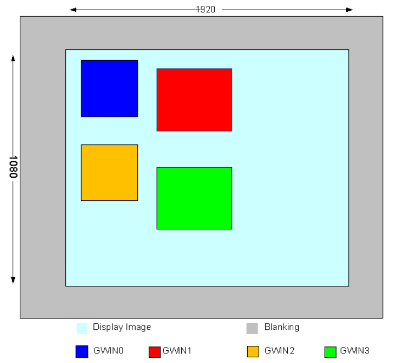
-
-
Related Data Type and Interface
3.24. MI_DISP_Position_t
-
Description
Define the DISP input port position
-
Definition
typedef struct MI_DISP_Position_s { MI_U16 u16X; MI_U16 u16Y; } MI_DISP_Position_t; -
Member
Member Description u16X X-axis start point u16Y Y-axis start point -
Related Data Type and Interface
3.25. MI_DISP_SyncMode_e
-
Description
Define the DISP sync mode
-
Definition
typedef enum { E_MI_DISP_SYNC_MODE_INVALID = 0, E_MI_DISP_SYNC_MODE_CHECK_PTS, E_MI_DISP_SYNC_MODE_FREE_RUN, E_MI_DISP_SYNC_MODE_NUM, } MI_DISP_SyncMode_e; -
Member
Member Description E_MI_DISP_SYNC_MODE_INVALID Invalid sync mode E_MI_DISP_SYNC_MODE_CHECK_PTS Check the PTS sync mode E_MI_DISP_SYNC_MODE_FREE_RUN Bypass the PTS sync mode -
Note
- Currently supported chips include MSR930 and MSR650x.
-
Related Data Type and Interface
3.26. MI_DISP_InputPortStatus_e
-
Description
Define the DISP input port status type
-
Definition
typedef enum { E_MI_DISP_INPUTPORT_STATUS_INVALID = 0, E_MI_DISP_INPUTPORT_STATUS_PAUSE, E_MI_DISP_INPUTPORT_STATUS_RESUME, E_MI_DISP_INPUTPORT_STATUS_STEP, E_MI_DISP_INPUTPORT_STATUS_REFRESH, E_MI_DISP_INPUTPORT_STATUS_SHOW, E_MI_DISP_INPUTPORT_STATUS_HIDE, E_MI_DISP_ INPUTPORT_STATUS _NUM, } MI_DISP_InputPortStatus_e; -
Member
Member Description E_MI_DISP_INPUTPORT_STATUS_INVALID Invalid status mode E_MI_DISP_INPUTPORT_STATUS_PAUSE Pause status E_MI_DISP_INPUTPORT_STATUS_RESUME Resume status E_MI_DISP_INPUTPORT_STATUS_STEP Step status E_MI_DISP_INPUTPORT_STATUS_REFRESH Refresh status E_MI_DISP_INPUTPORT_STATUS_SHOW Show status E_MI_DISP_INPUTPORT_STATUS_HIDE Hide status
3.27. MI_DISP_QueryChannelStatus_t
-
Description
Define the DISP input port status information
-
Definition
typedef struct MI_DISP_QueryChannelStatus_s { MI_BOOL bEnable; MI_DISP_InputPortStatus_e eStatus; } MI_DISP_QueryChannelStatus_t; -
Member
Member Description bEnable Input port enable status eStatus Input port status type -
Related Data Type and Interface
3.28. MI_DISP_VideoFrame_t
-
Description
Define the DISP video frame information.
-
Definition
typedef struct MI_DISP_VideoFrame_s { MI_U32 u32Width; MI_U32 u32Height; MI_DISP_PixelFormat_e ePixelFormat; MI_PHY aphyAddr[3]; Void * *pavirAddr[3]; MI_U64 u64pts; MI_U32 u32PrivateData; } MI_DISP_VideoFrame_t; -
Member
Member Description u32Width Image width u32Height Image height ePixelFormat Pixel format u32PhyAddr Image data physical address pVirAddr Image data virtual address u64pts Image data timestamp u32PrivateData Private data -
Note
- Currently supported chips include MSR930 and MSR650x.
-
Related Data Type and Interface
3.29. MI_DISP_InitParam_t
-
Description
DISP device initialization parameter.
-
Definition
typedef struct MI_DISP_InitParam_s { MI_U32 u32DevId; MI_U8 *u8Data; } MI_DISP_InitParam_t; -
Member
Member Description u32DevId Device ID u8Data Data pointer buffer -
Related Data Type and Interface
3.30. MI_DISP_WBC
-
Description
Define the type of DISP_WBC.
-
Definition
typedef MI_S32 MI_DISP_WBC
3.31. MI_DISP_WBC_SourceType_e
-
Description
The source type of the data captured by the video write-back device, used to distinguish whether it is from the video layer or the device.
-
Definition
typedef enum { MI_DISP_WBC_SOURCE_DEV, MI_DISP_WBC_SOURCE_VIDEO, }MI_DISP_WBC_SourceType_e; -
Member
Member Description MI_DISP_WBC_SOURCE_DEV The write back source is device (video + UI) MI_DISP_WBC_SOURCE_VIDEO The write back source is video layer (video only) -
Related Data Type and Interface
3.32. MI_DISP_WBC_Source_t
-
Description
The write-back source of video write-back device.
-
Definition
typedef struct MI_DISP_WBC_Source_s { MI_DISP_WBC_SourceType_e eSourceType; MI_U32 u32SourceId; }MI_DISP_WBC_Source_t; -
Member
Member Description eSourceType Write back source type u32SourceId Write back source device ID -
Related Data Type and Interface
3.33. MI_DISP_WBC_TargetSize_t
-
Description
The target size of the video write-back device.
-
Definition
typedef struct MI_DISP_WBC_TargetSize_s { MI_U32 u32Width; MI_U32 u32Height; }MI_DISP_WBC_TargetSize_t; -
Member
Member Description u32Width Width of write-back target u32Height Height of write-back target -
Note
- WBC supports zooming out, but not zooming in. If the target resolution is smaller than the source resolution, it will be automatically zooming out.
-
Related Data Type and Interface
3.34. MI_DISP_WBC_Attr_t
-
Description
Video write-back device attributes.
-
Definition
typedef struct MI_DISP_WBC_Attr_s { MI_DISP_WBC_TargetSize_t stTargetSize; MI_SYS_PixelFormat_e ePixFormat; MI_SYS_CompressMode_e eCompressMode; }MI_DISP_WBC_Attr_t; -
Member
Member Description stTargetSize Write-back target size ePixFormat Pixel format of write-back image eCompressMode Compress mode -
Note
- eDecompressMode is only supported by Mochi series chips.
-
Related Data Type and Interface
4. DISP ERROR CODE
The following table lists the DISP API error codes.
| Error Code | Macro Definition | Description |
|---|---|---|
| 0xA00F2001 | MI_ERR_DISP_INVALID_DEVID | Invalid Device ID |
| 0xA00F2002 | MI_ERR_DISP_INVALID_CHNID | Invalid Input Port ID |
| 0xA00F2003 | MI_ERR_DISP_ILLEGAL_PARAM | Illegal parameter |
| 0xA00F2006 | MI_ERR_DISP_NULL_PTR | Null pointer in function parameter |
| 0xA00F2008 | MI_ERR_DISP_NOT_SUPPORT | Operation not supported |
| 0xA00F2009 | MI_ERR_DISP_NOT_PERMIT | Operation not permitted |
| 0xA00F200C | MI_ERR_DISP_NO_MEM | No memory |
| 0xA00F2010 | MI_ERR_DISP_SYS_NOTREADY | System not ready |
| 0xA00F2012 | MI_ERR_DISP_BUSY | System busy |
| 0xA00F2040 | MI_ERR_DISP_DEV_NOT_CONFIG | Device not configured |
| 0xA00F2041 | MI_ERR_DISP_DEV_NOT_ENABLE | Device not enabled |
| 0xA00F2042 | MI_ERR_DISP_DEV_ALREADY_ENABLED | Device has been enabled already |
| 0xA00F2043 | MI_ERR_DISP_DEV_ALREADY_BOUND | Device has been bound already |
| 0xA00F2044 | MI_ERR_DISP_DEV_NOT_BIND | Device not bound |
| 0xA00F2045 | MI_ERR_DISP_LAYER_NOT_ENABLE | Video layer not enabled |
| 0xA00F2046 | MI_ERR_DISP_LAYER_NOT_DISABLE | Video layer not disabled |
| 0xA00F2047 | MI_ERR_DISP_LAYER_NOT_CONFIG | Video layer not configured |
| 0xA00F2048 | MI_ERR_DISP_INPUTPORT_NOT_DISABLE | Input port not disabled |
| 0xA00F2049 | MI_ERR_DISP_INPUTPORT _NOT_ENABLE | Input port not enabled |
| 0xA00F204A | MI_ERR_DISP_INPUTPORT _NOT_CONFIG | Input port not configured |
| 0xA00F204B | MI_ERR_DISP_INPUTPORT _NOT_ALLOC | Input port not allocated |
| 0xA00F204C | MI_ERR_DISP_INVALID_PATTERN | Invalid pattern |
| 0xA00F204D | MI_ERR_DISP_INVALID_POSITION | Invalid position |
| 0xA00F204E | MI_ERR_DISP_WAIT_TIMEOUT | Wait timeout |
| 0xA00F204F | MI_ERR_DISP_INVALID_VIDEO_FRAME | Invalid video frame |
| 0xA00F2050 | MI_ERR_DISP_INVALID_RECT_PARA | Invalid rectangle parameter |
| 0xA00F2051 | MI_ERR_DISP_ INPUTPORT_SHOW_AREA_OVERLAP | Input port area overlapped |
| 0xA00F2052 | MI_ERR_DISP_INVALID_LAYERID | Invalid video layer ID |
| 0xA00F2053 | MI_ERR_DISP_LAYER_ALREADY_BOUND | Video layer has been bound already |
| 0xA00F2054 | MI_ERR_DISP_LAYER_NOT_BIND | Video layer not bound |
5. PROCFS INTRODUCTION
5.1. DISP cat
-
Debug info
# cat /proc/mi_modules/mi_disp/mi_disp0
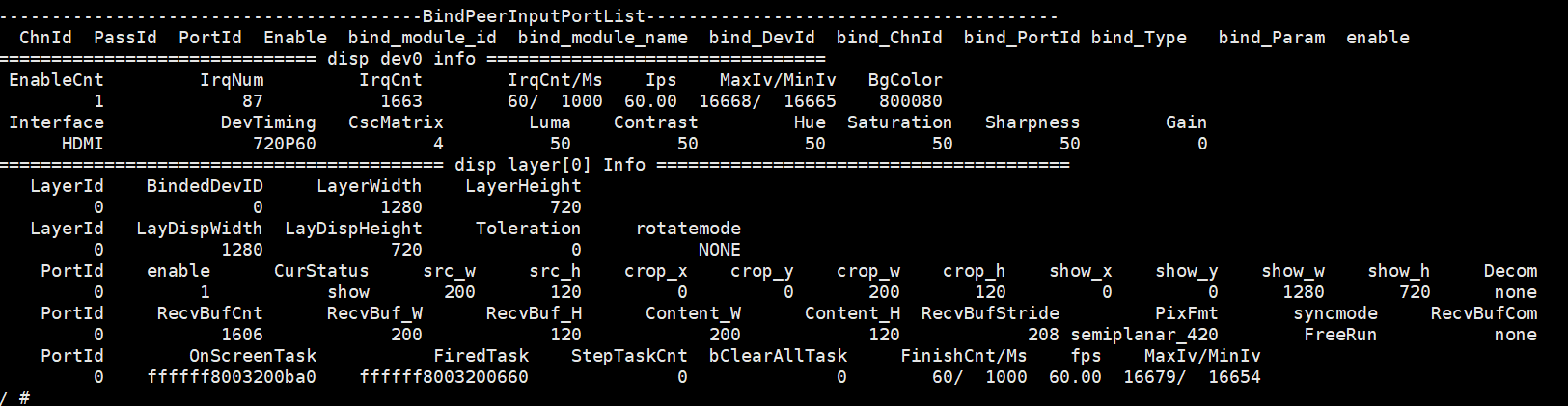
-
Debug info analysis
Record the current usage status of DISP, device attribute, layer attribute, and inputport attribute. This information can be obtained dynamically, which is convenient for debugging and testing.
-
Parameter Description
Parameter Description device info EnableCnt Dev Enable count IrqNum Interrupt Number IrqCnt Interrupt Count IrqCnt/Ms Interrupt count within a certain period of time, unit: ms Ips Interrupt count per second BgColor Background Color (YUYV accounts for 8bit) Interface Interface Type
CVBS, YPBPR, VGA, BT656, BT1120, MCU, MCU_NOFLM, HDMI, LCD, BT656_H, BT656_L, TTL, MIPI_DSI, TTL_SPI, SRGBDevTiming Output Timing
range: [E_MI_DISP_OUTPUT_PAL ~ E_MI_DISP_OUTPUT_USER]CscMatrix CSC Matrix selection
range: [E_MI_DISP_CSC_MATRIX_BYPASS ~ E_MI_DISP_CSC_MATRIX_RGB_TO_BT709_PC]device info Luma [0 ~ 99], default 50 Contrast [0 ~ 99], default 50 Hue [0 ~ 99], default 50 Saturation [0 ~ 99], default 50 Sharpness [0 ~ 255], default 0 Gain [0 ~ 255], default 0 layer info LayerId The value range depends on the chip specifications. BindedDevID The value range depends on the chip specifications. LayerWidth Layer Width LayerHeight Layer Height LayDispWidth Layer display width LayDispHeight Layer display height Toleration PTS error tolerance threshold, in milliseconds rotatemode Parameter range: [E_MI_DISP_ROTATE_NONE~E_MI_DISP_ROTATE_270] port info PortId The value range depends on the chip specifications. enable 0: Disable
1: EnableCurStatus Port status, range: [invalid, pause, resume, step, refresh, show, hide].
The default is invalid.src_w The width of original image src_h The height of original image crop_x The starting abscissa of crop area crop_y The starting ordinate of crop area crop_w The width of crop area crop_h The height of crop area show_x The starting abscissa of the port on the layer show_y The starting ordinate of the port on the layer show_w The width of the port display show_h The height of the port display RecvBufCnt The count of buffs currently received RecvBuf_W The width of input image RecvBuf_H The height of input image Content_W The valid width of input image Content_H The valid height of input image RecvBufStride Stride of input image PixFmt Pixel format of input image syncmode Check PTS/Free Run
Parameter range: [Invalid, CheckPts, FreeRun]RecvBufCom Video compression format
OnScreenTask The Task currently being displayed, if it is NULL, it may be that no buff was sent to disp, or disp was not interrupted, or the cmdq of disp did not take effect. FiredTask Task to be displayed StepTaskCnt Task count to be processed step by step bClearAllTask Whether to clear all Task
0: not clear
1: clear all TaskFinishCnt/Ms Tasks count finished in a certain period of time, unit: ms. fps Frame rate
MaxIv/MinIv The maximum and minimum intervals for completing a task within a certain period of time, unit: ms.
5.2. DISP echo
| Function | Get the echo command supported by the current DISP and its specific usage form. |
|---|---|
| Command | echo help > /proc/mi_modules/mi_disp/mi_disp0 |
| Parameter Description | None |
| Example | echo help > /proc/mi_modules/mi_disp/mi_disp0 |
| Function | Get current screen data (reserved, currently not supported). |
|---|---|
| Command | echo getcapframe [devid] [layerid] [path] > /proc/mi_modules/mi_disp/mi_disp0 |
| Parameter Description | [devid] Device id [layerid] Video layer id [path] Path and file name |
| Example | echo getcapframe 0 0 /mnt/frame.yuv > /proc/mi_modules/mi_disp/mi_disp0 |
| Function | Open/Close pts check of each port. |
|---|---|
| Command | echo checkframepts [layerid] [protid] [ON/OFF] > /proc/mi_modules/mi_disp/mi_disp0 |
| Parameter Description | [layerid] Video layer id [portid] port id [ON/OFF] ON: open, OFF: close |
| Example | echo checkframepts 0 0 ON > /proc/mi_modules/mi_disp/mi_disp0 |
| Function | dump frame data |
|---|---|
| Command | echo dumpframe [layerid] [portid] [path] > /proc/mi_modules/mi_disp/mi_disp0 |
| Parameter Description | [layerid] Video layer id [portid] port id [path] Storage path of dumped data |
| Example | echo dumpframe 0 0 /mnt/ > /proc/mi_modules/mi_disp/mi_disp0 |
| Function | Stop single port of disp to get buff |
|---|---|
| Command | echo stopgetbuff [layerid] [portid] [ON/OFF] > /proc/mi_modules/mi_disp/mi_disp0 |
| Parameter Description | [layerid] Video layer id [portid] port id [ON/OFF] ON:stop OFF:resume |
| Example | echo stopgetbuff 0 0 ON > /proc/mi_modules/mi_disp/mi_disp0 |
| Function | Set background color |
|---|---|
| Command | echo bgcolor [devid] [value] > /proc/mi_modules/mi_disp/mi_disp0 |
| Parameter Description | [devid] Device id [value] Color value |
| Example | echo setbgcolor 0 255 > /proc/mi_modules/mi_disp/mi_disp0 |
| Function | Dynamically set screen effects |
|---|---|
| Command | echo csc [devid] [CscMatrix] [Contrast] [Hue] [Luma] [Saturation] [Sharpness] [Gain] > /proc/mi_modules/mi_disp/mi_disp0 |
| Parameter Description | [devid] Device id [CscMatrix] Color matrix [Contrast] Contrast [Hue] Hue [Luma] Luma >[Saturation] Saturation [Sharpness] Sharpness [Gain] Gain |
| Example | echo csc 0 0 50 50 50 50 0 0 > /proc/mi_modules/mi_disp/mi_disp0 |
| Function | Debug color temperature |
|---|---|
| Command | echo colortemp [devid] [BlueOffset] [GreenOffset] [RedOffset] [BlueColor] [GreenColor] [RedColor] > /proc/mi_modules/mi_disp/mi_disp0 |
| Parameter Description | [devid] Device id [Blue/Green/Redoffset] Not used [RedColor] R Portion (0-255) [GreenColor] G Portion (0-255) [BlueColor] B Portion (0-255) |
| Example | echo setcolortemp 0 50 50 50 50 50 50 > /proc/mi_modules/mi_disp/mi_disp0 |
| Function | Rotate the layer |
|---|---|
| Command | echo rotate [layerid] [0/ 1/ 2]> /proc/mi_modules/mi_disp/mi_disp0 |
| Parameter Description | [layerid] Video layer id [0/ 1/ 2] rotate configuration 0:E_MI_DISP_ROTATE_NONE, not rotate 1:E_MI_DISP_ROTATE_90, rotate 90° 2:E_MI_DISP_ROTATE_270, rotate 270° |
| Example | echo rotate 1 1 > /proc/mi_modules/mi_disp/mi_disp0 |
| Function | Crop the original data of a port |
|---|---|
| Command | echo crop [layerid] [portid] [x] [y] [width] [height]> /proc/mi_modules/mi_disp/mi_disp0 |
| Parameter Description | [layerid] Video layer id [portid] port id [x] The starting abscissa of crop area [y] The starting ordinate of crop area [width] The width of crop area [height] The height of crop area |
| Example | echo crop 0 0 0 0 100 100 > /proc/mi_modules/mi_disp/mi_disp0 |
| Function | Hide a port |
|---|---|
| Command | echo hide [layerid] [portid] > /proc/mi_modules/mi_disp/mi_disp0 |
| Parameter Description | [layerid] Video layer id [portid] port id |
| Example | echo hide 0 0 > /proc/mi_modules/mi_disp/mi_disp0 |
| Function | Show a port |
|---|---|
| Command | echo show [layerid] [portid] > /proc/mi_modules/mi_disp/mi_disp0 |
| Parameter Description | [layerid] Video layer id [portid] port id |
| Example | echo show 0 0 > /proc/mi_modules/mi_disp/mi_disp0 |
| Function | Stop getting data for a port |
|---|---|
| Command | echo pause [layerid] [portid] > /proc/mi_modules/mi_disp/mi_disp0 |
| Parameter Description | [layerid] Video layer id [portid] port id |
| Example | echo pause 0 0 > /proc/mi_modules/mi_disp/mi_disp0 |
| Function | Resume getting data for a port |
|---|---|
| Command | echo resume [layerid] [portid] > /proc/mi_modules/mi_disp/mi_disp0 |
| Parameter Description | [layerid] Video layer id [portid] port id |
| Example | echo resume 0 0 > /proc/mi_modules/mi_disp/mi_disp0 |
| Function | Control a port to stop getting data after acquiring a frame of data |
|---|---|
| Command | echo step [layerid] [portid] > /proc/mi_modules/mi_disp/mi_disp0 |
| Parameter Description | [layerid] Video layer id [portid] port id |
| Example | echo step 0 0 > /proc/mi_modules/mi_disp/mi_disp0 |
| Function | Clear data of a port |
|---|---|
| Command | echo clear [layerid] [portid] > /proc/mi_modules/mi_disp/mi_disp0 |
| Parameter Description | [layerid] Video layer id [portid] port id |
| Example | echo clear 0 0 > /proc/mi_modules/mi_disp/mi_disp0 |
5.3. WBC cat
-
Debug info
# cat proc/mi_modules/mi_disp/mi_wbc0

-
Debug info analysis
Record the current use status and data attributes of WBC, and these information can be obtained dynamically to facilitate debugging and testing.
-
Parameter Description
Parameter Description device info irqnum Interrupt Number Isrcnt Interrupt Count irq enable Interrupt Status
0: disable
1: enablesrc dev src device id srcw The width of data source srch The height of data source src type Data source type
0: video+ui
1: videotargetW The width of data output targetH The height of data output OnScreenTask Task being output FiredTask Task to be output
5.4. WBC echo
| Function | Get the echo command supported by the current WBC and its specific usage form |
|---|---|
| Command | echo help > /proc/mi_modules/mi_disp/mi_wbc0 |
| Parameter Description | None |
| Example | echo help > /proc/mi_modules/mi_disp/mi_wbc0 |
| Function | Dump frame data |
|---|---|
| Command | echo dumpframe [path] > /proc/mi_modules/mi_disp/mi_wbc0 |
| Parameter Description | [path] Storage path of dumped data |
| Example | echo dumpframe /mnt/ > /proc/mi_modules/mi_disp/mi_wbc0 |