MI FB API
REVISION HISTORY
| Revision No. | Description |
Date |
|---|---|---|
| 3.0 | 07/27/2021 | |
| 08/08/2021 | ||
| 08/25/2021 | ||
| 12/17/2021 | ||
| 02/16/2022 | ||
| 03/21/2022 | ||
| 04/11/2022 | ||
| 07/07/2022 | ||
| 07/08/2022 | ||
| 08/10/2022 |
1. OVERVIEW
1.1. Module Description
MI_FB is a graphics layer device driver based on Linux Framebuff. It abstracts the display buffer, shields the bottom-level difference of the image hardware, and allows the upper-level APP to directly read and write the display buffer in the graphics mode. The specific location and storage method of the physical display buffer is completed by MI_FB driver. In addition to providing basic functions of Linux Framebuff, MI_FB also provides extended functions such as Alpha between layers, ColorKey, and display area setting.
1.2. Basic Structure
MI_FB manages multiple graphics layers. With chip support, each graphics layer can be overlaid on different video processing/output paths.
-
The video preview overlay path means that the graphics layer can be overlaid on the video display unit which is managed by MI_DISP submodule. If the graphics layer is overlaid on the video display unit, you need to configure MI_DISP submodule first, and then operate MI_FB submodule to draw the graphics layer, finally, the video display unit outputs the overlaid video data to the display device, and the video display unit determines the final display resolution.
-
Video processing overlay path means that the graphics layer can be overlaid on the video processing unit which is managed by MI_SCL submodule. If the graphics layer is overlaid on the video processing unit, you need to configure MI_SCL submodule, and then operate MI_FB submodule to draw the graphics layer, finally, the video processing unit outputs the overlaid video data to the video encoding unit or to the video display unit for preview playback.

Figure 1‑1: Graphics layer overlay path
From the perspective of application development, there are two ways to draw the graphics layer based on MI_FB.
Method 1: APP uses MI_FB based on Linux file system.
Method 2: Develop APP based on the API provided by MI_FB.

Figure 1‑2: MI_FB usage
Note: The two methods are mutually exclusive, only one of them can be selected for development.
1.3. Module Function
Linux Framebuff standard functions supported by MI_FB:
-
Get fixed info of display device (such as video memory size)
-
Map (or unmap) physical video memory to virtual memory space
-
Operate physical video memory like ordinary files
-
Set hardware display resolution and pixel format
-
Read, write, display and other operations from any location in the physical video memory
-
Support setting and obtaining 256-color palette
Extended functions added by MI_FB:
-
Set and get the Alpha value of the overlay graphics layer
-
Set and get the ColorKey value of the overlay graphics layer
-
Set the display position of the current overlay graphics layer (the offset relative to the origin of the screen)
-
Set the display area of the current overlay graphics layer (supports canvas enlargement display)
-
Set and get the display status of the current overlay (show/hide)
-
Manage the size of physical video memory and the number of overlay graphics layers through INI config file
-
Dynamically synchronized display device output resolution
-
Support the operation of the mouse graphics layer
Linux Framebuff standard functions not supported by MI_FB:
-
Set and get the Linux Framebuff corresponding to the console
-
Get real-time info of hardware scanning
-
Get hardware related info
-
Set hardware sync timing
-
Set hardware sync signal mechanism
1.4. Application Scenario
-
Pure Linux
Framebuff-based applications in Linux (such as MiniGUI) can also be developed based on the API interface provided by MI_FB.
-
Pure rtos
The standard Linux Framebuff framework is not supported under RTOS. Applications can develop UI based on the API interface provided by MI_FB (such as using lightweight lvgl to develop UI).
-
Dualos
In Dualos, applications running on Linux can be developed based on the standard Framebuff framework or MI_FB API; applications running on RTOS can only be developed based on MI_FB API.
1.5. Chip Difference
MI_FB has two forms of user interface. MI_FB adds the concept of FB ID to keep user behavior consistent. The following figure shows the relationship between FB ID and Framebuff device node.

Figure 1‑3: FB ID and device node relationship
MI_FB defines the ID growth sequence to be consistent with the device node of Framebuff, that is, /dev/fbxxx corresponds to FB IDxxx.
Each FB ID of MI_FB controls at most one GUI and one mouse layer, which means that the application can use the same FB ID to operate the GUI and mouse layer bound to the ID at the same time, GUI can be superimposed on video display unit or video processing unit, the mouse layer can only be superimposed on video display unit, and the superimposed output path of GUI and the mouse layer is configured in config.ini. Section 1.7.2 describes in detail how to configure the INI.
MI_FB can manage 16 FB IDs. The specific supported IDs are related to the chip capabilities. The differences between different chips are shown in the following table:
-
The Layer ID corresponds to FB_HWLAYER_ID items in the MI_FB startup parameters, please refer to the Layer ID when configuring the startup parameters.
-
The hierarchical relationship between different graphics layers in the same video display unit with the same PATH is GUI -> OSD -> CURSOR from bottom up.
-
Alpha0/1 indicates the actual Alpha value when the color format is ARGB1555 and the Alpha bit is 0/1. On some graphics layers, alpha1 is only supported and Alpha 0 is not supported, which is marked N.
1.5.1. Taiyaki
| Graphics layer | Layer ID | Color Format | Scale Up | Alpha0/1 | ||||||||
| ARGB8888 | ARGB1555 | ARGB4444 | RGB565 | I2 | I4 | I8 | ||||||
| Video display unit | DISP PATH0 | GUI | 1 | Y | Y | Y | Y | N | N | Y | Y | N |
| CURSOR | 0 | N | Y | Y | N | N | N | Y | N | Y | ||
1.5.2. Takoyaki
| Graphics layer | Layer ID | Color Format | Scale Up | Alpha0/1 | ||||||||
| ARGB8888 | ARGB1555 | ARGB4444 | RGB565 | I2 | I4 | I8 | ||||||
| Video display unit | DISP PATH0 | GUI | 1 | Y | Y | Y | Y | N | N | Y | Y | N |
| CURSOR | 0 | N | Y | Y | N | N | N | Y | N | Y | ||
1.5.3. Ispahan
| Graphics layer | Layer ID | Color Format | Scale Up | Alpha0/1 | |||||||
| ARGB8888 | ARGB1555 | ARGB4444 | RGB565 | I2 | I4 | I8 | |||||
| Video processing unit | GUI | NA | N | Y | Y | N | N | N | Y | N | Y |
1.5.4. Pudding
| Graphics layer | Layer ID | Color Format | Scale Up | Alpha0/1 | |||||||
| ARGB8888 | ARGB1555 | ARGB4444 | RGB565 | I2 | I4 | I8 | |||||
| Video processing unit | GUI | NA | N | Y | Y | N | N | N | Y | N | Y |
1.5.5. Ikayaki
| Graphics layer | Layer ID | Color Format | Scale Up | Alpha0/1 | ||||||||
| ARGB8888 | ARGB1555 | ARGB4444 | RGB565 | I2 | I4 | I8 | ||||||
| Video display unit | DISP PATH0 | GUI | 1 | Y | Y | Y | Y | N | N | Y | Y | N |
1.5.6. Tiramisu
| Graphics layer | Layer ID | Color Format | Scale Up | Alpha0/1 | ||||||||
| ARGB8888 | ARGB1555 | ARGB4444 | RGB565 | I2 | I4 | I8 | ||||||
| Video display unit | DISP PATH0 | GUI | 1 | Y | Y | Y | Y | N | N | Y | Y | N |
| CURSOR | 0 | N | Y | Y | N | N | N | Y | N | Y | ||
| DISP PATH1 | GUI | 3 | Y | Y | Y | Y | N | N | Y | Y | N | |
| CURSOR | 2 | N | Y | Y | N | N | N | Y | N | Y | ||
| Video processing unit | GUI | NA | N | Y | Y | N | N | N | Y | N | Y | |
1.5.7. Muffin
| Graphics layer | Layer ID | Color Format | Scale Up | Alpha0/1 | ||||||||
| ARGB8888 | ARGB1555 | ARGB4444 | RGB565 | I2 | I4 | I8 | ||||||
| Video display unit | DISP PATH0 | GUI | 1 | Y | Y | Y | Y | N | N | Y | Y | N |
| CURSOR | 0 | N | Y | Y | N | N | N | Y | N | Y | ||
| OSD | 2 | N | Y | Y | N | N | N | Y | N | Y | ||
| DISP PATH1 | GUI | 9 | Y | Y | Y | Y | N | N | Y | Y | N | |
| CURSOR | 8 | N | Y | Y | N | N | N | Y | N | Y | ||
| OSD | 10 | N | Y | Y | N | N | N | Y | N | Y | ||
| DISP PATH2 | GUI | 17 | Y | Y | Y | Y | N | N | Y | Y | N | |
| CURSOR | 16 | N | Y | Y | N | N | N | Y | N | Y | ||
| OSD | 18 | N | Y | Y | N | N | N | Y | N | Y | ||
| Video processing unit | GUI | NA | N | Y | Y | N | N | N | Y | N | Y | |
The video display unit of the Muffin series of chips has added an OSD graphics layer, typically as the default graphics layer that MI_RGN overlaid to DISP, and if MI_FB wants to use the OSD graphics layer, MI_RGN cannot overlay the OSD to DISP.
1.5.8. Mochi
| Graphics layer | Layer ID | Color Format | Scale Up | Alpha0/1 | ||||||||
| ARGB8888 | ARGB1555 | ARGB4444 | RGB565 | I2 | I4 | I8 | ||||||
| Video display unit | DISP PATH0 | GUI | 1 | Y | Y | Y | Y | N | N | Y | Y | N |
| CURSOR | 0 | N | Y | Y | N | N | N | Y | N | Y | ||
| OSD | 2 | N | Y | Y | N | N | N | Y | N | Y | ||
| DISP PATH1 | GUI | 9 | Y | Y | Y | Y | N | N | Y | Y | N | |
| CURSOR | 8 | N | Y | Y | N | N | N | Y | N | Y | ||
| OSD | 10 | N | Y | Y | N | N | N | Y | N | Y | ||
| Video processing unit | GUI | NA | N | Y | Y | N | N | N | Y | N | Y | |
The video display unit of the Mochi series of chips has added an OSD graphics layer, typically as the default graphics layer that MI_RGN overlaid to DISP, and if MI_FB wants to use the OSD graphics layer, MI_RGN cannot overlay the OSD to DISP.
1.5.9. Maruko
| Graphics layer | Layer ID | Color Format | Scale Up | Alpha0/1 | ||||||||
| ARGB8888 | ARGB1555 | ARGB4444 | RGB565 | I2 | I4 | I8 | ||||||
| Video display unit | DISP PATH0 | GUI | 2 | Y | Y | Y | Y | N | N | Y | N | Y |
| Video processing unit | GUI | NA | N | Y | Y | N | N | N | Y | N | Y | |
Video display unit GUI layer, video processing unit GUI and SCL/DISP GOP in MI_RGN share the same hardware. FB cannot be used when MI_RGN superimposes OSD on SCL/DISP. And vice versa.
1.6. Principle
1.6.1 Graphics layer refresh mode
-
Single buff mode
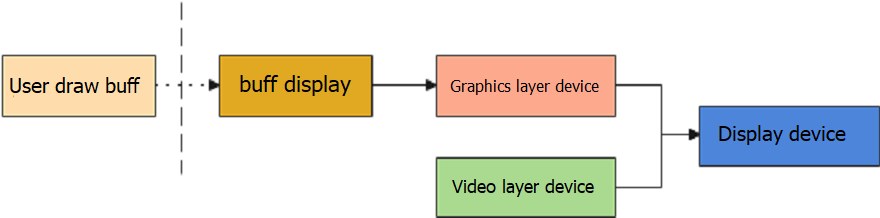
Figure 1‑4: Single buff refresh mode
In this mode, MI_FB provides a display buff, and app draw directly, which can save memory, but user will see the drawing process of the graphics on the display device. You can also apply for another buff for graphics drawing, and then move it to display buff, but this method will produce jagged.
-
Double buff mode
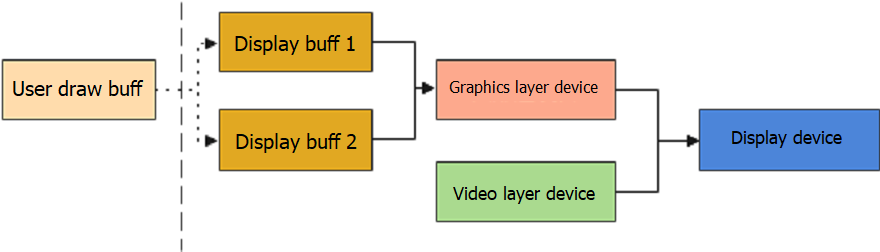
Figure 1‑5: Double buff refresh mode
In this mode, MI_FB provides two display buffs. When the graphics layer device is using display buff2, you can draw on buff1, and then switch to the starting position of buff1 by setting the virtual screen offset position. It consumes more memory, but the display effect is the best.
1.6.2 Relationship between virtual screen resolution, visible area and display resolution
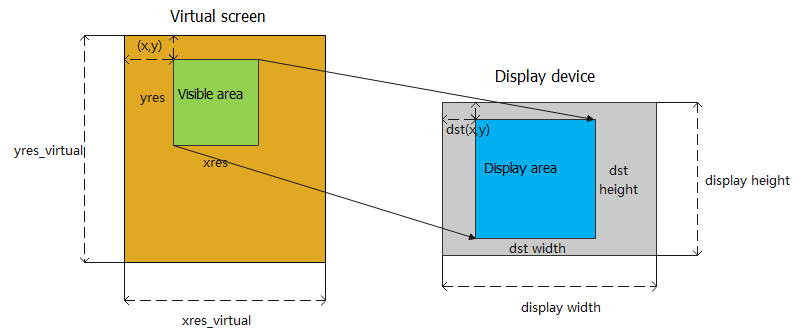
Figure 1‑6: Relationship between resolutions
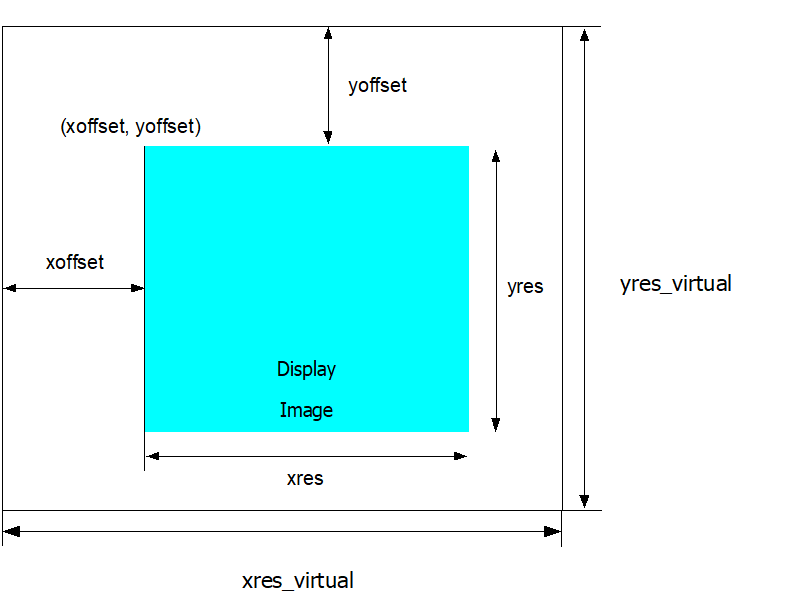
The virtual screen size can be regarded as the video memory size provided by MI_FB. You can define the resolution of the visible area (xres, yres) in the config file. MI_FB will adjust the virtual screen resolution (xres_virtual, yres_virtual) according to the range of the visible area. The default screen resolution is xres_virtual= xoffset+xres, xoffset is the offset of the visible area in the horizontal direction of the virtual screen, and xres is width.
MI_FB adjusts yres_virtual according to xres_virtual, pixel format and video memory size; you can freely change the visible area (xoffset, yoffset) within the range of (xres_virtual, yres_virtual) to switch the display content, and the double-buff refresh mode is also implemented based on this.
The graphics layer device reads the memory data from the visible area, and then outputs it to the display device according to the display area attributes configured by user. The display area attributes include the display area range and the offset position relative to the origin of the display screen.
The process from the visible area to the display area supports magnification, that is, the visible area (xres, yres) < display area (dst_width, dst_height) ≤ display device resolution (display width, display height), and the display device resolution is decided by output MI_DISP Timing.
1.7. Development Process
1.7.1 Compile Config
-
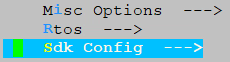
Enter alkaid project root directory, make menuconfig
-
Press Enter to enter the Sdk Config sub-option
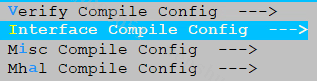
-
Press Enter to enter the Interface Compile Config sub-option
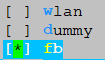
-
Press Space bar to select the fb submodule, and recompile the project
After compilation, mi_fb.ko will generated in project/release, and release mi_fb.h and mi_fb_datatype.h to this directory at the same time. It will be packaged into images by default in pure Linux. But in dualos, it will not be packaged by default and needs to be manually compiled and installed.
1.7.2 Configure MI_FB startup parameters
MI_FB startup parameters are managed in config.json.
“fb_device_disp_path” and “fb_device_video_path” defined in the config.json describes the entry of GUI or mouse layer parameters of the current platform.
-
“fb_device_disp_path” describes the configuration information superimposed on the GUI and cursor of the video display unit;
-
“fb_device_video_path” describes the configuration information superimposed on the GUI of the video processing unit.
{
    "mi_fb": {
        "fb_device_disp_path": [
            {
                "fb_hwlayer_id": 1,
                "fb_hwwin_id": 0,
                "fb_hwwin_format": 5,
                "fb_width": 1920,
                "fb_height": 1080,
                "fb_timing_width": 1920,
                "fb_timing_height": 1080,
                "fb_buffer_len": 16384,
                "cursor": {
                    "fb_hwlayer_id": 0,
                    "fb_hwwin_id": 0,
                    "fb_hwwin_format": 6
                }
            },
            {
                //Other GUI and cursor attach to disp path. (If the chip supports)
}
        ],
        "fb_device_video_path": [
            {
                "fb_buf_id_path": {
                    "fb_gwin_id": 7,
                    "fb_mod": 34,
                    "fb_dev": 1,
                    "fb_chn": 0,
                    "fb_port": 0
                },
                "fb_hwwin_format": 6,
                "fb_width": 1920,
                "fb_height": 1080,
                "fb_timing_width": 1920,
                "fb_timing_height": 1080,
                "fb_buf_cnt": 3
            },
            {
                // Other GUI attach to video path.(If the chip supports)
            }
        ]
    }
}
Note:
-
Adding multiple GUI layers (if supported by the chip) needs to add the new node to “fb_device_disp_path” and “fb_device_video_path” for management.
-
The growth order of /dev/fbxxx device nodes is consistent with the order in path, “fb_device_disp_path” comes first.
The description of each configuration parameter in config.ini is as follows:
| Parameter | Description |
|---|---|
| fb_hwlayer_id | The current graphics layer ID |
| fb_hwwin_id | Hardware device ID (determine which output PATH of the video layer device DISP is superimposed on) |
| fb_hwwin_format | Describe the canvas pixel format |
| fb_width | Describe the visible area range (xres) |
| fb_height | Describe the visible area range (yres) |
| fb_timing_width | Describe the display device resolution (display width) |
| fb_timing_height | Describe the display device resolution (display height) |
| fb_buffer_len | Describe the video memory size (unit: Kbyte) |
| fb_buf_cnt | Calculate the video memory size of the graphics layer superimposed on the video processing unit |
| fb_gwin_id | Superimpose the graphics layer GWIN ID of video processing unit |
| fb_mod | Superimpose the graphics layer MODULE ID of video processing unit |
| fb_dev | Superimpose the graphics layer DEV ID of video processing unit |
| fb_chn | Superimpose the graphics layer CHN ID of video processing unit |
| fb_port | Superimpose the graphics layer PORT ID of video processing unit |
1.7.3 Calculate the memory size of different layers
For the GUI layer of "fb_device_disp_path", it is necessary to calculate the maximum memory that may be used in the actual application scenario in advance and fill in "fb_buffer_len". This value is usually determined by the following points:
-
Maximum UI resolution: W * H
-
The largest BPP(Byte Per Pixel, such as the BPP of ARGB8888 is 4) in color format;
-
Number of buffer: NUM.
fb_buffer_len = W * H * BPP * NUM / 1024 (KByte)
If GUI’s setting includes “cursor” field, FB will apply for 0x20000 Bytes memory for the cursor layer when the corresponding FB_DEVICE applies for memory.
For the GUI layer of "fb_device_video_path", the FB will calculate the required memory size according to fb_width / fb_height / fb_hwwin_format / fb_buf_cnt in the configuration file.
1.7.4 configure display memory pool for MI_FB
Note:Only the chips listed in the table below need to configure this memory pool.
| CHIP |
|---|
| Mochi |
The default mma_heap for the chips listed in the table above uses a 64-bit physical address space, but uses a 32-bit compiler.In the standard framebuffer framework, unsigned long is used to define variables that store physical addresses. In a 32-bit environment, data will be lost.
In order to avoid the above errors, it is necessary to configure a separate mma_heap for fb in bootargs and ensure that its address space is within a 32-bit representable range in MI_SYS
The bootargs parameters that need to be added are as follows:
mma_heap=mma_heap_fb,miu=0,sz=0x2040000
This parameter is configured by default, you can adjust sz(size) as needed.
sz is calculated as follows:
-
For each additional disp path GUI, add the corresponding fb_buffer_len (KByte).
-
For each additional cursor, add 0x20000 Bytes.
-
For each additional video path GUI, add the memory size required for the fb_device_video_path layer.
1.7.5 Interface call
There are two types of interface calls: File system call based on standard Linux Framebuff; Interface call based on MI_FB API. Both of them are achieving the same function.
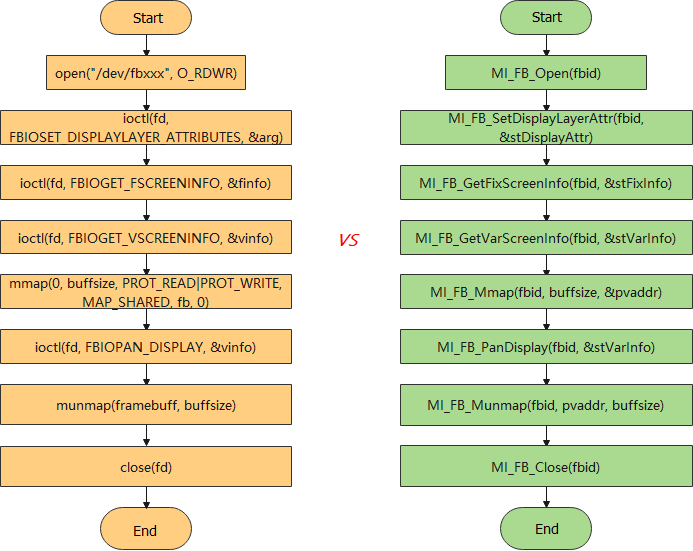
Figure 1‑7: MI_FB interface call process
Steps:
-
Open the specified FB device
-
Set pixel format, visible area, etc.
-
Get video memory info allocated to MI_FB
-
Map physical video memory to virtual memory space
-
Call ioctl or MI_FB API to set ColorKey, inter-layer Alpha, display position and area, etc
-
Operate the virtual memory address to complete the specific drawing task
-
Unmap video memory
-
Close the FB device
-
Exit
1.8. Example
This example is based on Linux Framebuff and MI_FB API to display three color blocks arranged in steps of red, orange and blue in the middle of the screen, using the ARGB8888 pixel format.
#include <stdio.h>
#include <fcntl.h>
#include <sys/ioctl.h>
#include <sys/mman.h>
#include <linux/fb.h>
#include "mi_sys.h"
#include "mi_disp.h"
#include "mi_disp_datatype.h"
#include "mi_fb.h
#include "mi_fb_datatype.h"

static void *framebuffer = NULL;
#define LINUX_FRAMEBUFF

void set_disp_dev(void)
{
    MI_DISP_PubAttr_t stPubAttr;
    memset(&stPubAttr, 0, sizeof(MI_DISP_PubAttr_t));
    stPubAttr.u32BgColor = YUYV_BLACK;
    stPubAttr.eIntfType == E_MI_DISP_INTF_TTL;
    MI_DISP_SetPubAttr(0, &stPubAttr);
    MI_PANEL_Init(E_MI_DISP_INTF_TTL);
}

#ifdef LINUX_FRAMEBUFF

// Based on Linux Framebuff
void drawRect_rgb32 (int x0, int y0, int width, int height, int color, struct fb_var_screeninfo *vinfo, struct fb_fix_screeninfo *finfo, char *fb)
{
    const int bytesPerPixel = 4;
    const int stride = finfo->line_length / bytesPerPixel;

    int *dest = (int *) (fb)
        + (y0 + vinfo->yoffset) * stride + (x0 + vinfo->xoffset);

    int x, y;
    for (y = 0; y < height; ++y)
    {
        for (x = 0; x < width; ++x)
        {
            dest[x] = color;
        }
        dest += stride;
    }
}

int main(int argc, char **argv)
{
    const char *devfile = "/dev/fb0";
    int fbFd = 0;
    long int screensize = 0;

    MI_SYS_Init(0);

    //set disp pub
    set_disp_dev();
    fbFd = open(devfile, O_RDWR);
    if(fbFd == -1)
    {
        perror ("Error: cannot open framebuffer device");
        exit(1);
    }
    //get fb_fix_screeninfo
    if(ioctl(fbFd, FBIOGET_FSCREENINFO, &finfo) == -1)
    {
        perror("Error reading fixed information");
        exit(2);
    }
    //get fb_var_screeninfo
    if(ioctl(fbFd, FBIOGET_VSCREENINFO, &vinfo) == -1)
    {
        perror("Error reading variable information");
        exit(3);
    }
    screensize = finfo.smem_len;

    /* Map the device to memory */
    framebuffer = (char *)mmap(0, screensize, PROT_READ | PROT_WRITE, MAP_SHARED,
            fbFd, 0);
    if(framebuffer == MAP_FAILED)
    {
        perror ("Error: Failed to map framebuffer device to memory");
        exit (4);
    }
    //draw red rectangle
    drawRect_rgb32 (vinfo.xres / 8, vinfo.yres / 16,
            vinfo.xres / 4, vinfo.yres / 4, 0xffff0000, &vinfo, &finfo, framebuffer);

    //draw DarkGoldenrod rectangle
    drawRect_rgb32 (vinfo.xres * 3 / 8, vinfo.yres * 5 / 16,
            vinfo.xres / 4, vinfo.yres / 4, 0xffb8860b, &vinfo, &finfo, framebuffer);

    //draw blue rectanble
    drawRect_rgb32 (vinfo.xres * 5 / 8, vinfo.yres * 9 / 16,
            vinfo.xres / 4, vinfo.yres / 4, 0xff0000ff, &vinfo, &finfo, framebuffer);

    munmap(framebuffer, screensize);
    framebuffer = NULL;

    close(fbFd);

    return 0;
}
#else

// Based on MI_FB API
void drawRect_rgb32(int x0, int y0, int width, int height, int color, MI_FB_VarScreenInfo_t *vinfo, MI_FB_FixScreenInfo_t *finfo, char *fb)
{
    const int bytesPerPixel = 4;
    const int stride = finfo->u32LineLength/ bytesPerPixel;

    int *dest = (int *) (fb)
        + (y0 + vinfo->u32Yoffset) * stride + (x0 + vinfo->u32Xoffset);

    int x, y;
    for (y = 0; y < height; ++y)
    {
        for (x = 0; x < width; ++x)
        {
            dest[x] = color;
        }
        dest += stride;
    }
}

int main(int argc, char **argv)
{
    MI_S32 s32Ret = 0;
    MI_U8 u8FbId = 0;
    MI_U32 screensize = 0;

    MI_SYS_Init(0);

    //set disp pub
    set_disp_dev();

    s32Ret = MI_FB_Open(u8FbId);
    if(s32Ret != MI_SUCCESS)
    {
        printf("open fb id:%d failed\n", u8FbId);
        exit(1);
    }
    s32Ret = MI_FB_GetFixScreenInfo(u8FbId, &stFixScreenInfo);
    if(s32Ret != MI_SUCCESS)
    {
        printf("get fix screen info failed\n");
        exit(2);
    }

    s32Ret = MI_FB_GetVarScreenInfo(u8FbId, &stVarScreenInfo);
    if(s32Ret != MI_SUCCESS)
    {
        printf("get var screen info failed\n");
        exit(3);
    }
    screensize = stFixScreenInfo.u32SmemLen;
    MI_FB_Mmap(u8FbId, screensize, &framebuffer);
    if(!framebuffer)
    {
        printf("mmap framebuffer failed\n");
        exit(4);
    }
    //draw red rectangle
    drawRect_rgb32 (stVarScreenInfo.u32Xres / 8, stVarScreenInfo.u32Yres/ 8,
         stVarScreenInfo.u32Xres / 4, stVarScreenInfo.u32Yres / 4, 0xffff0000, &stVarScreenInfo, &stFixScreenInfo, framebuffer);

    //draw DarkGoldenrod rectangle
    drawRect_rgb32 (stVarScreenInfo.u32Xres * 3 / 8, stVarScreenInfo.u32Yres * 3 / 8,
         stVarScreenInfo.u32Xres / 4, stVarScreenInfo.u32Yres / 4, 0xffb8860b, &stVarScreenInfo, &stFixScreenInfo, framebuffer);

    //draw blue rectanble
    drawRect_rgb32 (stVarScreenInfo.u32Xres * 5 / 8, stVarScreenInfo.u32Yres * 5 / 8,
            stVarScreenInfo.u32Xres / 4, stVarScreenInfo.u32Yres / 4, 0xff0000ff, &stVarScreenInfo, &stFixScreenInfo, framebuffer);

    MI_FB_Munmap(u8FbId, framebuffer, screensize);
    framebuffer = NULL;

    MI_FB_Close(u8FbId);
    return 0;
}
#endif
2. API REFERENCE
Two forms of MI_FB user mode interface:
-
File operations based on Linux Framebuff, embodied in the form of ioctl. int ioctl(int fd, unsigned long cmd, CMD_DATA_TYPE *cmddata); CMD_DATA_TYPE changes with the parameter cmd, the cmd supported by MI_FB is as follows.
Parameter Description Input/Output fd The descriptor of Framebuffer device file, which is the return value of calling the open function. Input cmd The main cmds are as follows:
FBIOGET_VSCREENINFO: Get screen variable info
FBIOPUT_VSCREENINFO: Set screen variable info
FBIOGET_FSCREENINFO: Get screen fixed info
FBIOPAN_DISPLAY: Set PAN display
FBIOGETCMAP: Get color table info
FBIOPUTCMAP: Set color table info
FBIOGET_SCREEN_LOCATION: Get the overlay display area
FBIOSET_SCREEN_LOCATION: Set the overlay display area
FBIOGET_SHOW: Get the overlay display status
FBIOSET_SHOW: Set the overlay display status
FBIOGET_GLOBAL_ALPHA: Get the overlay Alpha attribute
FBIOSET_GLOBAL_ALPHA: Set the overlay Alpha attribute
FBIOGET_COLORKEY: Get the overlay Colorkey attribute
FBIOSET_COLORKEY: Set the overlay Colorkey attribute
FBIOGET_DISPLAYLAYER_ATTRIBUTES: Get overlay attribute
FBIOSET_DISPLAYLAYER_ATTRIBUTES: Set overlay attribute
FBIOGET_CURSOR_ATTRIBUTE: Get mouse layer attribute
FBIOSET_CURSOR_ATTRIBUTE: Set mouse layer attributeInput cmddata Data type corresponding to cmd:
Get or set screen variable info: struct fb_var_screeninfo *type
Get screen fixed info: struct fb_fix_screeninfo *type
Set PAN display: struct fb_var_screeninfo *type
Get or set the origin of the screen overlay coordinate: MI_FB_Rectangle_t *type
Get or set the overlay display status: MI_BOOL *type
Get or set the overlay Alpha: MI_FB_GlobalAlpha_t *type
Get or set the overlay Colorkey: MI_FB_ColorKey_t *type
Get or set the overlay attribute: MI_FB_DisplayLayerAttr_t *type
Get or set mouse layer attribute: MI_FB_CursorAttr_t *typeInput/Output -
Based on MI_FB API in the form of dynamic library or static library, the following APIs are currently supported.
API name Function MI_FB_Open Open FB device MI_FB_Close Close FB device MI_FB_Mmap Map physical video memory to virtual memory space MI_FB_Munmap Unmap physical video memory to virtual memory space MI_FB_GetVarScreenInfo Get screen variable info MI_FB_SetVarScreenInfo Set screen variable info MI_FB_GetFixScreenInfo Get FB fixed info MI_FB_PanDisplay Set the display to start at a different offset in the virtual resolution MI_FB_WaitForVsync Wait for a signal that screen vertical refresh is complete(Vsync) MI_FB_GetScreenLocation Get the display area of the overlay on screen MI_FB_SetScreenLocation Set the display area of the overlay on screen MI_FB_GetDisplayLayerAttr Get layer info MI_FB_SetDisplayLayerAttr Set layer info MI_FB_GetCursorAttr Get mouse layer info MI_FB_SetCursorAttr Set mouse layer info MI_FB_GetGlobalAlpha Get overlay Alpha MI_FB_SetGlobalAlpha Set overlay Alpha MI_FB_GetColorKey Get overlay colorkey MI_FB_SetColorKey Set overlay colorkey MI_FB_SetCmap Set the color table MI_FB_GetCmap Get color table MI_FB_GetShow Get the overlay display status MI_FB_SetShow Show or hide the overlay
Section 1.4 introduces the use of two forms of API in different scenarios, you can choose to use one of them according to the actual situation.
Note: Only one of the two calling methods can be selected.
2.1. Standard Function
2.1.1 FBIOGET_VSCREENINFO
-
Function
Get screen variable information
-
Syntax
int ioctl (int fd, FBIOGET_VSCREENINFO, struct fb_var_screeninfo *var);
-
Description
Use this interface to get screen variable information, including primarily resolution and pixel format.
-
Parameter
Parameter Name Description Input/Output fd Framebuffer device file descriptor Input FBIOGET_VSCREENINFO ioctl cmd Input var Variable information structure pointer Output -
Return Value
-
0: Successful
-
-1: Failed
-
-
Requirement
- Header file: fb.h
-
Related Interface
2.1.2 FBIOPUT_VSCREENINFO
-
Function
Set Framebuffer screen resolution and pixel format, etc.
-
Syntax
int ioctl (int fd, FBIOPUT_VSCREENINFO, struct fb_var_screeninfo *var);
-
Description
Use this interface to set screen resolution and pixel format
-
Parameter
Parameter Name Description Input/Output fd Framebuffer device file descriptor Input FBIOPUT_VSCREENINFO ioctl cmd Input var Variable information structure pointer Input -
Return Value
-
0: Successful
-
-1: Failed
-
-
Requirement
- Header file: fb.h
-
Note
The actual resolution and offset must be guaranteed to be within the virtual resolution range. Otherwise, system will automatically adjust the actual resolution to keep it within the coverage of the virtual resolution range.
-
Related Interface
2.1.3 FBIOGET_FSCREENINFO
-
Function
Get Framebuffer fixed information
-
Syntax
int ioctl (int fd, FBIOGET_FSCREENINFO, struct fb_fix_screeninfo *fix);
-
Description
Use this interface to get Framebuffer fixed information, including memory start physical address, memory size and line spacing, etc.
-
Parameter
Parameter Name Description Input/Output fd Framebuffer device file descriptor Input FBIOGET_FSCREENINFO ioctl cmd Input fix Fixed information structure pointer Output -
Return Value
-
0: Successful
-
-1: Failed
-
-
Requirement
- Header file: fb.h
2.1.4 FBIOPAN_DISPLAY
-
Function
Set to display from different offsets in the virtual resolution
-
Syntax
int ioctl (int fd, FBIOPAN_DISPLAY, struct fb_var_screeninfo *var);
-
Description
Use this interface to set the display position from different offsets in the virtual resolution; the actual resolution remains unchanged. As shown in the Figure 2-1 below, (xres_virtual, yres_virtual) means the virtual resolution, (xres, yres) the resolution actually shown, and (xoffset, yoffset) the offset used.
-
Parameter
Parameter Name Description Input/Output fd Framebuffer device file descriptor Input FBIOPAN_DISPLAY ioctl cmd Input var Variable information structure pointer Input -
Return Value
-
0: Successful
-
-1: Failed
-
-
Requirement
- Header file: fb.h
-
Note
The actual resolution and offset must be guaranteed to be within the virtual resolution range. Otherwise, the setting will fail.
Figure 2‑1 Setting the Display Position from Different Offsets in the Virtual Resolution
2.1.5 FBIO_WAITFORVSYNC
-
Function
Wait for a signal that screen vertical refresh is complete(Vsync).
-
Syntax
int ioctl (int fd, FBIO_WAITFORVSYNC, u32 *zero);
-
Parameter
Parameter Name Description Input/Output fd Framebuffer device file descriptor Input FBIOGETCMAP ioctl cmd Input zero be sure to pass argument value 0 or it will not work. Input -
Return Value
-
0: Successful
-
-1: Failed
-
-
Requirement
- Header file: fb.h
2.1.6 FBIOGETCMAP
-
Function
Get color table info.
-
Syntax
int ioctl (int fd, FBIOGETCMAP, struct fb_cmap_user *cmap);
-
Parameter
Parameter Name Description Input/Output fd Framebuffer device file descriptor Input FBIOGETCMAP ioctl cmd Input cmap Describe the color table info Output -
Return Value
-
0: Successful
-
-1: Failed
-
-
Requirement
- Header file: fb.h
-
Related Interface
2.1.7 FBIOPUTCMAP
-
Function
Set color table info.
-
Syntax
int ioctl (int fd, FBIOPUTCMAP, struct fb_cmap_user *cmap);
-
Parameter
Parameter Name Description Input/Output fd Framebuffer device file descriptor Input FBIOPUTCMAP ioctl cmd Input cmap Describe the color table info Input -
Return Value
-
0: Successful
-
-1: Failed
-
-
Requirement
- Header file: fb.h
-
Related Interface
2.2. Extended Function
2.2.1 FBIOGET_SCREEN_LOCATION
-
Function
Get overlay screen display region
-
Syntax
int ioctl (int fd, FBIOGET_SCREEN_LOCATION, MI_FB_Rectangle_t* pstRectangle);
-
Description
Use this interface to get overlay screen display region
-
Parameter
Parameter Name Description Input/Output fd Framebuffer device file descriptor Input FBIOGET_SCREEN_LOCATION ioctl cmd Input pstRectangle Pointer to MI_FB_Rectangle_t structure, including (x,y) coordinates, width, and height. It refers to the overlay screen display region. Output -
Return Value
-
0: Successful
-
-1: Failed
-
-
Requirement
- Header file: mi_fb_datatype.h
-
Related Interface
2.2.2 FBIOSET_SCREEN_LOCATION
-
Function
Set overlay screen display region
-
Syntax
int ioctl (int fd, FBIOSET_SCREEN_LOCATION, MI_FB_Rectangle_t* pstRectangle);
-
Description
Use this interface to set overlay screen display region
-
Parameter
Parameter Name Description Input/Output fd Framebuffer device file descriptor Input FBIOSET_SCREEN_LOCATION ioctl cmd Input pstRectangle Pointer to MI_FB_Rectangle_t structure, including (x, y) coordinates, width, and height. It refers to the overlay screen display region. Input -
Return Value
-
0: Successful
-
-1: Failed
-
-
Requirement
- Header file: mi_fb_datatype.h
-
Related Interface
2.2.3 FBIOGET_SHOW
-
Function
Get current overlay display status
-
Syntax
int ioctl (int fd, FBIOGET_SHOW, MI_BOOL *bShow);
-
Description
Use this interface to get current overlay display status
-
Parameter
Parameter Name Description Input/Output Fd Framebuffer device file descriptor Input FBIOGET_SHOW ioctl cmd Input bShow Indicate the current overlay status:
*bShow = MS_TRUE: Current overlay is in Show status
*bShow = MS_FALSE: Current overlay is in Hidden statusOutput -
Return Value
-
0: Successful
-
-1: Failed
-
-
Requirement
- Header file: mi_fb_datatype.h
-
Related Interface
2.2.4 FBIOSET_SHOW
-
Function
Show or hide the overlay
-
Syntax
int ioctl (int fd, FBIOSET_SHOW, MI_BOOL *bShow);
-
Description
Use this interface to set the overlay display status: show or hide
-
Parameter
Parameter Name Description Input/Output fd Framebuffer device file descriptor Input FBIOSET_SHOW ioctl cmd Input bShow Display status of the overlay:
*bShow = MS_TRUE: Show the current overlay
*bShow = MS_FALSE: Hide the current overlayInput -
Return Value
-
0: Successful
-
-1: Failed
-
-
Requirement
- Header file: mi_fb_datatype.h
-
Related Interface
2.2.5 FBIOGET_GLOBAL_ALPHA
-
Function
Get overlay Alpha setting
-
Syntax
int ioctl (int fd, FBIOGET_GLOBAL_ALPHA, MI_FB_GlobalAlpha_t *pstAlpha);
-
Description
Use this interface to get current overlay Alpha setting
-
Parameter
Parameter Name Description Input/Output fd Framebuffer device file descriptor Input FBIOGET_GLOBAL_ALPHA ioctl cmd Input pstAlpha Pointer to MI_FB_GlobalAlpha_t structure Output -
Return Value
-
0: Successful
-
-1: Failed
-
-
Requirement
- Header file: mi_fb_datatype.h
-
Related Interface
2.2.6 FBIOSET_GLOBAL_ALPHA
-
Function
Set overlay Alpha
-
Syntax
int ioctl (int fd, FBIOSET_GLOBAL_ALPHA, MI_FB_GlobalAlpha_t *pstAlpha);
-
Description
Use this interface to set current overlay Alpha function
-
Parameter
Parameter Name Description Input/Output fd Framebuffer device file descriptor Input FBIOSET_GLOBAL_ALPHA ioctl cmd Input pstAlpha Pointer to MI_FB_GlobalAlpha_t structure Input -
Return Value
-
0: Successful
-
-1: Failed
-
-
Requirement
- Header file: mi_fb_datatype.h
-
Related Interface
2.2.7 FBIOGET_COLORKEY
-
Function
Get overlay colorkey
-
Syntax
int ioctl (int fd, FBIOGET_COLORKEY, MI_FB_ColorKey_t *pstColorKey);
-
Description
Use this interface to get overlay colorkey
-
Parameter
Parameter Name Description Input/Output Fd Framebuffer device file descriptor Input FBIOGET_COLORKEY ioctl cmd Input pstColorKey Pointer to MI_FB_ColorKey_t structure Output -
Return Value
-
0: Successful
-
-1: Failed
-
-
Requirement
- Header file: mi_fb_datatype.h
-
Related Interface
2.2.8 FBIOSET_COLORKEY
-
Function
Set the overlay colorkey
-
Syntax
int ioctl (int fd, FBIOSET_COLORKEY, MI_FB_ColorKey_t *pstColorKey);
-
Description
Use this interface to set current overlay colorkey function
-
Parameter
Parameter Name Description Input/Output fd Framebuffer device file descriptor Input FBIOSET_COLORKEY ioctl cmd Input pstColorKey Pointer to MI_FB_ColorKey_t structure Input -
Return Value
-
0: Successful
-
-1: Failed
-
-
Requirement
- Header file: mi_fb_datatype.h
-
Related Interface
2.2.9 FBIOSET_DISPLAYLAYER_ATTRIBUTES
-
Function
Set graphic layer information
-
Syntax
int ioctl (int fd, FBIOSET_DISPLAYLAYER_ATTRIBUTES, MI_FB_DisplayLayerAttr_t *pstLayerInfo);
-
Description
This interface is used to set graphic layer information, including screen display position, canvas resolution, memory resolution, screen display resolution, and capability of pre-multiplication of the graphic layer. For more details, see description with respect to MI_FB_DisplayLayerAttr_t.
-
Parameter
Parameter Name Description Input/Output fd Framebuffer device file descriptor Input FBIOSET_DISPLAYLAYER_ATTRIBUTES ioctl cmd Input pstLayerInfo Pointer to MI_FB_DisplayLayerAttr_t structure Output -
Return Value
-
0: Successful
-
-1: Failed
-
-
Requirement
- Header file: mi_fb_datatype.h
-
Related Interface
2.2.10 FBIOGET_DISPLAYLAYER_ATTRIBUTES
-
Function
Get graphic layer information
-
Syntax
int ioctl (int fd, FBIOGET_DISPLAYLAYER_ATTRIBUTES, MI_FB_DisplayLayerAttr_t *pstLayerInfo);
-
Description
Used to get graphic layer information, including screen display position, memory resolution, screen display resolution, and capability of pre-multiplication of the graphic layer.
-
Parameter
Parameter Name Description Input/Output fd Framebuffer device file descriptor Input FBIOGET_DISPLAYLAYER_ATTRIBUTES ioctl cmd Input pstLayerInfo Pointer to graphic layer structure Output -
Return Value
-
0: Successful
-
-1: Failed
-
-
Requirement
- Header file: mi_fb_datatype.h
-
Related Interface
2.2.11 FBIOGET_CURSOR_ATTRIBUTE
-
Function
Get cursor graphic layer information
-
Syntax
int ioctl (int fd, FBIOGET_CURSOR_ATTRIBUTE, MI_FB_CursorAttr_t *pstCursorAttr)
-
Description
Get cursor graphic layer information, including hotspot, position, Alpha, Colorkey, and visibility.
-
Parameter
Parameter Name Description Input/Output fd Framebuffer device file descriptor Input FBIOGET_CURSOR_ATTRIBUTE ioctl cmd Input pstCursorAttr Pointer to MI_FB_CursorAttr_t structure Output -
Return Value
-
0: Successful
-
-1: Failed
-
-
Requirement
- Header file: mi_fb_datatype.h
-
Related Interface
2.2.12 FBIOSET_CURSOR_ATTRIBUTE
-
Function
Set cursor graphic layer information
-
Syntax
int ioctl (int fd, FBIOSET_CURSOR_ATTRIBUTE, MI_FB_CursorAttr_t *pstCursorAttr)
-
Description
Set cursor graphic layer information, including hotspot, position, Alpha, Colorkey, and visibility
-
Parameter
Parameter Name Description Input/Output fd Framebuffer device file descriptor Input FBIOSET_CURSOR_ATTRIBUTE ioctl cmd Input pstCursorAttr Pointer to MI_FB_CursorAttr_t structure Output -
Return Value
-
0: Successful
-
-1: Failed
-
-
Requirement
- Header file: mi_fb_datatype.h
-
Related Interface
2.3. MI_FB API
2.3.1 MI_FB_Open
-
Function
The function is the same as open framebuff device node.
-
Syntax
MI_S32 MI_FB_Open (MI_U32 u32FbId);
-
Parameter
Parameter Name Description Input/Output u32FbId FB device number Input -
Return Value
-
0: Successful
-
Non-zero: Failed, please refer to ERROR CODE for details
-
-
Requirement
-
Header file: mi_fb.h
-
Library file: libmi_fb.a
-
-
Example
MI_S32 s32Ret = MI_SUCCESS; MI_U32 u32FbId = 0; void *framebuff = NULL; MI_U32 u32ScreenSize; MI_FB_VarScreenInfo_t stVarScreenInfo; MI_FB_FixScreenInfo_t stFixScreenInfo; memset(&stVarScreenInfo, 0, sizeof(MI_FB_VarScreenInfo_t)); memset(&stFixScreenInfo, 0, sizeof(MI_FB_FixScreenInfo_t)); s32Ret = MI_FB_Open(u32FbId); if(MI_SUCCESS == s32Ret) { MI_FB_GetFixScreenInfo(u32FbId, &stFixScreenInfo); MI_FB_GetVarScreenInfo(u32FbId, &stVarScreenInfo); u32ScreenSize = stFixScreenInfo.u32SmemLen; if(u32ScreenSize) MI_FB_Mmap(u32FbId, u32ScreenSize, &framebuff); if(framebuff) { draw(x, y, framebuff); stVarScreenInfo.u32Xoffset = 0; stVarScreenInfo.u32Yoffset = stVarScreenInfo.u32Yres; MI_FB_PanDisplay(u32FbId, &stVarScreenInfo); } MI_FB_Close(u32FbId); } -
Related Interface
2.3.2 MI_FB_Close
-
Function
The function is the same as close framebuff device node.
-
Syntax
MI_S32 MI_FB_Close (MI_U32 u32FbId);
-
Parameter
Parameter Name Description Input/Output u32FbId FB device number Input -
Return Value
-
0: Successful
-
Non-zero: Failed, please refer to ERROR CODE for details
-
-
Requirement
-
Header file: mi_fb.h
-
Library file: libmi_fb.a
-
-
Related Interface
2.3.3 MI_FB_Mmap
-
Function
The function is the same as framebuff mmap.
-
Syntax
MI_S32 MI_FB_Mmap (MI_U32 u32FbId, MI_U32 u32size, void **pVirAddr);
-
Parameter
Parameter Name Description Input/Output u32FbId FB device number Input u32size buff size Input pVirAddr Return the mapped virtual address Output -
Return Value
-
0: Successful
-
Non-zero: Failed, please refer to ERROR CODE for details
-
-
Requirement
-
Header file: mi_fb.h
-
Library file: libmi_fb.a
-
2.3.4 MI_FB_Munmap
-
Function
The function is the same as framebuff munmap.
-
Syntax
MI_S32 MI_FB_Munmap (MI_U32 u32FbId, void *pVirAddr, MI_U32 u32Size);
-
Parameter
Parameter Name Description Input/Output u32FbId FB device number Input pVirAddr Mapped virtual address Input u32Size buff size Input -
Return Value
-
0: Successful
-
Non-zero: Failed, please refer to ERROR CODE for details
-
-
Requirement
-
Header file: mi_fb.h
-
Library file: libmi_fb.a
-
2.3.5 MI_FB_GetVarScreenInfo
-
Function
The function is the same as FBIOGET_VSCREENINFO.
-
Syntax
MI_S32 MI_FB_GetVarScreenInfo (MI_U32 u32FbId, MI_FB_VarScreenInfo_t *pstVarScreenInfo);
-
Parameter
Parameter Name Description Input/Output u32FbId FB device number Input pstVarScreenInfo Describe screen variable info Output -
Return Value
-
0: Successful
-
Non-zero: Failed, please refer to ERROR CODE for details
-
-
Requirement
-
Header file: mi_fb.h
-
Library file: libmi_fb.a
-
-
Related Interface
2.3.6 MI_FB_SetVarScreenInfo
-
Function
The function is the same as FBIOPUT_VSCREENINFO.
-
Syntax
MI_S32 MI_FB_SetVarScreenInfo (MI_U32 u32FbId, MI_FB_VarScreenInfo_t *pstVarScreenInfo);
-
Parameter
Parameter Name Description Input/Output u32FbId FB device number Input pstVarScreenInfo Describe screen variable info Input -
Return Value
-
0: Successful
-
Non-zero: Failed, please refer to ERROR CODE for details
-
-
Requirement
-
Header file: mi_fb.h mi_fb_datatype.h
-
Library file: libmi_fb.a
-
-
Related Interface
2.3.7 MI_FB_GetFixScreenInfo
-
Function
The function is the same as FBIOGET_FSCREENINFO.
-
Syntax
MI_S32 MI_FB_GetFixScreenInfo (MI_U32 u32FbId, MI_FB_FixScreenInfo_t *pstFixScreenInfo);
-
Parameter
Parameter Name Description Input/Output u32FbId FB device number Input pstFixScreenInfo Description屏幕固定信息 Output -
Return Value
-
0: Successful
-
Non-zero: Failed, please refer to ERROR CODE for details
-
-
Requirement
-
Header file: mi_fb.h mi_fb_datatype.h
-
Library file: libmi_fb.a
-
-
Related Interface
2.3.8 MI_FB_PanDisplay
-
Function
The function is the same as FBIOPAN_DISPLAY.
-
Syntax
MI_S32 MI_FB_PanDisplay (MI_U32 u32FbId, MI_FB_VarScreenInfo_t *pstVarScreenInfo);
-
Parameter
Parameter Name Description Input/Output u32FbId FB device number Input pstVarScreenInfo Describe screen variable info Input -
Return Value
-
0: Successful
-
Non-zero: Failed, please refer to ERROR CODE for details
-
-
Requirement
-
Header file: mi_fb.h mi_fb_datatype.h
-
Library file: libmi_fb.a
-
-
Related Interface
2.3.9 MI_FB_WaitForVsync
-
Function
The function is the same as FBIO_WAITFORVSYNC.
-
Syntax
MI_S32 MI_FB_WaitForVsync (MI_U32 u32FbId);
-
Parameter
Parameter Description Input/Output u32FbId FB DEVICE NUMBER Input -
Return Value
-
0: Successful
-
Non-zero: Failed, please refer to ERROR CODE for details
-
-
Requirement
-
Header file: mi_fb.h mi_fb_datatype.h
-
Library file: libmi_fb.a
-
2.3.10 MI_FB_GetScreenLocation
-
Function
The function is the same as FBIOGET_SCREEN_LOCATION.
-
Syntax
MI_S32 MI_FB_GetScreenLocation (MI_U32 u32FbId, MI_FB_Rectangle_t *pstWinRect);
-
Parameter
Parameter Name Description Input/Output u32FbId FB device number Input pstWinRect Describe the display area of the overlay on screen Output -
Return Value
-
0: Successful
-
Non-zero: Failed, please refer to ERROR CODE for details
-
-
Requirement
-
Header file: mi_fb.h mi_fb_datatype.h
-
Library file: libmi_fb.a
-
-
Related Interface
2.3.11 MI_FB_SetScreenLocation
-
Function
The function is the same as FBIOSET_SCREEN_LOCATION.
-
Syntax
MI_S32 MI_FB_SetScreenLocation (MI_U32 u32FbId, MI_FB_Rectangle_t *pstWinRect);
-
Parameter
Parameter Name Description Input/Output u32FbId FB device number Input pstWinRect Describe the display area of the overlay on screen Input -
Return Value
-
0: Successful
-
Non-zero: Failed, please refer to ERROR CODE for details
-
-
Requirement
-
Header file: mi_fb.h mi_fb_datatype.h
-
Library file: libmi_fb.a
-
-
Related Interface
2.3.12 MI_FB_GetDisplayLayerAttr
-
Function
The function is the same as FBIOGET_DISPLAYLAYER_ATTRIBUTES.
-
Syntax
MI_S32 MI_FB_GetDisplayLayerAttr (MI_U32 u32FbId, MI_FB_DisplayLayerAttr_t *pstDisplayLayerAttr);
-
Parameter
Parameter Name Description Input/Output u32FbId FB device number Input pstDisplayLayerAttr Describe the layer info Output -
Return Value
-
0: Successful
-
Non-zero: Failed, please refer to ERROR CODE for details
-
-
Requirement
-
Header file: mi_fb.h mi_fb_datatype.h
-
Library file: libmi_fb.a
-
-
Related Interface
2.3.13 MI_FB_SetDisplayLayerAttr
-
Function
The function is the same as FBIOSET_DISPLAYLAYER_ATTRIBUTES.
-
Syntax
MI_S32 MI_FB_SetDisplayLayerAttr (MI_U32 u32FbId, MI_FB_DisplayLayerAttr_t *pstDisplayLayerAttr);
-
Parameter
Parameter Name Description Input/Output u32FbId FB device number Input pstDisplayLayerAttr Describe the layer info Input -
Return Value
-
0: Successful
-
Non-zero: Failed, please refer to ERROR CODE for details
-
-
Requirement
-
Header file: mi_fb.h mi_fb_datatype.h
-
Library file: libmi_fb.a
-
-
Related Interface
2.3.14 MI_FB_GetCursorAttr
-
Function
The function is the same as FBIOGET_CURSOR_ATTRIBUTE.
-
Syntax
MI_S32 MI_FB_GetCursorAttr (MI_U32 u32FbId, MI_FB_CursorAttr_t *pstCursorAttr);
-
Parameter
Parameter Name Description Input/Output u32FbId FB device number Input pstCursorAttr Describe the mouse layer info Output -
Return Value
-
0: Successful
-
Non-zero: Failed, please refer to ERROR CODE for details
-
-
Requirement
-
Header file: mi_fb.h mi_fb_datatype.h
-
Library file: libmi_fb.a
-
-
Related Interface
2.3.15 MI_FB_SetCursorAttr
-
Function
The function is the same as FBIOSET_CURSOR_ATTRIBUTE.
-
Syntax
MI_S32 MI_FB_SetCursorAttr (MI_U32 u32FbId, MI_FB_CursorAttr_t *pstCursorAttr);
-
Parameter
Parameter Name Description Input/Output u32FbId FB device number Input pstCursorAttr Describe the mouse layer info Input -
Return Value
-
0: Successful
-
Non-zero: Failed, please refer to ERROR CODE for details
-
-
Requirement
-
Header file: mi_fb.h mi_fb_datatype.h
-
Library file: libmi_fb.a
-
-
Related Interface
2.3.16 MI_FB_GetGlobalAlpha
-
Function
The function is the same as FBIOGET_GLOBAL_ALPHA.
-
Syntax
MI_S32 MI_FB_GetGlobalAlpha (MI_U32 u32FbId, MI_FB_GlobalAlpha_t *pstAlpha);
-
Parameter
Parameter Name Description Input/Output u32FbId FB device number Input pstAlpha Describe Alpha of the overlay Output -
Return Value
-
0: Successful
-
Non-zero: Failed, please refer to ERROR CODE for details
-
-
Requirement
-
Header file: mi_fb.h mi_fb_datatype.h
-
Library file: libmi_fb.a
-
-
Related Interface
2.3.17 MI_FB_SetGlobalAlpha
-
Function
The function is the same as FBIOSET_GLOBAL_ALPHA.
-
Syntax
MI_S32 MI_FB_SetGlobalAlpha (MI_U32 u32FbId, MI_FB_GlobalAlpha_t *pstAlpha);
-
Parameter
Parameter Name Description Input/Output u32FbId FB device number Input pstAlpha Describe Alpha of the overlay Input -
Return Value
-
0: Successful
-
Non-zero: Failed, please refer to ERROR CODE for details
-
-
Requirement
-
Header file: mi_fb.h mi_fb_datatype.h
-
Library file: libmi_fb.a
-
-
Related Interface
2.3.18 MI_FB_GetColorKey
-
Function
The function is the same as FBIOGET_COLORKEY.
-
Syntax
MI_S32 MI_FB_GetColorKey (MI_U32 u32FbId, MI_FB_ColorKey_t *pstClrKey);
-
Parameter
Parameter Name Description Input/Output u32FbId FB device number Input pstClrKey Describe colorkey info of the overlay Output -
Return Value
-
0: Successful
-
Non-zero: Failed, please refer to ERROR CODE for details
-
-
Requirement
-
Header file: mi_fb.h mi_fb_datatype.h
-
Library file: libmi_fb.a
-
-
Related Interface
2.3.19 MI_FB_SetColorKey
-
Function
The function is the same as FBIOSET_COLORKEY.
-
Syntax
MI_S32 MI_FB_SetColorKey (MI_U32 u32FbId, MI_FB_ColorKey_t *pstClrKey);
-
Parameter
Parameter Name Description Input/Output u32FbId FB device number Input pstClrKey Describe colorkey info of the overlay Input -
Return Value
-
0: Successful
-
Non-zero: Failed, please refer to ERROR CODE for details
-
-
Requirement
-
Header file: mi_fb.h mi_fb_datatype.h
-
Library file: libmi_fb.a
-
-
Related Interface
2.3.20 MI_FB_SetCmap
-
Function
The function is the same as FBIOPUTCMAP.
-
Syntax
MI_S32 MI_FB_SetCmap (MI_U32 u32FbId, MI_FB_Cmap_t *pstCmap);
-
Parameter
Parameter Name Description Input/Output u32FbId FB device number Input pstCmap Describe the color table info Input -
Return Value
-
0: Successful
-
Non-zero: Failed, please refer to ERROR CODE for details
-
-
Requirement
-
Header file: mi_fb.h mi_fb_datatype.h
-
Library file: libmi_fb.a
-
-
Related Interface
2.3.21 MI_FB_GetCmap
-
Function
The function is the same as FBIOGETCMAP.
-
Syntax
MI_S32 MI_FB_GetCmap (MI_U32 u32FbId, MI_FB_Cmap_t *pstCmap);
-
Parameter
Parameter Name Description Input/Output u32FbId FB device number Input pstCmap Describe the color table info Output -
Return Value
-
0: Successful
-
Non-zero: Failed, please refer to ERROR CODE for details
-
-
Requirement
-
Header file: mi_fb.h mi_fb_datatype.h
-
Library file: libmi_fb.a
-
-
Related Interface
2.3.22 MI_FB_GetShow
-
Function
The function is the same as FBIOGET_SHOW.
-
Syntax
MI_S32 MI_FB_GetShow (MI_U32 u32FbId, MI_BOOL *pbShown);
-
Parameter
Parameter Name Description Input/Output u32FbId FB device number Input pbShown Overlay display status Output -
Return Value
-
0: Successful
-
Non-zero: Failed, please refer to ERROR CODE for details
-
-
Requirement
-
Header file: mi_fb.h
-
Library file: libmi_fb.a
-
-
Related Interface
2.3.23 MI_FB_SetShow
-
Function
The function is the same as FBIOSET_SHOW.
-
Syntax
MI_S32 MI_FB_SetShow (MI_U32 u32FbId, MI_BOOL bShown);
-
Parameter
Parameter Name Description Input/Output u32FbId FB device number Input bShown 1: show 0: hide Input -
Return Value
-
0: Successful
-
Non-zero: Failed, please refer to ERROR CODE for details
-
-
Requirement
-
Header file: mi_fb.h
-
Library file: libmi_fb.a
-
-
Related Interface
3. FB DATA TYPE
Data types defined in the Linux Framebuff standard:
| Data type | Description |
|---|---|
| struct fb_bitfield | Bit field information for setting pixel format |
| struct fb_var_screeninfo | Variable screen information |
| struct fb_fix_screeninfo | Fixed screen information |
| struct fb_cmap_user | Describe the color table info |
Data types defined in MI_FB:
| Data type | Description |
|---|---|
| MI_FB_BitField_t | Bit field information for setting pixel format |
| MI_FB_VarScreenInfo_t | Variable screen information |
| MI_FB_FixScreenInfo_t | Fixed screen information |
| MI_FB_ColorFmt_e | Collection of pixel formats supported by SigmaStar FB |
| MI_FB_OuputColorSpace_e | Color space output by FB overlay |
| MI_FB_DstDisplayPlane_e | The target module that FB overlay output to display chain |
| MI_FB_DisplayLayerAttrMaskBit_e | Specify the attributes to be updated in MI_FB_DisplayLayerAttr_t |
| MI_FB_CursorAttrMaskBit_e | Specify the attributes to be updated in MI_FB_CursorAttr_t |
| MI_FB_DisplayLayerAttr_t | Describe overlay attribute info |
| MI_FB_GlobalAlpha_t | Alpha information structure |
| MI_FB_ColorKey_t | Colorkey information structure |
| MI_FB_CursorImage_t | Describe cursor icon data info |
| MI_FB_CursorAttr_t | Describe mouse layer info |
| MI_FB_Rectangle_t | Describe the overlay display area |
| MI_FB_Cmap_t | Describe the color table info |
Note: For data types not listed, please refer to mi_fb_datatype.h
3.1. Standard Data Type
3.1.1 struct fb_bitfield
-
Description
Bit field information for setting pixel format
-
Definition
struct fb_bitfield { __u32 offset; /* beginning of bitfield */ __u32 length; /* length of bitfield */ __u32 msb_right; /* != 0: Most significant bit is right */ }; -
Member
Member Description Supportability offset Color component start bit Supported length Length of the bit occupied by the color component Supported msb_right Whether the bit on the right is the most significant bit. Only 0 is supported. That is, the leftmost bit is the most significant bit.
3.1.2 struct fb_var_screeninfo
-
Description
Variable screen information
-
Definition
struct fb_var_screeninfo { __u32 xres; /* visible resolution */ __u32 yres; __u32 xres_virtual; /* virtual resolution */ __u32 yres_virtual; __u32 xoffset; /* offset from virtual to visible */ __u32 yoffset; /* resolution */ __u32 bits_per_pixel; /* guess what */ __u32 grayscale; /* != 0 Graylevels instead of colors */ struct fb_bitfield red; /* bitfield in fb mem if true color, */ struct fb_bitfield green; /* else only length is significant */ struct fb_bitfield blue; struct fb_bitfield transp; /* transparency */ __u32 nonstd; /* != 0 Non standard pixel format */ __u32 activate; /* see FB_ACTIVATE_* */ __u32 height; /* height of picture in mm */ __u32 width; /* width of picture in mm */ __u32 accel_flags; /* (OBSOLETE) see fb_info.flags */ /* Timing: All values in pixclocks, except pixclock (of course) */ __u32 pixclock; /* pixel clock in ps (pico seconds) */ __u32 left_margin; /* time from sync to picture */ __u32 right_margin; /* time from picture to sync */ __u32 upper_margin; /* time from sync to picture */ __u32 lower_margin; __u32 hsync_len; /* length of horizontal sync */ __u32 vsync_len; /* length of vertical sync */ __u32 sync; /* see FB_SYNC_* */ __u32 vmode; /* see FB_VMODE_* */ __u32 rotate; /* angle we rotate counter clockwise */ __u32 reserved[5]; /* Reserved for future compatibility */ }; -
Member
Member Description Supportability xres Visible screen width (number of pixels) Supported yres Visible screen height (number of pixels) Supported xres_virtual Virtual screen width (image width in memory). When the value is smaller than xres, xres will be modified to be equal to that value. Supported yres_virtual Virtual screen height (image height in memory). When the value is smaller than yres, yres will be modified to be equal to that value. If used in combination with xres_virtual, this parameter can pan image quickly in horizontal or vertical direction. Supported xoffset Number of offset pixels in x direction Supported, default is 0 yoffset Number of offset pixels in y direction Supported, default is 0 bits_per_pixel Number of bits occupied by each pixel Supported grayscale Grayscale Not supported, default is 0 (color) red Red bit field information in the color component Supported green Green bit field information in the color component Supported blue Blue bit field information in the color component Supported transp Alpha bit field information in the color component Supported nonstd Indicates whether standard pixel format is used Not supported, default is 0 (standard pixel format supported) activate Set the time of activation Not supported, default is FB_ACTIVATE_NOW (activated immediately) height Screen height, unit is mm Not supported, default is -1 width Screen width, unit is mm Not supported, default is -1 accel_flags Acceleration flag Not supported, default is -1 pixclock Time required to show a pixel, unit is ns Not supported, default is -1 left_margin Represent the left blanking signal, the right blanking signal, and the horizontal synchronization duration. The sum of these values is equal to the horizontal retrace time in unit of dot clock. Not supported, default is 64 right_margin hsync_len upper_margin Represent the upper blanking signal, the lower blanking signal, and the vertical synchronization duration. The sum of these values is equal to the vertical retrace time in unit of dot clock. Not supported, default is -1 lower_margin vsync_len sync Signal synchronization method Not supported, default is -1 vmode Scan mode Not supported, default is -1 rotate Angle of rotation clockwise Not supported, default is 0 (no rotation) -
Note
The default resolution of the HD device graphics layer is 1280x720; the default resolution of the SD device graphics layer is 720x576, and the cursor layer default resolution is 128x128. The pixel format is ARGB1555.
-
Related Data Type and Interface
3.1.3 struct fb_fix_screeninfo
-
Description
Fixed screen information
-
Definition
struct fb_fix_screeninfo { char id[16]; /* identification string eg "TT Builtin" */ unsigned long smem_start; /* Start of frame buffer mem (physical address) */ __u32 smem_len; /* Length of frame buffer mem */ __u32 type; /* see FB_TYPE_* */ __u32 type_aux; /* Interleave for interleaved Planes */ __u32 visual; /* see FB_VISUAL_* */ __u16 xpanstep; /* zero if no hardware panning */ __u16 ypanstep; /* zero if no hardware panning */ __u16 ywrapstep; /* zero if no hardware ywrap */ __u32 line_length; /* length of a line in bytes */ unsigned long mmio_start; /* Start of Memory Mapped I/O (physical address) */ __u32 mmio_len; /* Length of Memory Mapped I/O */ __u32 accel; /* Indicate to driver which specific chip/card we have */ __u16 reserved[3]; /* Reserved for future compatibility */ }; -
Member
Member Description Supportability id Device driver name Supported smem_start Memory start physical address Supported smem_len Memory size Supported type Graphics card type Fixed to FB_TYPE_PACKED_PIXELS(pixel values closely packed) type_aux Auxiliary type Not supported. Undefined graphics card type under FB_TYPE_PACKED_PIXELS. visual Color mode Not supported, default is FB_VISUAL_TRUECOLOR (true color) xpanstep Support horizontal PAN display or not: 0: Not supported ǂ 0: Supported. The value in this case is used to indicate the pixel value per step in the horizontal direction Fixed to 1 ypanstep Support vertical PAN display or not: 0: Not supported ǂ 0: Supported. The value in this case is used to indicate the pixel value per step in the vertical direction Fixed to 1 ywrapstep Smilar to ypanstep, except that when it is displayed to the bottom, it can be returned to the beginning of the video memory for display. Not supported, default is 0 line_length Number of bytes per line Supported mmio_start Memory map I/O start address Not supported, default is 0 mmio_len Memory map I/O length Not supported, default is 0 accel Indicate the hardware acceleration device supported Not supported, default is FB_ACCEL_NONE (no acceleration) reserved Reserved Not supported, default is 0 -
Related Data Type and Interface
3.1.4 struct fb_cmap_user
-
Description
Describe the color table info。
-
Definition
struct fb_cmap_user { __u32 start; /* First entry */ __u32 len; /* Number of entries */ __u32 __user *red; /* Red values */ __u32 __user *green; __u32 __user *blue; __u32 __user *transp; /* transparency, can be NULL*/ }; -
Member
Member Description Supportability start Entry of the first element Supported len Number of elements Supported red Red component start position Supported green Green component start position Supported blue Blue component start position Supported transp Transparency component start position Supported
3.2. MI_FB Data Type
3.2.1 MI_FB_BitField_t
-
Description
Bit field information for setting pixel format
-
Related Data Type and Interface
3.2.2 MI_FB_VarScreenInfo_t
-
Description
Variable screen information
-
Related Data Type and Interface
3.2.3 MI_FB_FixScreenInfo_t
-
Description
Fixed screen information
-
Related Data Type and Interface
3.2.4 MI_FB_ColorFmt_e
-
Description
Collection of pixel formats supported by SigmaStar FB.
-
Definition
typedef enum { E_MI_FB_COLOR_FMT_RGB565 = 1, E_MI_FB_COLOR_FMT_ARGB4444 = 2, E_MI_FB_COLOR_FMT_I8 = 4, E_MI_FB_COLOR_FMT_ARGB8888 = 5, E_MI_FB_COLOR_FMT_ARGB1555 = 6, E_MI_FB_COLOR_FMT_YUV422 = 9, E_MI_FB_COLOR_FMT_I4 = 13, E_MI_FB_COLOR_FMT_I2 = 14, /// Invalid color format. E_MI_FB_COLOR_FMT_INVALID }MI_FB_ColorFmt_e; -
Member
Member Description E_MI_FB_COLOR_FMT_RGB565 RGB565 format E_MI_FB_COLOR_FMT_ARGB4444 ARGB444 format E_MI_FB_COLOR_FMT_I8 I8 E_MI_FB_COLOR_FMT_ARGB8888 ARGB8888 format E_MI_FB_COLOR_FMT_ARGB1555 ARGB1555 format E_MI_FB_COLOR_FMT_YUV422 YUV422 format E_MI_FB_COLOR_FMT_I4 I4 E_MI_FB_COLOR_FMT_I2 I2 E_MI_FB_COLOR_FMT_INVALID Invalid pixel format -
Related Data Type and Interface
3.2.5 MI_FB_OuputColorSpace_e
-
Description
FBColor space output by FB overlay
-
Definition
typedef enum { E_MI_FB_OUTPUT_RGB = 0, E_MI_FB_OUTPUT_YUV = 1 }MI_FB_OutputClrSpace_e; -
Member
Member name Description E_MI_FB_OUTPUT_RGB RGB ColorSpace E_MI_FB_OUTPUT_YUV YUV ColorSpace -
Related Data Type and Interface
3.2.6 MI_FB_DstDisplayPlane_e
-
Description
The target module that FB overlay output to display chain, which can select the image adjustment process that the overlay participates in by configuring different display chain.
-
Definition
typedef enum { E_MI_FB_DST_IP0 = 0, E_MI_FB_DST_IP0_SUB = 1, E_MI_FB_DST_MIXER2VE = 2, E_MI_FB_DST_OP0 = 3, E_MI_FB_DST_VOP = 4, E_MI_FB_DST_IP1 = 5, E_MI_FB_DST_IP1_SUB = 6, E_MI_FB_DST_MIXER2OP = 7, E_MI_FB_DST_VOP_SUB = 8, E_MI_FB_DST_FRC = 9, E_MI_FB_DST_VE = 10, E_MI_FB_DST_BYPASS = 11, E_MI_FB_DST_OP1 = 12, E_MI_FB_DST_MIXER2OP1 = 13, E_MI_FB_DST_DIP = 14, E_MI_FB_DST_COPScaling = 15, E_MI_FB_DST_OP_DUAL_RATE = 16, E_MI_FB_DST_INVALID = 17, }MI_FB_DstDisplayPlane_e -
Member
Member name Description E_MI_FB_DST_OP0 OP0 path E_MI_FB_DST_OP1 OP1 path Note: Only supports E_MI_FB_DST_OP0/E_MI_FB_DST_OP1
-
Related Data Type and Interface
3.2.7 MI_FB_DisplayLayerAttrMaskBit_e
-
Description
Specify the attributes to be updated in MI_FB_DisplayLayerAttr_t
-
Definition
typedef enum { E_MI_FB_DISPLAYLAYER_ATTR_MASK_DISP_POS = 0x1, E_MI_FB_DISPLAYLAYER_ATTR_MASK_DISP_SIZE = 0x2, E_MI_FB_DISPLAYLAYER_ATTR_MASK_DISP_BUFFER_SIZE = 0x4, E_MI_FB_DISPLAYLAYER_ATTR_MASK_DISP_SCREEN_SIZE = 0x8, E_MI_FB_DISPLAYLAYER_ATTR_MASK_DISP_PREMUL = 0x10, E_MI_FB_DISPLAYLAYER_ATTR_MASK_DISP_COLOR_FMB = 0x20, E_MI_FB_DISPLAYLAYER_ATTR_MASK_DISP_OUTPUT_COLORSPACE = 0x40, E_MI_FB_DISPLAYLAYER_ATTR_MASK_DISP_DST_DISP = 0x80, }MI_FB_DisplayLayerAttrMaskBit_e -
Member
Member Description E_MI_FB_DISPLAYLAYER_ATTR_MASK_DISP_POS Update display position E_MI_FB_DISPLAYLAYER_ATTR_MASK_DISP_SIZE Update display range E_MI_FB_DISPLAYLAYER_ATTR_MASK_DISP_BUFFER_SIZE Update buff size E_MI_FB_DISPLAYLAYER_ATTR_MASK_DISP_SCREEN_SIZE Update screen resolution E_MI_FB_DISPLAYLAYER_ATTR_MASK_DISP_PREMUL Update premultiply alpha E_MI_FB_DISPLAYLAYER_ATTR_MASK_DISP_COLOR_FMB Update pixel format E_MI_FB_DISPLAYLAYER_ATTR_MASK_DISP_OUTPUT_COLORSPACE Update output color space E_MI_FB_DISPLAYLAYER_ATTR_MASK_DISP_DST_DISP Update the destination module of the overlay output to the display chain -
Related Data Type and Interface
3.2.8 MI_FB_CursorAttrMaskBit_e
-
Description
Specify the attributes to be updated in MI_FB_CursorAttr_t
-
Definition
typedef enum { E_MI_FB_CURSOR_ATTR_MASK_ICON = 0x1, E_MI_FB_CURSOR_ATTR_MASK_POS = 0x2, E_MI_FB_CURSOR_ATTR_MASK_ALPHA = 0x4, E_MI_FB_CURSOR_ATTR_MASK_SHOW = 0x8, E_MI_FB_CURSOR_ATTR_MASK_HIDE = 0x10, E_MI_FB_CURSOR_ATTR_MASK_COLORKEY = 0x20, E_MI_FB_CURSOR_ATTR_MASK = 0x3F, }MI_FB_CursorAttrMaskBit_e -
Member
Member Description E_MI_FB_CURSOR_ATTR_MASK_ICON Mouse icon changes E_MI_FB_CURSOR_ATTR_MASK_POS Mouse position changes E_MI_FB_CURSOR_ATTR_MASK_ALPHA Alpha changes E_MI_FB_CURSOR_ATTR_MASK_SHOW Show mouse E_MI_FB_CURSOR_ATTR_MASK_HIDE Hide mouse E_MI_FB_CURSOR_ATTR_MASK_COLORKEY Color key changes E_MI_FB_CURSOR_ATTR_MASK Identify all settable attributes of the mouse -
Related Data Type and Interface
3.2.9 MI_FB_DisplayLayerAttr_t
-
Description
Describe overlay attribute info
-
Definition
typedef struct { MI_U32 u32XPos; /**the x pos of orign point in screen*/ MI_U32 u32YPos; /**the y pos of orign point in screen*/ MI_U32 u32DstWidth; /**display buffer dest with in screen*/ MI_U32 u32DstHeight; /**display buffer dest hight in screen*/ MI_U32 u32DisplayWidth; /**the width of display buf in fb */ MI_U32 u32DisplayHeight; /**the height of display buf in fb. */ MI_U32 u32ScreenWidth; /**the width of screen */ MI_U32 u32ScreenHeight; /** the height of screen */ MI_BOOL bPreMul; /**the data drawed in buffer whether is premultiply alpha or not*/ MI_FB_ColorFmt_e eFbColorFmt; /**the color format of framebuffer*/ MI_FB_OutputClrSpace_e eFbOutputColorSpace; /**output color space*/ MI_FB_DstDisplayPlane_e eFbDestDisplayPlane; /**destination displayplane*/ MI_U32 u32DisplayInfoMask; /** display attribute modify mask*/ }MI_FB_DisplayLayerAttr_t; -
Member
Member Description Supportability offset Color component start bit Supported u32XPos The X coordinate of the layer at the origin of the screen. Supported u32YPos The Y coordinate of the layer at the origin of the screen. Supported u32DstWidth The display width of the layer on the screen Supported u32DstHeight The display height of the layer on the screen Supported u32DisplayWidth The width of the video memory resolution. Supported u32DisplayHeight The height of the video memory resolution. Supported u32ScreenWidth The width of the screen display resolution. Supported u32ScreenHeight The height of the screen display resolution. Supported bPreMul Whether the data in FB is premultiplied data. Supported eFbColorFmt FB pixel format. Supported u32SetAttrMask When setting the layer information, the parameter modifies the mask bit. Supported eFbOutputColorSpace Set the Color space of the overlay output Supported eFbDestDisplayPlane Set the destination module of the overlay output to the display chain. The default is E_MI_FB_DST_OP0. Supported -
Related Data Type and Interface
3.2.10 MI_FB_GlobalAlpha_t
-
Description
Alpha information structure
-
Definition
typedef struct { MI_BOOL bAlphaEnable; /* alpha enable flag */ MI_BOOL bAlphaChannel; /* alpha channel enable flag */ MI_BOOL bAlphaInvert; MI_U8 u8Alpha0; /* alpha0 value */ MI_U8 u8Alpha1; /* alpha1 value */ MI_U8 u8GlobalAlpha; /* global alpha value */ MI_U8 u8Reserved; } MI_FB_GlobalAlpha_t; -
Member
Member Description bAlphaEnable Enable Alpha overlay, the default is 1. bAlphaChannel Enable the Alpha channel, the default is 0. bAlphaInvert Alpha invert flag u8Alpha0 Alpha0 value, the range is 0~255, the default is 255. In the RGB1:5:5:5 format, when the highest bit is 0, select this value as the Alpha superimposition value. u8Alpha1 Alpha1 value, the range is 0~255, the default is 255. In the RGB1:5:5:5 format, when the highest bit is 1, select this value as the Alpha superimposition value. u8GlobalAlpha Global Alpha value, the range is 0~255, the default is 255. It takes effect when the Alpha channel is enabled. -
Related Data Type and Interface
3.2.11 MI_FB_ColorKey_t
-
Description
Colorkey information structure.
-
Definition
typedef struct { MI_BOOL bKeyEnable; MI_U8 u8Red; MI_U8 u8Green; MI_U8 u8Blue; } MI_FB_ColorKey_t -
Member
Member Description bKeyEnable Colorkey enable.
TRUE: Enable
FALSE: Not enableu8Red Colorkey R component value u8Green Colorkey G component value u8Blue Colorkey B component value -
Related Data Type and Interface
3.2.12 MI_FB_CursorImage_t
-
Description
Describe cursor icon data info
-
Definition
typedef struct { MI_U32 u32Width; /**width, unit pixel*/ MI_U32 u32Height; /**Height, unit pixel*/ MI_U32 u32Pitch; /**Pitch, unit pixel*/ MI_FB_ColorFmt_e eColorFmt; /**Color format*/ const char *pData; }MI_FB_CursorImage_t; -
Member
Member Description u32Width Icon width u32Height Icon height u32Pitch pitch eColorFmt Icon data pixel format pData Icon data -
Related Data Type and Interface
3.2.13 MI_FB_CursorAttr_t
-
Description
Describe mouse layer info
-
Definition
typedef struct { MI_U32 u32XPos; MI_U32 u32YPos; MI_U32 u32HotSpotX; MI_U32 u32HotSpotY; MI_FB_GlobalAlpha_t stAlpha; MI_FB_ColorKey_t stClrKey; MI_BOOL bShown; MI_FB_CursorImage_t stCursorImageInfo; MI_U16 u16CursorInfoMask; }MI_FB_CursorAttr_t; -
Member
Member Description u32XPos X coordinate of mouse position u32YPos Y coordinate of mouse position u32HotSpotX Mouse hotspot X coordinate u32HotSpotY Mouse hotspot Y coordinate stAlpha MI_FB_GlobalAlpha_t, mouse layer alpha info stColorKey MI_FB_ColorKey_t, mouse layer colorkey info bShown Whether the mouse is visible TRUE: visible FALSE: invisible MI_FB_CursorImage_t Icon data info. u16CursorInfoMask Set the mouse layer parameters to modify the mask bit -
Related Data Type and Interface
3.2.14 MI_FB_Rectangle_t
-
Description
Describe the overlay display area
-
Definition
typedef struct { MI_U32 u32XPos; MI_U32 u32YPos; MI_U32 u32Width; MI_U32 u32Height; }MI_FB_Rectangle_t; -
Member
Member Description u32XPos X coordinate of mouse position u32YPos Y coordinate of mouse position u32HotSpotX Mouse hotspot X coordinate u32HotSpotY Mouse hotspot Y coordinate stAlpha MI_FB_GlobalAlpha_t, mouse layer alpha info stColorKey MI_FB_ColorKey_t, mouse layer colorkey info bShown Whether the mouse is visible TRUE: visible FALSE: invisible MI_FB_CursorImage_t Icon data info. u16CursorInfoMask Set the mouse layer parameters to modify the mask bit -
Related Data Type and Interface
3.2.15 MI_FB_Cmap_t
-
Description
Describe the color table info
-
Related Data Type and Interface
4. ERROR CODE
| Error Code | Macro Definition | Description |
|---|---|---|
| 0x0 | MI_SUCCESS | succeeded |
| 0xA00B2011 | MI_ERR_FB_INVALID_PARAM | Invalid parameter |
| 0xA00B2006 | MI_ERR_FB_NULL_PTR | Abnormal null pointer |
| 0xA00B2001 | MI_ERR_FB_INVALID_DEVID | Invalid device number |
| 0xA00B2018 | MI_ERR_FB_DRV_FAILED | Failure returned by FB driver |
| 0xA00B2015 | MI_ERR_FB_NOT_INIT | Uninitialized FB |
| 0xA00B2008 | MI_ERR_FB_NOT_SUPPORT | Not supported |
5. PROCFS INTRODUCTION
5.1. cat
-
Debug info
/ # cat /proc/mi_modules/mi_fb/mi_fb0 #####################################[ Start dump fb ]##################################### ==============================[ Start dump MI_FB module info ]============================== Frame buffer disp path: enable Frame buffer video path: enable default_reserved_mem_name: "fb" ===============================[ End dump MI_FB module info ]=============================== ==========================================[ FB 0 ]========================================== Framebuffer id=SStar FB0 open count:2 fix.smem_start=0 fix.smem_length=1074151424 fix.line_length=1024 colorFmt=ARGB1555 xres=512 yres=300 xres_virtual=512 yres_virtual=8320 xoffset=0 yoffset=0 Show=TRUE Output Space=RGB ScreenLocation Info ==> Pos=[0, 0] Size=[512, 300] Alpha Info ==> Enable=1 Type=Pixel Invert=0 GlobalAlphaValue=0xff Alpha0=0x0 Aalpha1=0xff ColorKey Info ==> Enable=0 ColorKey Value=[0x0, 0x0, 0x0] -------------------------------------[ Dump Gop Info ]------------------------------------- Gop ID=2 Gwin ID=1 StretchWindow Info ==> Pos=[0, 0] Src=[512, 300] Dst=[512, 300] Gwin Info ==> Pos=[0, 0] Size=[512, 300] colorFmt=6 pitch=1024 phyAddr:0x40064000 Current timing=[1024, 600] ++++++++++++++++++++++++++++++++++++++++[ CURSOR 0 ]++++++++++++++++++++++++++++++++++++++++ Init=0 Show=FALSE Icon Size=[0, 0] Icon Pos=[0, 0] Hotspot=[0, 0] Alpha Info ==> Enable=0 Type=Global Invert=0 GlobalAlphaValue=0x0 Alpha0=0x0 Aalpha1=0x0 ColorKey Info ==> Enable=0 ColorKey Value=[0x0, 0x0, 0x0] -------------------------------------[ Dump Gop Info ]------------------------------------- Gop ID=2 Gwin ID=0 StretchWindow Info ==> Pos=[0, 0] Src=[0, 0] Dst=[0, 600] Gwin Info ==> Pos=[0, 0] Size=[0, 0] colorFmt=0 pitch=0 phyAddr:0x0 ==========================================[ FB 1 ]========================================== Framebuffer id=SStar FB1 open count:0 fix.smem_start=0 fix.smem_length=0 fix.line_length=3840 colorFmt=ARGB1555 xres=1920 yres=1080 xres_virtual=1920 yres_virtual=5760 xoffset=0 yoffset=0 Show=FALSE Output Space=RGB ScreenLocation Info ==> Pos=[0, 0] Size=[1920, 1080] Alpha Info ==> Enable=0 Type=Global Invert=0 GlobalAlphaValue=0x0 Alpha0=0x0 Aalpha1=0x0 ColorKey Info ==> Enable=0 ColorKey Value=[0x0, 0x0, 0x0] -------------------------------------[ Dump Gop Info ]------------------------------------- Path=[34, 1, 0, 0] Gwin ID=7 Canvas Info ==> Pos=[0, 0] Size=[0, 0] colorFmt=0 Stride=0 phyAddr=0x0 ######################################[ End dump fb ]###################################### -
Debug info analysis
Record the current Fbdev and Hwcursor usage status and OSD layer/OSD device/Hwcursor attributes, and can dynamically obtain information, which is convenient for debugging and testing.
-
Parameter Description
Parameter Description module info Frame buffer disp path If Framebuffer supports disp path, enable: support, disable: non-support
disp path device was parsed only if disp path is support.Frame buffer video path If Framebuffer supports video path, enable: support, disable:non-support
video path device was parsed only if disp path is support.default_reserved_mem_name default reserve memory name, in the device that display bootlogo by GOP, a buffer is allocated to store bootlogo. Buffer need to reserve when fb pandisplay, and this parameter is used for indexing. FB UI Device Info Framebuffer id Framebuffer device ID open count Open count of this layer. Add 1 when the user calls open(); minus 1 when calling close() fix.smem_start Start address in frame buffer fix.smem_length Frame buffer memory size, unit: byte fix.line_length Bytes per line of virtual resolution colorFmt Layer color format.
Value: ARGB1555, ARGB4444, ARGB8888, RGB565.
Update after the user sets the format item in the variable screen.xres Visible resolution width yres Visible resolution height xres_virtual Virtual resolution width yres_virtual Virtual resolution height xoffset X offset from visible resolution to virtual resolution yoffset Y offset from visible resolution to virtual resolution Show Display status of this layer.
Value: "TRUE" means visible; "FALSE" means invisible.
The user calls FBIOSET_SHOW to set the layer state.Output Space The color space of the layer output.
Value: YUV means Output YUV color space, default value; RGB means Output RGB color space.ScreenLocation Info => Pos The starting position of the layer on display device.
Unit: pixel, default is 0. User can call FBIOSET_SCREEN_LOCATION to set it.ScreenLocation Info => Size Default value equal to visible screen.
It is allowed to set only when displaying the UI with GOP that supports scale up, which means the size of the UI on the screen when scaled up
User can call FBIOSET_SCREEN_LOCATION to set it.Alpha Info => Enable Enable Alpha Blend or not.
Value: 0 means disable; 1 means enable, default 1.
Users can update it after setting FBIOSET_GLOBAL_ALPHA.
Pixel alpha config is invalid when disabled it. UI will be displayed as the RGB component of the pixel in full opacity.Alpha Info => Type Alpha type
Value: "Pixel" means pixel alpha; "Global" means global alpha, default "Pixel".
The transparency displayed by the UI refers to the alpha component in each pixel.
(Only one bit represents transparency when color fotmat is ARGB1555, the transparency is alpha1 when Pixel transparency component is equal to 1)Alpha Info => Invert Alpha invert.
Value: 0 means disable; 1 means enable, default 0
Only valid at color format is ARGB1555. The transparency is alpha0 when Pixel transparency component is equal to 1, and the transparency is alpha1 when Pixel transparency component is equal to 0.Alpha Info => GlobalAlphaValue Global alpha value.
Value: 0~0xff。defaule 0xff.
Valid when alpha type is "Global", and UI use this value as the only transparency.Alpha Info => Alpha0 In ARGB1555 format, when the highest bit is 0, select Alpha0 as the Alpha blending value.
Value: 0~255, the default is 0.Alpha Info => Alpha1 In ARGB1555 format, when the highest bit is 1, select Alpha1 as the Alpha blending value.
Value: 0~255, the default is 0.ColorKey Info => Enable Enable colorKey or not.
Value: 0 means disable; 1 means enable, default 0.
User can set it by FBIOSET_COLORKEYColorKey Info => Value RED/GREEN/BLUE channels of ColorKey.
Value range of each channel: 0-255. ColorKey val value is in RGB888 format.
Users can update it after setting FBIOSET_COLORKEY.FB UI Disp Path GOP Info Gop ID Hardware ID of the layer Gwin ID ID of the hardware display window StretchWindow Info => Pos The starting position of the layer on display device.
Unit: pixel.
Used for debug.StretchWindow Info => Src The width and height of the original resolution of the layer.
Unit: pixel.
Used for debug.StretchWindow Info => Dst The width and height of the layer on the display device.
Unit: pixel.
Used for debug.Gwin Info => Pos The starting position of the layer display window.
Unit: pixel.
Used for debug.Gwin Info => Size The width and height of the layer display window.
Unit: pixel.
Used for debug.Gwin Info => ColorFmt The actual value of UI colorfmt.
Used for debug.Gwin Info => pitch Gwin stride。
Unit:byte
Used for debug.Gwin Info => PhyAddr The physical address of the layer currently displayed data.
Used for debug.Current Timing Current DISP timing.
Unit: pixel.FB UI Video Path Gop Info Path The path of video path fb device.
[mod id, dev id, chn id, port id], these parameters are needed to determine the path where MI_RGN works, because video path fb device depends on MI_RGN.Gwin ID ID of the hardware display window. Canvas Info => Pos Parameter passed to MI_RGN to describe the starting position of the UI.
Used for debug.Canvas Info => Size Describes the size of the UI display area.
Used for debug.Canvas Info => colorFmt Color format.
Used for debug.Canvas Info => Stride Buffer stride.
Used for debug.Canvas Info => phyAddr Physical address.
Used for debug.FB CURSOR Deivce Info Init The initialization state of cursor
Value: 0.
The value is only set to 1 when the user calls FBIOSET_CURSOR_ATTRBUTE.Show Cursor display status.
Value: "TRUE" means show; "FALSE" means hide.
Users can update it after setting FBIOSET_CURSOR_ATTRIBUTE.Icon Size Cursor icon size.
Value: 0~128
Users can update it after setting FBIOSET_CURSOR_ATTRIBUTE.Icon Pos Cursor position.
Unit: pixel
Users can update it after setting FBIOSET_CURSOR_ATTRIBUTE.HotSpot Cursor icon hotspot information.
Unit: pixel.
Hotspot information is usually related to the cursor icon, and user can set it by FBIOSET_CURSOR_ATTRIBUTEAlpha Info => * Same as UI alpha info.
User can set it by FBIOSET_CURSOR_ATTRIBUTE.ColorKey Info => * Same as UI colorkey info.
User can set it by FBIOSET_CURSOR_ATTRIBUTE.FB CURSOR GOP Info Gop ID Cursor layer hardware ID. Cursor Gwin ID Cursor layer hardware display window ID. StretchWindow Info => * Same as UI StretchWindow info.
Used for debug.Gwin Info => * Same as UI gwin info.
Used for debug.
5.2. echo
| Function | Turn on or off the specified layer |
|---|---|
| Command | echo SHOW [FbID] [Layer] [Status] > /proc/mi_modules/mi_fb/mi_fb0 |
| Parameter Description | [FbID] Index of framebuffer devices on UI layer. [Layer] "GUI" or "CURSOR", select layer [Status] on / off |
| Example | echo SHOW 0 GUI on > /proc/mi_modules/mi_fb/mi_fb0 Turn on the GUI of fb0 echo SHOW 0 CURSOR off > /proc/mi_modules/mi_fb/mi_fb0 //Turn off the CURSOR of fb0 |
| Function | Set Colorkey for the specified layer |
|---|---|
| Command | echo COLORKEY [FbID] [Layer] [Red] [Green] [Blue] > /proc/mi_modules/mi_fb/mi_fb0 |
| Parameter Description | [FbID] Index of framebuffer devices on UI layer. [Layer] "GUI" or "CURSOR" [Red] Red component, hex , in ARGB888 format. [Green] Green component, hex, in ARGB888 format. [Blue] Blue component, hex, in ARGB888 format. |
| Example | echo COLORKEY 0 GUI ff 00 00 > /proc/mi_modules/mi_fb/mi_fb0 //Set the GUI's Colorkey of fb0 to red. |
| Function | Dump the current displayed cursor icon |
|---|---|
| Command | echo DUMP_CURSOR [FbID] [Path] >/proc/mi_modules/mi_fb/mi_fb0 |
| Parameter Description | [FbID] Index of framebuffer devices on cursor layer. [Path] Path to save dump data |
| Example | echo DUMP_CURSOR 0 /mnt > /proc/mi_modules/mi_fb/mi_fb0 //Dump cursor icon to /mnt, the file name is CursorIcon_width*_currentBufX, open with 7yuv, set the width and height to 128, and display Rawdata according to the cursor format setting. |
| Function | Set the pixel alpha value for alpha bit0 and alpha bi1 of ARGB1555 format respectively. Because currently msr620 does not support this feature, it has not been implemented yet |
|---|---|
| Command | echo ALPHA01 [FbID] [Layer] [Alpha0] [Alpha1]> /proc/mi_modules/mi_fb/mi_fb0 |
| Parameter Description | [FbID] Index of framebuffer devices on UI layer. [Layer] "GUI" or "CURSOR" [Alpha0] alpha0 value [Alpha1] alpha1 value |
| Example | echo ALPHA01 0 CURSOR 0 0xff > /proc/mi_modules/mi_fb/mi_fb0 //Set the CURSOR alpha0 of fb0 to 0, alpha1 to 0xff |