MI SCL API
REVISION HISTORY
| Revision No. | Description |
Date |
|---|---|---|
| 3.0 | 12/04/2020 | |
| 3.1 | 07/25/2021 | |
| 08/25/2021 | ||
| 3.2 | 02/17/2022 | |
| 3.3 | 03/21/2022 | |
| 3.4 | 03/22/2022 | |
| 3.5 | 08/03/2022 | |
| 3.6 | 09/09/2022 |
1. OVERVIEW
1.1. Module description
SCL scales the original image to the specified resolution of each output port. Each scl is divided into different devices according to the type of input data source, and each output port has a crop/scaling/mirror/flip/pixel conversion function.
1.2. Flow chart
1.2.1. Tiramisu

Figure 1-1: Tiramisu flow chart
Tiramisu MI_SCL has 6 scl hardware, which are divided into different Devices according to the type of input source.
| Device Id | Input port source type |
|---|---|
| Device0 | Only supports connection with MI_ISP output port0 realtime |
| Device1 | Support Frame mode reading data from Dram; Support binding with MI_JPD realtime |
| Device2 | Only supports connection with MI_VIF YUV Realtime |
| Device3 | Only supports Frame mode reading data from Dram; Only E_MI_SCL_HWSCL5 can be used; Support Rotation, see MI_SCL_SetChnParam for function limitation |
1.2.2. Muffin

Figure 1-2: Muffin flow chart
MI_SCL muffin has 9 scl hardware, which are divided into different Devices according to the type of input source.
| Device Id | Input port source type |
|---|---|
| Device0 | Only supports connection with MI_ISP device0 output port0 realtime |
| Device1 | Support Frame mode reading data from Dram; Support binding with MI_JPD realtime |
| Device2 | Only supports connection with MI_VIF device8 YUV Realtime |
| Device3 | Only support Frame mode reading data from Dram; Only E_MI_SCL_HWSCL8 can be used; Support Rotation, see MI_SCL_SetChnParam for function limitation; |
| Device4 | Only supports connection with MI_ISP device1 output port0 realtime |
| Device5 | Support Frame mode reading data from Dram; Support binding with MI_JPD realtime |
| Device6 | Only supports connection with MI_VIF device24 YUV Realtime |
1.2.3. Mochi

Figure 1-3: Mochi flow chart
Mochi MI_SCL has 7 scl hardware, which are divided into different Devices according to the type of input source.
| Device Id | Input port source type |
|---|---|
| Device0 | Only support connection with MI_ISP output port0 realtime. |
| Device1 | Support Frame mode reading data from Dram; Support binding with MI_JPD realtime. |
1.2.4. Maruko

Figure 1-4: Maruko flow chart
Maruko MI_SCL has 4 scl hardware, which are divided into different Devices according to the type of input source.
| Device Id | Input port source type |
|---|---|
| Device0 | Only support connection with MI_ISP output port0 realtime. |
| Device1 | Support Frame mode reading data from Dram. |
| Device2 | Only supports connection with MI_VIF YUV Realtime. |
1.3. Keyword
-
Device
Device consists of a fixed input type and a user assigned HWSclId.
-
Channel
A device can be time-sharing multiplexed into multiple channels.
-
Input Port
Input port on the channel and the input type supported by each device are shown in the flowchart.
-
Output port
Output port on the Device, which corresponds to the HWSclId of the Device one-to-one.
-
Crop
Crop the image.
-
Scaling
Saling to reduce or enlarge the image.
-
Compress
Compress mode, compress data transmission to save bandwidth.
1.4. Specification
Both ‘\’ and ‘N’ mean this function is not supported.
-
Module function specifications
Function Tiramisu Mochi Muffin Maruko Dev Number 4 2 7 3 Chn Number 32 32 32 16 Port Number 6 7 9 4 InputCrop Y Y Y Y Rotation Y N Y N mirror Y Y Y Y flip Y Y Y Y OutPutCrop Y Y Y Y Scaling Y Y Y Y Compress N Y N Y Max Pixel Rate 4k30 4K60 4K60 4k30 -
Input specifications
Input Tiramisu Mochi Muffin Maruko pixel ARGB8888 Y Y Y Y ABGR8888 Y Y Y Y BGRA8888 Y Y Y Y yuv420SP NV12 Y Y Y Y yuv420SP NV21 Y Y Y Y yuv420 Planer Y Y Y Y yuv422 YUYV Y Y Y Y yuv422 YVYU Y Y Y Y YUV422 VYUY Y Y Y Y yuv422 UYVY Y Y Y Y yuv422 SP Y Y Y Y yuv422 Planer Y Y Y Y Crop Y Y Y Y CompressMode NONE Y Y Y Y 10TO6 N Y N Y resolution MAX Width 4096 4096 8192 3840 MIN WxH 16x16 16x16 16x16 16x16 Pixel Alignment (the same as rot source pixel) YUV Pack 8x2 2x2 2x2 2x2 YUV SP 16x2 2x2 2x2 2x2 YUV Planer 32x2 2x2 2x2 2x2 ARGB 4x2 2x2 2x2 2x2 Rot source 2x2 NA 2x2 NA -
Output specifications
Output Tiramisu Mochi Muffin Maruko pixel ARGB8888 Y Y Y Y ABGR8888 Y Y Y Y BGRA8888 Y Y Y Y yuv420SP NV12 Y Y Y Y yuv420SP NV21 Y Y Y Y yuv420 Planer Y Y Y Y yuv422 YUYV Y Y Y Y yuv422 YVYU Y Y Y Y YUV422 VYUY Y Y Y Y yuv422 UYVY Y Y Y Y yuv422 SP Y Y Y Y yuv422 Planer Y Y Y Y CompressMode NONE Y Y Y Y 10TO6 N Y N Y IFC N N N Y Crop Y Y Y Y Scaling Y Y Y Y Mirror Y Y Y Y Flip Y Y Y Y Rotation Y N Y N Frame mode Y Y Y Y Realtime_JPEG Y Y N Y Ring_H26x Y Y Y N HalfRing_H26x Y Y Y N MulitRing_H26x N N N Y(only HWSCL0 support) YUV420 MAX Width SCL0 4608 4096 7680 3840 SCL1 4608 4096 7680 3840 SCL2 4096 3840 3840 1920 SCL3 4096 1920 1920 1920 SCL4 4096 1280 7680 \ SCL5 4096 1280 7680 \ SCL6 \ 4096 3840 \ SCL7 \ \ 1920 \ SCL8 \ \ 8192 \ SCL9 \ \ \ \ Pixel Alignment Width 2 2 2 2 Height 2 2 2 2
2. API REFERENCE
This function module provides the following API:
| API Name | Function |
|---|---|
| MI_SCL_CreateDevice | Create SCL device |
| MI_SCL_DestoryDevice | Destroy SCL device |
| MI_SCL_CreateChannel | Create SCL channel |
| MI_SCL_DestroyChannel | Destroy SCL channel |
| MI_SCL_SetChnParam | Set channel attribute |
| MI_SCL_GetChnParam | Get channel attribute |
| MI_SCL_SetInputPortCrop | Set channel input port crop |
| MI_SCL_GetInputPortCrop | Get channel input port crop information |
| MI_SCL_StartChannel | Start channel |
| MI_SCL_StopChannel | Stop channel |
| MI_SCL_SetOutputPortParam | Set output port parameter |
| MI_SCL_GetOutputPortParam | Get output port parameter |
| MI_SCL_EnableOutputPort | Enable output port |
| MI_SCL_DisableOutputPort | Disable output port |
| MI_SCL_StretchBuf | Zoom, stretch, crop the image data in the specified memory |
| MI_SCL_StretchBufOsd | |
| Superimpose OsdBuf on the basis of Zoom, stretch, crop the image data in the specified memory |
2.1. MI_SCL_CreateDevice
-
Description
Create SCL device.
-
Syntax
MI_S32 MI_SCL_CreateDevice(MI_SCL_DEV DevId, MI_SCL_DevAttr_t *pstSclDevAttr)
-
Parameter
Parameter name Description Input/Output DevId SCL device ID. Input pstSclDevAttr Scl device attribute. Input -
Return value
-
MI_SUCCESS(0): successful.
-
Non-Zero: failed, see error code for details.
-
-
Dependence
-
Header: mi_scl_datatype.h, mi_scl.h
-
Library:
-
-
Note
- For the characteristics of each device, please refer to
Notein section 1.2.
- For the characteristics of each device, please refer to
-
Example
MI_SCL initialization process:
MI_S32 ST_SclModuleInit(MI_SCL_DEV SclDevId)
{
    #define ST_MAX_ISP_OUTPORT_NUM (6) //Muffin (9), Tiramisu (6)
    MI_SCL_CHANNEL SclChnId = 0;
    MI_SCL_PORT  SclOutPortId =0;

    MI_SCL_DevAttr_t stCreateDevAttr;
    memset(&stCreateDevAttr, 0x0, sizeof(MI_SCL_DevAttr_t));
    stCreateDevAttr.u32NeedUseHWOutPortMask=E_MI_SCL_HWSCL2|E_MI_SCL_HWSCL3| E_MI_SCL_HWSCL4;
    MI_SCL_CreateDevice(SclDevId, &stCreateDevAttr);

    MI_SCL_ChannelAttr_t  stSclChnAttr;
    memset(&stSclChnAttr, 0x0, sizeof(MI_SCL_ChannelAttr_t));

    MI_SCL_CreateChannel(SclDevId, SclChnId, &stSclChnAttr);

    MI_SYS_WindowRect_t  stCropInfo;
    stCropInfo.u16x=0;
    stCropInfo.u16y=0;
    stCropInfo.u16Width=0;
    stCropInfo.u16Height=0;//width/height use 0, not use crop
    MI_SCL_SetInputPortCrop(SclDevId, SclChnId, & stCropInfo);

    MI_SCL_ChnParam_t  stSclChnParam;
    memset(&stSclChnParam, 0x0, sizeof(MI_SCL_ChnParam_t));
    stSclChnParam.eRot = E_MI_SYS_ROTATE_NONE;
    MI_SCL_SetChnParam(SclDevId, SclChnId, &stSclChnParam);

    MI_SCL_StartChannel(SclDevId, SclChnId);

    for(SclOutPortId=0; SclOutPortId<ST_MAX_SCL_OUTPORT_NUM; SclOutPortId++)
    {
        MI_SCL_OutPortParam_t  stSclOutputParam;
        memset(&stSclOutputParam, 0x0, sizeof(MI_SCL_OutPortParam_t));
        stSclOutputParam. stSCLOutCropRect.u16x=0;
        stSclOutputParam. stSCLOutCropRect.u16x=0;
        stSclOutputParam. stSCLOutCropRect.u16Width =0;
        stSclOutputParam. stSCLOutCropRect.u16Height =0;
        //width/height use 0, not use crop
        stSclOutputParam. stSCLOutputSize.u16Width=1920;
        stSclOutputParam. stSCLOutputSize.u16Height=1080;
        stSclOutputParam.ePixelFormat = E_MI_SYS_PIXEL_FRAME_YUV_SEMIPLANR_420;
        stSclOutputParam.bMirror =FALSE;
        stSclOutputParam.bFlip =FALSE;
        MI_SCL_SetOutputPortParam(SclDevId, SclChnId, SclOutPortId, &stSclOutputParam);
        MI_SCL_EnableOutputPort(SclDevId, SclChnId, SclOutPortId);
    }

    return MI_SUCCESS;
}
MI_SCL de-initialization process:
MI_S32 ST_SclModuleUnInit(MI_SCL_DEV SclDevId)
{
    #define ST_MAX_SCL_OUTPORT_NUM (6) //Muffin (9), Tiramisu (6)
    MI_SCL_CHANNEL SclChnId = 0;
    MI_SCL_PORT  SclOutPortId =0;

    for(SclOutPortId=0; SclOutPortId<ST_MAX_SCL_OUTPORT_NUM; SclOutPortId++)
    {
        MI_SCL_DisableOutputPort(SclDevId, SclChnId, SclOutPortId);
    }

    MI_SCL_StopChannel(SclDevId, SclChnId);
    MI_SCL_DestroyChannel(SclDevId, SclChnId);

    MI_SCL_DestroyDevice(SclDevId);

    return MI_SUCCESS;
}
2.2. MI_SCL_DestroyDevice
-
Description
Destroy SCL device.
-
Syntax
MI_S32 MI_SCL_DestroyDevice(MI_SCL_DEV DevId)
-
Parameter
Parameter name Description Input/Output DevId SCL device ID Input -
Return value
-
MI_SUCCESS(0): successful.
-
Non-Zero: failed, see error code for details.
-
-
Dependence
-
Header: mi_scl_datatype.h, mi_scl.h
-
Library:
-
-
Note
Disable all the output ports and channels on device, otherwise the failure will be returned.
-
Example
See the example of MI_SCL_CreateDevice.
-
Related APIs
2.3. MI_SCL_CreateChannel
-
Description
Create a SCL channel.
-
Syntax
MI_S32 MI_SCL_CreateChannel(MI_SCL_DEV DevId, MI_SCL_CHANNEL ChnId, MI_SCL_ChannelAttr_t *pstChnAttr)
-
Parameter
Parameter name Description Input/Output DevId SCL device ID Input ChnId SCL channel ID, value range (0 ~ 31) Input pstChnAttr SCL channel attribute Input -
Return value
-
MI_SUCCESS(0): successful.
-
Non-Zero: failed, see error code for details.
-
-
Dependence
-
Header: mi_scl_datatype.h, mi_scl.h
-
Library:
-
-
Note
Create device firstly, then channel can be created.
-
Example
See the example of MI_SCL_CreateDevice.
-
Related APIs
2.4. MI_SCL_DestroyChannel
-
Description
Destroy SCL channel.
-
Syntax
MI_S32 MI_SCL_DestroyChannel(MI_SCL_DEV DevId, MI_SCL_CHANNEL ChnId)
-
Parameter
Parameter name Description Input/Output DevId SCL device ID Input ChnId SCL channel ID Input -
Return value
-
MI_SUCCESS(0): successful.
-
Non-Zero: failed, see error code for details.
-
-
Dependence
-
Header: mi_scl_datatype.h, mi_scl.h
-
Library:
-
-
Note
Disable all the output ports on device firstly, then the channel can be destroyed.
-
Example
See the example of MI_SCL_CreateDevice.
-
Related APIs
2.5. MI_SCL_SetChnParam
-
Description
Dynamically set channel parameters.
-
Syntax
MI_S32 MI_SCL_SetChnParam(MI_SCL_DEV DevId, MI_SCL_CHANNEL ChnId,
MI_SCL_ChnParam_t *pstChnParam)
-
Parameter
Parameter name Description Input/Output DevId SCL device ID Input ChnId SCL channel ID Input pstChnParam Channel parameter Input -
Return value
-
MI_SUCCESS(0): successful.
-
Non-Zero: failed, see error code for details.
-
-
Dependence
-
Header: mi_scl_datatype.h, mi_scl.h
-
Library:
-
-
Note
- If the channel is running, use MI_SCL_StopChannel to stop it first and clear the buffer when you need to change the channel parameter.
-
Example
See the example of MI_SCL_CreateDevice.
-
Related APIs
2.6. MI_SCL_GetChnParam
-
Description
Get channel parameter.
-
Syntax
MI_S32 MI_SCL_GetChnParam(MI_SCL_DEV DevId, MI_SCL_CHANNEL ChnId,
MI_SCL_ChnParam_t *pstChnParam)
-
Parameter
Parameter name Description Input/Output DevId SCL device ID Input ChnId SCL channel ID Input pstChnParam SCL channel parameter Output -
Return value
-
MI_SUCCESS(0): successful.
-
Non-Zero: failed, see error code for details.
-
-
Dependence
-
Header: mi_scl_datatype.h, mi_scl.h
-
Library:
-
-
Note
When there is no setting, Parameter is all 0.
-
Related APIs
2.7. MI_SCL_SetInputPortCrop
-
Description
Set channel input port crop area.
-
Syntax
MI_S32 MI_SCL_SetInputPortCrop(MI_SCL_DEV DevId,
MI_SCL_CHANNEL ChnId, MI_SYS_WindowRect_t *pstCropInfo)
-
Parameter
Parameter name Description Input/Output DevId SCL device ID Input ChnId SCL channel ID Input pstCropInfo Crop area Input -
Return value
-
MI_SUCCESS(0): successful.
-
Non-Zero: failed, see error code for details.
-
-
Dependence
-
Header: mi_scl_datatype.h, mi_scl.h
-
Library:
-
-
Note
-
This setting can only take effect when the Input port is reading data from DRAM.
-
When the input data compression mode is not E_MI_SYS_COMPRESS_MODE_NONE, the input data does not support cropping.
-
-
Example
See the example of MI_SCL_CreateDevice.
-
Related APIs
2.8. MI_SCL_GetInputPortCrop
-
Description
Get channel input port crop area.
-
Syntax
MI_S32 MI_SCL_GetInputPortCrop(MI_SCL_DEV DevId,
MI_SCL_CHANNEL ChnId, MI_SYS_WindowRect_t *pstCropInfo)
-
Parameter
Parameter name Description Input/Output DevId SCL device ID Input ChnId SCL channel ID Input pstCropInfo Crop area Output -
Return value
-
MI_SUCCESS(0): successful.
-
Non-Zero: failed, see error code for details.
-
-
Dependence
-
Header: mi_scl_datatype.h, mi_scl.h
-
Library:
-
-
Note
When no cropping is required, what you got is the input port resolution.
-
Related APIs
2.9. MI_SCL_StartChannel
-
Description
Start channel on device.
-
Syntax
MI_S32 MI_SCL_StartChannel(MI_SCL_DEV DevId, MI_SCL_CHANNEL ChnId)
-
Parameter
Parameter name Description Input/Output DevId SCL device ID Input ChnId SCL channel ID Input -
Return value
-
MI_SUCCESS(0): successful.
-
Non-Zero: failed, see error code for details.
-
-
Dependence
-
Header: mi_scl_datatype.h, mi_scl.h
-
Library:
-
-
Note
Called in pairs with MI_SCL_StopChannel.
-
Example
See the example of MI_SCL_CreateDevice.
-
Related APIs
2.10. MI_SCL_StopChannel
-
Description
Stop channel on device.
-
Syntax
MI_S32 MI_SCL_StopChannel(MI_SCL_DEV DevId, MI_SCL_CHANNEL ChnId)
-
Parameter
Parameter name Description Input/Output DevId SCL device ID Input ChnId SCL channel ID Input -
Return value
-
MI_SUCCESS(0): successful.
-
Non-Zero: failed, see error code for details.
-
-
Dependence
-
Header: mi_scl_datatype.h, mi_scl.h
-
Library:
-
-
Note
All the channels can be stopped while creating, and then all the output ports will have no data output.
-
Example
See the example of MI_SCL_CreateDevice.
-
Related APIs
2.11. MI_SCL_SetOutputPortParam
-
Description
Set channel output port parameter.
-
Syntax
MI_S32 MI_SCL_SetOutputPortParam(MI_SCL_DEV DevId, MI_SCL_CHANNEL ChnId, MI_SCL_PORT PortId, MI_SCL_OutPortParam_t *pstOutPortParam)
-
Parameter
Parameter name Description Input/Output DevId SCL device ID Input ChnId SCL channel ID Input PortId Output port ID Input pstOutPortParam Output port parameter Input -
Return value
-
MI_SUCCESS(0): successful.
-
Non-Zero: failed, see error code for details.
-
-
Dependence
-
Header: mi_scl_datatype.h, mi_scl.h
-
Library:
-
-
Note
-
If the output port is enabled, and the output parameter need to be changed, you should call MI_SCL_DisableOutputPort to disable the port and set parameter, then restart the output port.
-
When VIF->ISP->SCL are all Realtime bindings, SCL Output setting Scaling up has the risk of FIFO FULL. It is not recommended to set Scaling up.
-
-
Example
See the example of MI_SCL_CreateDevice.
-
Related APIs
2.12. MI_SCL_GetOutputPortParam
-
Description
Get output port parameter.
-
Syntax
MI_S32 MI_SCL_GetOutputPortParam(MI_SCL_DEV DevId, MI_SCL_CHANNEL ChnId, MI_SCL_PORT PortId, MI_SCL_OutPortParam_t *pstOutPortParam)
-
Parameter
Parameter name Description Input/Output DevId SCL device ID Input ChnId SCL channel ID Input PortId SCL output port ID Input pstOutPortParam SCL output port parameter Output -
Return value
-
MI_SUCCESS(0): successful.
-
Non-Zero: failed, see error code for details.
-
-
Dependence
-
Header: mi_scl_datatype.h, mi_scl.h
-
Library:
-
-
Related APIs
2.13. MI_SCL_EnableOutputPort
-
Description
Enable output port.
-
Syntax
MI_S32 MI_SCL_EnableOutputPort(MI_SCL_DEV DevId,
MI_SCL_CHANNEL ChnId, MI_SCL_PORT PortId)
-
Parameter
Parameter name Description Input/Output DevId SCL device ID Input ChnId SCL channel ID Input PortId SCL output port ID Input -
Return value
-
MI_SUCCESS(0): successful.
-
Non-Zero: failed, see error code for details.
-
-
Dependence
-
Header: mi_scl_datatype.h, mi_scl.h
-
Library:
-
-
Note
Called in pair with MI_SCL_DisableOutputPort.
-
Example
See the example of MI_SCL_CreateDevice.
-
Related APIs
2.14. MI_SCL_DisableOutputPort
-
Description
Disable output port.
-
Syntax
MI_S32 MI_SCL_DisableOutputPort(MI_SCL_DEV DevId,
MI_SCL_CHANNEL ChnId, MI_SCL_PORT PortId)
-
Parameter
Parameter name Description Input/Output DevId SCL device ID Input ChnId SCL channel ID Input PortId Output port ID Input -
Return value
-
MI_SUCCESS(0): successful.
-
Non-Zero: failed, see error code for details.
-
-
Dependence
-
Header: mi_scl_datatype.h, mi_scl.h
-
Library:
-
-
Note
Called in pair with MI_SCL_EnableOutputPort.
-
Example
See the example of MI_SCL_CreateDevice.
-
Related APIs
2.15. MI_SCL_StretchBuf
-
Description
Zoom, stretch, crop the image data in the specified memory.
-
Syntax
MI_S32 MI_SCL_StretchBuf(MI_SCL_DirectBuf_t *pstSrcBuf, MI_SYS_WindowRect_t *pstSrcCrop, MI_SCL_DirectBuf_t *pstDstBuf, MI_SCL_FilterType_e eFilterType)
-
Parameter
Parameter name Description Input/Output pstSrcBuf Source data buffer parameter pointer Input pstSrcCrop Source data crop area Input pstDstBuf Output buffer parameter pointer Output eFilterType Scl filter type Input -
Return value
-
MI_SUCCESS(0): successful.
-
Non-Zero: failed, see error code for details.
-
-
Dependence
-
Header: mi_scl_datatype.h, mi_scl.h
-
Library:
-
-
Note
-
This interface is in blocking mode, and the frame of data will not end until it is finished.
-
Before using this interface, you need to set the corresponding DEVID. The corresponding DEVIDs used by different series of chips are as follows:
Chip StretchBuf used DEVID Tiramisu Device3 Muffin Device3 Mochi Device1 Maruko Device1 -
Alignment requirements for input width and height:
pixel format width height YUV420SPNV12, YUV420SPNV21 2 2 YUV422YUYV, YUV422UYVY, YUV422YVYU, YUV422VYUY 2 2 ARGB8888, ABGR8888, BGRA8888 2 2 -
Alignment requirements for output width and height:
pixel format width height YUV420SPNV12, YUV420SPNV21 2 2 YUV422YUYV, YUV422UYVY, YUV422YVYU, YUV422VYUY 2 2 ARGB8888, ABGR8888, BGRA8888 2 2 -
StretchBuf used HWSCLID:
Chip StretchBuf used HWSCL ID Tiramisu HWSCL5 Muffin HWSCL8 Mochi HWSCL6 Maruko HWSCL3
-
-
Example
MI_SCL_StretchBuf Usage:
int stretchBuffDemo()
{
    MI_S32 s32Ret = 0;
    char *pInFilePath = "in.yuv";
    char *pOutFilePath = "out.yuv";

    MI_SCL_DirectBuf_t  stSrcBuff;
    memset(&stSrcBuff, 0x0, sizeof(MI_SCL_DirectBuf_t));
    stSrcBuff.u32Width = 1920;
    stSrcBuff.u32Height = 1080;
    stSrcBuff.ePixelFormat = E_MI_SYS_PIXEL_FRAME_YUV422_YUYV;
    stSrcBuff.u32Stride[0] = stSrcBuff.u32Width*2;
    stSrcBuff.u32BuffSize = stSrcBuff.u32Stride[0]*stSrcBuff.u32Height;

    MI_SYS_WindowRect_t stoutputCrop;
    memset(&stoutputCrop, 0x0, sizeof(MI_SYS_WindowRect_t));
    stoutputCrop.u16X = 100;
    stoutputCrop.u16Y = 122;
    stoutputCrop.u16Width = 124;
    stoutputCrop.u16Height = 126;

    MI_SCL_DirectBuf_t  stDestBuff;
    memset(&stDestBuff, 0x0, sizeof(MI_SCL_DirectBuf_t));
    stDestBuff.u32Width = 100;
    stDestBuff.u32Height = 110;
    stDestBuff.ePixelFormat = E_MI_SYS_PIXEL_FRAME_YUV422_YUYV;
    stDestBuff.u32Stride[0] = stDestBuff.u32Width*2;
    stDestBuff.u32BuffSize = stDestBuff.u32Stride[0]*stDestBuff.u32Height;

    void *pviraddr = NULL, *pviroutaddr = NULL;
    MI_PHY  phyInAllockAddr = 0, phyOutAllocAddr = 0;

    ExecFuncResult(MI_SYS_Init(0), s32Ret);
    ExecFuncResult(MI_SYS_MMA_Alloc(0, (MI_U8*)"mma_heap_name0", stSrcBuff.u32BuffSize, &phyInAllockAddr), s32Ret);
    ExecFuncResult(MI_SYS_Mmap(phyInAllockAddr, stSrcBuff.u32BuffSize, &pviraddr, FALSE), s32Ret);
    ExecFuncResult(MI_SYS_MMA_Alloc(0, (MI_U8*)"mma_heap_name0", stDestBuff.u32BuffSize, &phyOutAllocAddr), s32Ret);
    ExecFuncResult(MI_SYS_Mmap(phyOutAllocAddr, stDestBuff.u32BuffSize, &pviroutaddr, FALSE), s32Ret);

    stSrcBuff.phyAddr[0] = phyInAllockAddr;
    stDestBuff.phyAddr[0] = phyOutAllocAddr;

    FILE *src_fd = NULL;
    src_fd  = fopen(pInFilePath,"rb");
    fread(pviraddr, stSrcBuff.u32BuffSize, 1, src_fd);
    fclose(src_fd);

    MI_SCL_DEV DevId = 1;
    MI_SCL_DevAttr_t stDevAttr;
    stDevAttr.u32NeedUseHWOutPortMask = E_MI_SCL_HWSCL3;
    ExecFuncResult(MI_SCL_CreateDevice(DevId, &stDevAttr), s32Ret);
    ExecFuncResult(MI_SCL_StretchBuf(&stSrcBuff, &stoutputCrop, &stDestBuff, E_MI_SCL_FILTER_TYPE_AUTO), s32Ret);

    FILE *dst_fd = NULL;
    dst_fd  = fopen(pOutFilePath,"wb+");
    fwrite(pviroutaddr, stDestBuff.u32BuffSize, 1, dst_fd);
    fclose(dst_fd);

    ExecFuncResult(MI_SCL_DestroyDevice(DevId), s32Ret);

    MI_SYS_Munmap(pviraddr, stSrcBuff.u32BuffSize);
    MI_SYS_Munmap(pviroutaddr, stDestBuff.u32BuffSize);
    MI_SYS_MMA_Free(0,phyInAllockAddr);
    MI_SYS_MMA_Free(0,phyOutAllocAddr);

EXIT:

    return MI_SUCCESS;

}
-
Related APIs
2.16. MI_SCL_StretchBufOsd
-
Description
Superimpose OsdBuf on the basis of Zoom, stretch, crop the image data in the specified memory.
-
Syntax
MI_S32 MI_SCL_StretchBufOsd(MI_SCL_DirectBuf_t *pstSrcBuf,
MI_SYS_WindowRect_t*pstSrcCrop,MI_SCL_DirectBuf_t *pstDstBuf,
MI_SCL_DirectOsdBuf_t*pstDstOsdBuf,MI_SCL_FilterType_e eFilterType);
-
Parameter
Parameter name Description Input/Output pstSrcBuf Source data buffer parameter pointer Input pstSrcCrop Source data crop area Input pstDstBuf Output buffer parameter pointer Output pstDstOsdBuf OsdBuf pointer superimposing on Output buffer Input eFilterType Scl filter type Input -
Return value
-
MI_SUCCESS(0): successful.
-
Non-Zero: failed, see error code for details.
-
-
Dependence
-
Header: mi_scl_datatype.h, mi_scl.h
-
Library:
-
-
Note
-
Before using this interface, you need to create device first.
-
This interface is in blocking mode, and the frame of data will not end until it is finished.
-
The corresponding DEVIDs used by different series of chips are as follows:
Chip StretchBuf used DEVID Tiramisu Device3 Muffin Device3 Mochi Device1 Maruko Device1 -
Alignment requirements for input width and height:
pixel format width height YUV420SPNV12, YUV420SPNV21 2 2 YUV422YUYV, YUV422UYVY, YUV422YVYU, YUV422VYUY 2 2 ARGB8888, ABGR8888, BGRA8888 2 2 -
Alignment requirements for output width and height:
pixel format width height YUV420SPNV12, YUV420SPNV21 2 2 YUV422YUYV, YUV422UYVY, YUV422YVYU, YUV422VYUY 2 2 ARGB8888, ABGR8888, BGRA8888 2 2 -
StretchBuf used HWSCLID:
Chip StretchBuf used HWSCL ID Tiramisu HWSCL5 Muffin HWSCL8 Mochi HWSCL6 Maruko HWSCL3
-
-
Related APIs
3. SCL DATA TYPE
The video Input related data types are defined as follows:
| Data type | Description |
|---|---|
| MI_SCL_DEV | SCL device ID |
| MI_SCL_CHANNEL | SCL channel ID |
| MI_SCL_PORT | SCL output port ID |
| MI_SCL_HWSclId_e | SCL output port corresponded hardware scaling ID |
| MI_SCL_DevAttr_t | SCL device attribute |
| MI_SCL_ChannelAttr_t | SCL channel static attribute |
| MI_SCL_ChnParam_t | SCL channel dynamic attribute |
| MI_SCL_OutPortParam_t | SCL output port parameter |
| MI_SCL_FilterType_e | SCL filter type |
| MI_SCL_DirectBuf_t | SCL specified buffer parameter type |
| MI_SCL_DirectOsdArgb1555Alpha_t | |
| Foreground and background Alpha settings of Argb1555 format | |
| MI_SCL_DirectOsdAlphaModePara_u | |
| The union of osd alpha mode parameters | |
| MI_SCL_DirectOsdAlphaMode_e | |
| The way to display with alpha mode | |
| MI_SCL_DirectOsdAlphaAttr_t | |
| The structure of the attribute of OSD ‘alpha’ | |
| MI_SCL_DirectOsdInfo_t | |
| SCL direct processes Osdbuffer parameter Info | |
| MI_SCL_DirectOsdBuf_t | |
| SCL direct processes Osdbuffer parameter type |
3.1. MI_SCL_DEV
-
Description
Define SCL device ID type.
-
Definition
typedef MI_U32 MI_SCL_DEV;
3.2. MI_SCL_CHANNEL
-
Description
Define SCL channel ID type.
-
Definition
typedef MI_U32 MI_SCL_CHANNEL;
3.3. MI_SCL_PORT
-
Description
Define SCL output port ID type.
-
Definition
typedef MI_U32 MI_SCL_PORT;
3.4. MI_SCL_HWSclId_e
-
Description
SCL device used hardware scaler Id enumeration.
-
Definition
typedef enum { E_MI_SCL_HWSCLID_INVALID= 0, E_MI_SCL_HWSCL0 = 0x0001, E_MI_SCL_HWSCL1 = 0x0002, E_MI_SCL_HWSCL2 = 0x0004, E_MI_SCL_HWSCL3 = 0x0008, E_MI_SCL_HWSCL4 = 0x0010, E_MI_SCL_HWSCL5 = 0x0020, E_MI_SCL_HWSCL6 = 0x0040, E_MI_SCL_HWSCL7 = 0x0080, E_MI_SCL_HWSCL8 = 0x0100, E_MI_SCL_HWSCL_MAX = 0xffff, }MI_SCL_HWSclId_e; -
Note
- For each HW scl id specification, please refer to HW sclid in
Output specificationsin Chapter 1.4, and select according to the scene.
- For each HW scl id specification, please refer to HW sclid in
-
Related data type and interface
3.5. MI_SCL_DevAttr_t
-
Description
SCL device attribute.
-
Definition
typedef struct MI_SCL_DevAttr_s { MI_U32 u32NeedUseHWOutPortMask; }MI_SCL_DevAttr_t; -
Member
Member name Description u32NeedUseHWOutPortMask Scaler id used by device. -
Note
-
u32NeedUseHWOutPortMask is composed of bit mask of MI_SCL_HWSclId_e.
-
Mapping with MI_SCL_HWSclId_e from low to high
-
The correspondence between portid and HWSCL ID on each Dev:
stCreateDevAttr.u32NeedUseHWOutPortMask = E_MI_SCL_HWSCL2 | E_MI_SCL_HWSCL3 | E_MI_SCL_HWSCL4;
Port0 → HWSCL2
Port1 → HWSCL3
Port2 → HWSCL4
-
-
The same HWSclId cannot be used across devices
For example:
Dev0 pstSclDevAttr->u32NeedUseHWOutPortMask= E_MI_SCL_HWSCL2 | E_MI_SCL_HWSCL3;
Dev1 pstSclDevAttr->u32NeedUseHWOutPortMask= E_MI_SCL_HWSCL0 | E_MI_SCL_HWSCL2;
In this way, hwscl2 will be used by dev0 / dev1 at the same time, and the err status will be returned when the device is created.
-
In Tiramisu, Device3 will be created and used internally when MI_VDEC is used, and other device cannot use HWSCL5 anymore, use the channel corresponding to Device3 created by the user.
-
In Muffin, Device3 will be created and used internally when MI_VDEC is used, and other device cannot use HWSCL8 anymore, use the channel corresponding to Device3 created by the user.
-
In Mochi, Device1 will be created and used internally when MI_VDEC is used, and other device cannot use HWSCL6 anymore, use the channel corresponding to Device1 created by the user.
-
-
Related data type and interface
3.6. MI_SCL_ChannelAttr_t
-
Description
Scl channel attribute.
-
Definition
typedef struct MI_SCL_ChannelAttr_s { MI_U32 u32Reserved; }MI_SCL_ChannelAttr_t; -
Member
Member name Description u32Reserved Reserved. -
Note
Tiramisu has no channel static setting Parameter, which can be set directly to 0.
-
Related data type and interface
3.7. MI_SCL_ChnParam_t
-
Description
SCL channel dynamic parameter type.
-
Definition
typedef struct MI_SCL_ChnParam_s { MI_SYS_Rotate_e eRot; }MI_SCL_ChnParam_t; -
Member
Member name Description eRot Rotation Parameter -
Note
-
When rotate 90/180/270 degree, output port only support rotation, do not support crop/scaling/pixel format conversion/Mirror/Filp.
-
When rotate 90/180/270 degree, MI_RGN attach is not supported to overlay osd/cover.
-
Chip support rotate situation:
chip Support rotate devid Tiramisu Device3 Muffin Device3 Mochi Not support Mochi only supports E_MI_SYS_ROTATE_NONE.
-
-
Related data type and interface
3.8. MI_SCL_OutPortParam_t
-
Description
SCL output port parameter.
-
Definition
typedef struct MI_SCL_OutPortParam_s { MI_SYS_WindowRect_t stSCLOutCropRect; MI_SYS_WindowSize_t stSCLOutputSize; MI_BOOL bMirror; MI_BOOL bFlip; MI_SYS_PixelFormat_e ePixelFormat; MI_SYS_CompressMode_e eCompressMode; }MI_SCL_OutPortParam_t; -
Member
Member name Description stSCLOutCropRect Output crop area stSCLOutputSize Output size bMirror Enable horizontal flip bFlip Enable vertical flip ePixelFormat Output pixel format eCompressMode Output compression format -
Note
-
eCompressMode support range:
Chip Supported compress mode Tiramisu E_MI_SYS_COMPRESS_MODE_NONE Muffin E_MI_SYS_COMPRESS_MODE_NONE Mochi E_MI_SYS_COMPRESS_MODE_NONE
E_MI_SYS_COMPRESS_MODE_TO_6BITMaruko E_MI_SYS_COMPRESS_MODE_NONE
E_MI_SYS_COMPRESS_MODE_TO_6BIT
E_MI_SYS_COMPRESS_MODE_IFC-
eCompressMode limit
Output_Compress 10TO6 IFC Pixel yuv420SP NV12 Y Y yuv422 YUYV Y N Pixel Alignment (WxH) yuv420SP NV12 2x2 2x2 yuv422 YUYV 2x2 2x2 bMirror N N bFlip Y N -
E_MI_SYS_COMPRESS_MODE_IFC only supports one HW SclId at the same time.
-
-
Mochi/Maruko does not support to enable Mirror when ePixelFormat is YUV422_UYVY / YUV422_VYUY.
-
-
Related data type and interface
3.9. MI_SCL_FilterType_e
-
Description
Scl filter type.
-
Definition
typedef enum { E_MI_SCL_FILTER_TYPE_AUTO, E_MI_SCL_FILTER_TYPE_BYPASS, E_MI_SCL_FILTER_TYPE_BILINEAR, E_MI_SCL_FILTER_TYPE_BICUBIC, E_MI_SCL_FILTER_TYPE_MAX, } MI_SCL_FilterType_e; -
Member
Member name Description E_MI_SCL_FILTER_TYPE_AUTO Automatic filter selection E_MI_SCL_FILTER_TYPE_BYPASS Without algorithm filter E_MI_SCL_FILTER_TYPE_BILINEAR Bilinear filter E_MI_SCL_FILTER_TYPE_BICUBIC Bicubic interpolation filter E_MI_SCL_FILTER_TYPE_MAX Maximum filter type -
Note
Choose the same filter type as the algorithm to get more accurate algorithm results.
-
Related data type and interface
3.10. MI_SCL_DirectBuf_t
-
Description
SCL direct processes buffer parameter type.
-
Definition
typedef struct MI_SCL_DirectBuf_s { MI_SYS_PixelFormat_e ePixelFormat; MI_U32 u32Width; MI_U32 u32Height; MI_PHY phyAddr[2]; MI_U32 u32Stride[2]; MI_U32 u32BuffSize; }MI_SCL_DirectBuf_t; -
Member
Member name Description ePixelFormat Buffer pixel format u32Width Effective pixel width u32Height Effective pixel height phyAddr Buffer physical address u32Stride Buffer number of bytes in a row u32BuffSize Buffer size -
Related data type and interface
3.11. MI_SCL_DirectOsdArgb1555Alpha_t
-
Description
Argb1555 only has one bit to describe the alpha, which divides two settings, the foreground alpha with alpha bit equal ‘1’ and background alpha with alpha bit equal ‘0’.
-
Definition
typedef struct MI_SCL_DirectBufOsdArgb1555Alpha_s { MI_U8 u8BgAlpha; MI_U8 u8FgAlpha; } MI_SCL_DirectOsdArgb1555Alpha_t; -
Member
Member name Description u8BgAlpha The alpha value to display in background when alpha bit is 0. Value range: 0~0xFF. u8FgAlpha The alpha value to display in foreground when alpha bit is 1. Value range: 0~0xFF. -
Related data type and interface
3.12. MI_SCL_DirectOsdAlphaModePara_u
-
Description
The union of osd alpha mode parameters.
-
Definition
typedef union { MI_SCL_DirectOsdArgb1555Alpha_t stArgb1555Alpha; MI_U8 u8ConstantAlpha; } MI_SCL_DirectOsdAlphaModePara_u; -
Member
Member name Description stArgb1555Alpha The setting of argb1555 format foreground and background alpha. u8ConstantAlpha The setting in constant alpha case, and value range is from 0 to 0xFF. -
Related data type and interface
3.13. MI_SCL_DirectOsdAlphaMode_e
-
Description
The way to display with alpha mode.
-
Definition
typedef enum { E_MI_SCL_DIRECT_BUF_OSD_PIXEL_ALPHA = 0, E_MI_SCL_DIRECT_BUF_OSD_CONSTANT_ALPHT } MI_SCL_DirectOsdAlphaMode_e; -
Member
Member name Description E_MI_SCL_DIRECT_BUF_OSD_PIXEL_ALPHA OSD displays every pixel with alpha value, which can support by these color formats ‘argb1555/argb4444/arbg8888/i2/i4/i8’. Rgb565 without alpha value does not make sense. E_MI_SCL_DIRECT_BUF_OSD_CONSTANT_ALPHT The hardware ignores the alpha value (if exist) from the pixel format, In fact it use the specified alpha value to take the place of the original alpha value of each pixel. -
Related data type and interface
3.14. MI_SCL_DirectOsdAlphaAttr_t
-
Description
The structure of the attribute of OSD ‘alpha’.
-
Definition
typedef struct MI_SCL_DirectOsdAlphaAttr_s { MI_SCL_DirectOsdAlphaMode_e eAlphaMode; MI_SCL_DirectOsdAlphaModePara_u stAlphaPara; } MI_SCL_DirectOsdAlphaAttr_t; -
Member
Member name Description eAlphaMode The OSD alpha mode enum. stAlphaPara The parameters of alpha mode. -
Related data type and interface
3.15. MI_SCL_DirectOsdInfo_t
-
Description
SCL direct processes Osdbuffer parameter Info.
-
Definition
typedef struct MI_SCL_DirectOsdInfo_s { MI_U32 u32X; MI_U32 u32Y; MI_U32 u32Width; MI_U32 u32Height; MI_PHY phyAddr; MI_U32 u32Stride; MI_SCL_DirectOsdAlphaAttr_t stOsdAlphaAttr; } MI_SCL_DirectOsdInfo_t; -
Member
Member name Description u32X X-axis u32Y Y-axis u32Width Effective pixel width u32Height Effective pixel height phyAddr Buffer physical address u32Stride Buffer number of bytes in a row stOsdAlphaAttr Osd Alpha attribute. -
Related data type and interface
3.16. MI_SCL_DirectOsdBuf_t
-
Description
SCL direct processes Osdbuffer parameter type.
-
Definition
typedef struct MI_SCL_DirectOsdBuf_s { MI_U8 u8OsdBufCnt; MI_SYS_PixelFormat_e ePixelFormat; MI_SCL_DirectOsdInfo_t astOsdBuf[MI_SCL_DIRECT_OSD_CNT_MAX]; } MI_SCL_DirectOsdBuf_t; -
Member
Member name Description u8OsdBufCnt OSD 图像数据的数量 ePixelFormat OSD Buffer 像素格式 astOsdBuf OSD 图像数据 -
Note
-
u8OsdBufCnt Effective interval is [0, MI_SCL_DIRECT_OSD_CNT_MAX].
#define MI_SCL_DIRECT_OSD_CNT_MAX (8)
-
For ePixelFormat support scope, please refer to MI_RGN_AttachToChn chapter in MI_RGN_API_V3.
-
-
Related data type and interface
4. SCL ERROR CODE
Video input APIs error code are as following.
| Error code | Macro definition | Description |
|---|---|---|
| 0XA0222000 | MI_ERR_SCL_INVALID_DEVID | Invalid device ID |
| 0XA0222001 | MI_ERR_SCL_INVALID_CHNID | Invalid channel ID |
| 0XA0222002 | MI_ERR_SCL_INVALID_PORTID | Invalid port ID |
| 0XA0222003 | MI_ERR_SCL_ILLEGAL_PARAM | Invalid parameter setting |
| 0XA0222004 | MI_ERR_SCL_EXIST | Device already exists |
| 0XA0222005 | MI_ERR_SCL_UNEXIST | Device already unexists |
| 0XA0222006 | MI_ERR_SCL_NULL_PTR | Input parameter null pointer error |
| 0XA0222007 | MI_ERR_SCL_NOT_SUPPORT | Operation not supported |
| 0XA0222008 | MI_ERR_SCL_NOT_PERM | Operation not allowed |
| 0XA0222009 | MI_ERR_SCL_NOMEM | Failed to allocate memory |
| 0XA022200a | MI_ERR_SCL_NOBUF | Buffer is full |
| 0XA022200b | MI_ERR_SCL_BUF_EMPTY | Buffer is empty |
| 0XA022200c | MI_ERR_SCL_NOTREADY | System is not initialized |
| 0XA022200d | MI_ERR_SCL_BUSY | System is busy |
5. PROCFS INTRODUCTION
5.1. cat
-
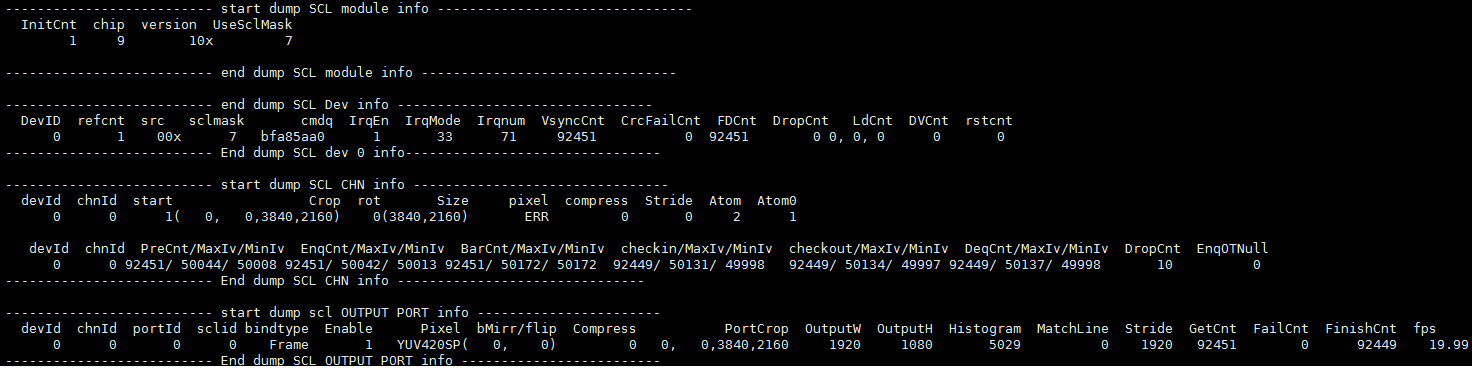
Debug Information
# cat /proc/mi_modules/mi_scl/mi_scl0
-
Debug Information Analysis
Record the current use status and related attributes of the scaler, which can be dynamically obtained to facilitate debugging and testing.
-
Parameter Description
Parameter Description module info InitCnt The count of connected module occurrence chip Chip index version Chip version UseSclMask The use status of scaler Device Info DevID Device ID refcnt The count of dev repeated creation src Input source sclmask Scaler id used by the device cmdq Cmdq pointer IrqEn IRQ enable status IrqMode IRQ mode Irqnum IRQ ID VsyncCnt ISR vsync Cnt crcFailCnt input crc check fail cnt FDCnt ISR Frame Done Cnt DropCnt IRQ Frame Drop or Double Vsync LdCnt Low Lantency Mode Match Line IRQ Cnt DVCnt double vsync cnt rstcnt reset hw cnt Channel Info DevId Device id ChnId Channel ID start Channel start or not Crop Channel Crop location Rot Rotation angle Size Input width/height pixel Input Pixel format compress input compress type Stride Input buffer stride Atom The count of buffers held by the bottom layer Atom0Cnt The count of times that the bottom layer cannot get buffer after buffer release PreCnt/EnqCnt/BarCnt/checkin/
checkout/DeqCntThe count of Callback interface execution MaxIv/MinIv callback execution interval DropCnt drop task cnt EnqOTNull The count that OutBuffer is Null while Enq Outputport Info DevId Device id ChnId Channel ID PortId Port ID sclid scaler ID bindtype 0: Real Time mode
1: Ring mode
2: frame modeEnable Enable status Pixel Output pixel format compress output compress type bMirr/flip Port mirror/flip PortCrop Port crop range OutputW /OutputH Output width/output height Histogram Scl Picture complexity MatchLine Low Lantency Mode Match Line Cnt Stride Output buffer stride, pixel byte GetCnt The count of outputbuffer to get FailCnt The count of outputbuffer failed to get FinishCnt The count of output buffer finished fps Output port frame rate
5.2. echo
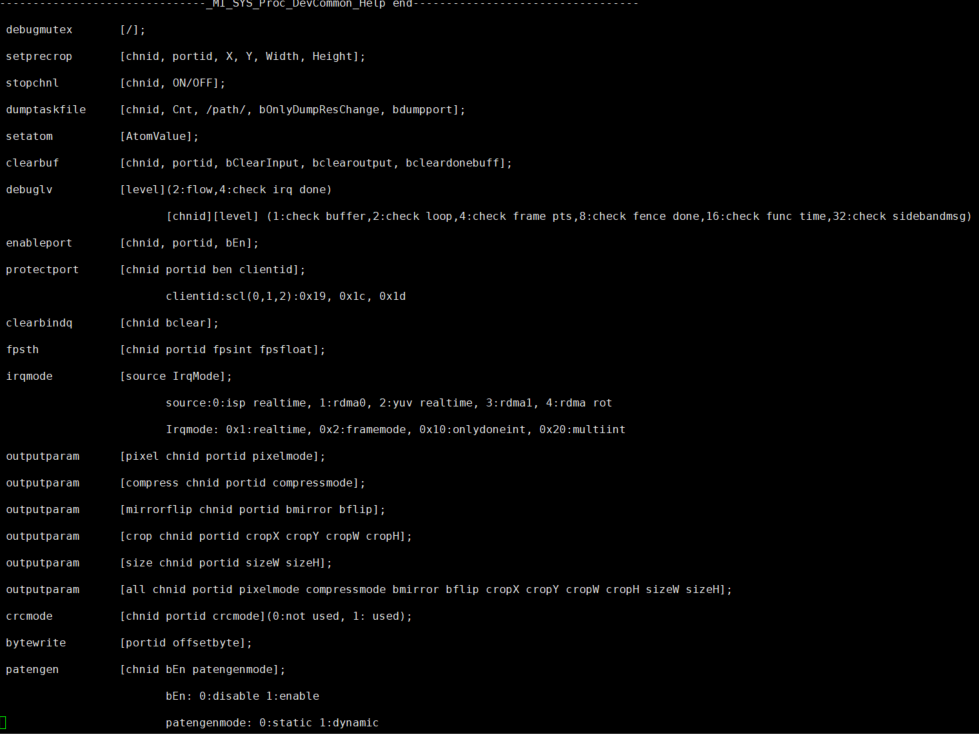
Echo help can view available commands:
# echo help > /proc/mi_modules/mi_scl/mi_scl0
| Function | Set the crop Parameter of each scl port, which is directly set to the driver without going through the MI process. |
|---|---|
| Command | echo setprecrop [chnid portid X Y Width Height] > /proc/mi_modules/mi_scl/mi_scl0 |
| Parameter Description |
Chnid: channel id Portid: port id X,Y,width,height: crop range |
| Example | echo setprecrop 0 0 0 0 800 200 > /proc/mi_modules/mi_scl/mi_scl0 |
| Function | After finishing the bottom layer buffer, stop channel to trigger the bottem layer. |
|---|---|
| Command | echo stopchnl [chnid, ON/OFF] > /proc/mi_modules/mi_scl/mi_scl0 |
| Parameter Description |
Chnid: channel id ON/OFF: ON means stop channel, OFF means open channel |
| Example | echo stopchnl 0 ON > /proc/mi_modules/mi_scl/mi_scl0 echo stopchnl 0 OFF > /proc/mi_modules/mi_scl/mi_scl0 |
| Function | Dump the output data of the selected channel and save it in the /path. |
|---|---|
| Command | echo dumptaskfile [chnid, Cnt, /path/, bOnlyDumpResChange, bdumpport] > /proc/mi_modules/mi_scl/mi_scl0 |
| Parameter Description |
Chnid: channel id Cnt: dump count Path: The path to store dumped files bOnlyDumpResChange: Sometimes some flower images are generated when the resolution is changed, and the dump command does not work well with the resolution changing. You can set this parameter first, and then change the resolution. When the program recognizes the resolution change, it will dump the buffer after the resolution change. (Optional parameter) Bdumpport: Only dump a certain portid, the default is to dump all the output ports. (Optional parameter) |
| Example | echo dumptaskfile 0 2 /tmp > /proc/mi_modules/mi_scl/mi_scl0 |
| Function | Set pass atomvalue |
|---|---|
| Command | echo setatom [AtomValue] > /proc/mi_modules/mi_scl/mi_scl0 |
| Parameter Description |
AtomValue: The maximum number of buffers held by the driver. |
| Example | echo setatom 3 > /proc/mi_modules/mi_scl/mi_scl0 PS: Sometimes the bottom layer is stuck, you can try to enlarge this atom, plug a buffer into the driver, and trigger again to see if it can be restored. Or when the frame is dropped, increase the atom to see if the frame can be full. |
| Function | Clear the input/output/done buffer of the specified channel port. |
|---|---|
| Command | echo clearbuf [chnid, portid, bClearInput, bClearoutput] > /proc/mi_modules/mi_scl/mi_scl0 |
| Parameter Description |
Chnid: channel id Portid: port id bClearInput: Clear input buffer bClearoutput: Clear output buffer |
| Example | echo clearbuf 0 0 1 0 > /proc/mi_modules/mi_scl/mi_scl0 |
| Function | Set debug level |
|---|---|
| Command | echo debuglv [level] > /proc/mi_modules/mi_scl/mi_scl0 echo debuglv [chnid][level] > /proc/mi_modules/mi_scl/mi_scl0 |
| Parameter Description |
Chnid: channel id Level: (1) When single parameter: 2:flow, 4:check irq done (2) When two parameters: 1:check buffer, 2:check loop, 4:check frame pts, 8:check fence done, 16:check func time, 32:check sidebandmsg |
| Example | echo debuglv 4 > /proc/mi_modules/mi_scl/mi_scl0 //Open check irq done related MI print. echo debuglv 0 3 > /proc/mi_modules/mi_scl/mi_scl0 //Open channel0 level3 print about buffer info and loop info. |
| Function | Set port enable or not |
|---|---|
| Command | echo enableport [chnid, portid, bEn] > /proc/mi_modules/mi_scl/mi_scl0 |
| Parameter Description |
Chnid: channel id Portid: port id bEn: 1/0 |
| Example | echo enableport 0 0 1 > /proc/mi_modules/mi_scl/mi_scl0 |
| Function | Clear the buffer cached in Bind Q |
|---|---|
| Command | echo clearbindq [chnid bclear] > /proc/mi_modules/mi_scl/mi_scl0 |
| Parameter Description |
Chnid: channel id bclear: Whether to clear |
| Example | echo clearbindq 0 1 > /proc/mi_modules/mi_scl/mi_scl0 //clear channel0 bindQ Clear channel0 bindQ. Sometimes the front end can't get the buffer, and it is found that scl BindQ is full. Judge whether scl takes the buffer fast enough. Clear bindQ to see if bindQ will be accumulated. If it is still accumulated, it means that the scl is not fast enough. If it is not increased, it means that the previous exception has been stuffed in and has not been consumed. |
| Function | Print the value lower than the setting frame rate. |
|---|---|
| Command | echo fpsth [chnid portid fpsint fpsfloat] > /proc/mi_modules/mi_scl/mi_scl0 |
| Parameter Description |
Chnid: channel id Portid: port id fpsint: Frame rate integer bits fpsfloat: Frame rate demical bits |
| Example | echo fpsth 0 0 30 30 > /proc/mi_modules/mi_scl/mi_scl0 //Print the fps lower than 30.30 in channel0 port0. |
| Function | Set the print pts, print if it is exceeding PTS interval. |
|---|---|
| Command | echo ptsth [chnid portid ptsmininterval ptsmaxinterval] > /proc/mi_modules/mi_scl/mi_scl0 |
| Parameter Description |
Chnid: channel id Portid: port id ptsmininterval: pts interval min value ptsmaxinterval: pts interval max value |
| Example | echo ptsth 0 0 30000 40000 > /proc/mi_modules/mi_scl/mi_scl0 // Values with PTS interval less than 30ms and more than 40ms in channel0 port0 are printed out. |
| Function | Reset SCL entire hardware. |
|---|---|
| Command | echo resethw [chnid ] > /proc/mi_modules/mi_scl/mi_scl0 |
| Parameter Description |
Chnid: channel id |
| Example | echo resethw 0 > /proc/mi_modules/mi_scl/mi_scl0 //mi_scl0 mens Dev0, mi_scl1 means Dev1. |
| Function | Set output port parameters |
|---|---|
| Command | echo outputparam pixel [chnid, portid pixelmode] > /proc/mi_modules/mi_scl/mi_scl1 echo outputparam compress [chnid, portid compressmode] > /proc/mi_modules/mi_scl/mi_scl1 echo outputparam mirrorflip [chnid, portid bmirror bflip] > /proc/mi_modules/mi_scl/mi_scl1 echo outputparam crop [chnid, portid cropX cropY cropW cropH] > /proc/mi_modules/mi_scl/mi_scl1 echo outputparam size [chnid, portid sizeW sizeH] > /proc/mi_modules/mi_scl/mi_scl1 echo outputparam all [chnid, portid pixelmode compressmode bmirror bflip cropX cropY cropW cropH sizeW sizeH] > /proc/mi_modules/mi_scl/mi_scl1 |
| Parameter Description |
Chnid: channel id Portid: port id Pixelmode: output pixel format Compressmode: ouput compress mode Bmirror: Ouput enable horizontal turn Bflip: Ouput enable vertical turn cropX: Output crop X coordinate cropY: Output crop Y coordinate cropW: Output crop width cropH: Output crop height sizeW: Output size width sizeH: Output size height |
| Example | echo outputparam pixel 0 0 11 > /proc/mi_modules/mi_scl/mi_scl1 echo outputparam compress 0 0 5 > /proc/mi_modules/mi_scl/mi_scl1 echo outputparam mirrorflip 0 0 1 1 > /proc/mi_modules/mi_scl/mi_scl1 echo outputparam crop 0 0 0 0 1920 1080 > /proc/mi_modules/mi_scl/mi_scl1 echo outputparam size 0 0 1920 1080 > /proc/mi_modules/mi_scl/mi_scl1 echo outputparam all 0 0 11 5 1 1 0 0 1920 1080 1920 1080 > /proc/mi_modules/mi_scl/mi_scl1 |
| Function | Set the crc of the output port. |
|---|---|
| Command | echo crcmode [chnid portid crcmode] > /proc/mi_modules/mi_scl/mi_scl0 |
| Parameter Description | chnid: channel id Portid: port id crcmode: 0:not used, 1: used |
| Example | echo crcmode 0 1 1 > /proc/mi_modules/mi_scl/mi_scl0 |
| Function | Set the bytewrite of the output port. |
|---|---|
| Command | echo bytewrite [chnid portid bEn offsetbyte] > /proc/mi_modules/mi_scl/mi_scl0 |
| Parameter Description | chnid: channel id Portid: port id bEn: 0:disable, 1:enable offsetbyte: offset byte |
| Example | echo bytewrite 0 0 1 1 > /proc/mi_modules/mi_scl/mi_scl0 |
| Function | Set the patengen of the input source. |
|---|---|
| Command | echo patengen [chnid bEn patengenmode] > /proc/mi_modules/mi_scl/mi_scl0 |
| Parameter Description | chnid: channel id bEn: 0:disable, 1:enable patengenmode: 0:static, 1:dynamic |
| Example | echo patengen 0 1 0 > /proc/mi_modules/mi_scl/mi_scl0 |
| Function | Set the command fetching information executed after cmdq timeout |
|---|---|
| Command | echo cmdqtimeout [bEn, keyword, cmdline, path] > /proc/mi_modules/mi_scl/mi_scl0 |
| Parameter Description |
bEn: 1/0 keyword: Commands executed cmdline: Executed string path: Information saving path |
| Example | echo 1 cat /proc/mi_modules/mi_isp/mi_scl0 /mnt/cmdqerr.txt > /proc/mi_modules/mi_isp/mi_scl0 |
| Function | Set scl filter type. |
|---|---|
| Command | echo outputfilter [chnid, portid, filtertype] > /proc/mi_modules/mi_scl/mi_scl0 |
| Parameter Description |
Chnid: channel id Portid: port id filtertype: 0:auto, 1:bilinear, 2:bicubic |
| Example | echo outputfilter 0 0 1> /proc/mi_modules/mi_scl/mi_scl0 |